Participant
April 7, 2020
Answered

Illustrator color picker only shows white... help!

  • April 7, 2020
  • 3 replies
  • 3053 views

I am experiencing an issue where no matter what i click on with the color picker, it only returns a white swatch. This is terribly limiting.


ANyone else run in to this? Have a fix for it?

This topic has been closed for replies.
Correct answer mjbelt

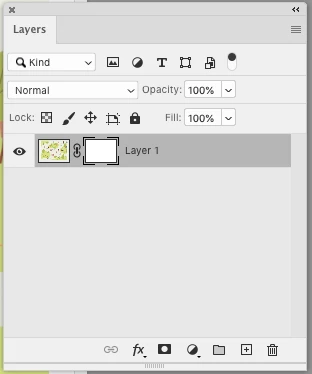
Make sure you're not selected on the Mask in the Layers Panel.

3 replies

Participant
September 8, 2023

Hi, I rarely work with layers, but when I use them, this problem occurs. It happens when I move the top layer from the top to another level below the current level. However, when I move the layer back to the top, the white color bug is gone. I hope that helps.

Participant
September 8, 2023
I never asked about layers and no one in the chat helped me.

Get Outlook for iOS<>
Participant
September 8, 2023

After trial and error, I found out that this bug (white color) occurs when I pick a color from a different layer. For example, if I am in layer 1 and then pick a color from a different layer, my object's color becomes white. This doesn't happen when I pick a color in the same layer.

mjbeltCorrect answer
Participating Frequently
April 7, 2020

Make sure you're not selected on the Mask in the Layers Panel.

Participating Frequently
April 7, 2020

Are you selecting the color? or typing numbers in.