
KB_Brohi
Participant
March 5, 2024
Question

illustrator could partially read this file

  • March 5, 2024
  • 2 replies
  • 297 views

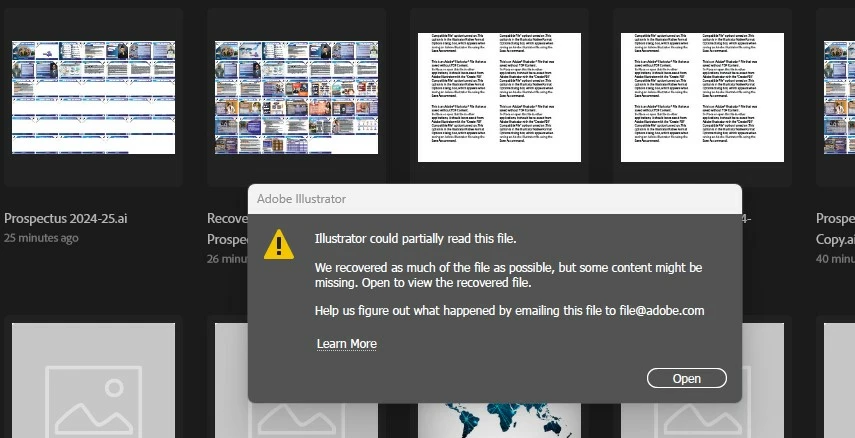
Facing the "illustrator could partially read this file" problem, any solution?

This topic has been closed for replies.

2 replies

Mike_Gondek10189183
Community Expert
Community Expert
March 11, 2024

Try opening the .ai in Adobe Acrobat. Sometimes the pdf half of the file gets saved, and can be useful in rebuilding your file.

Monika Gause
Community Expert
Community Expert
March 5, 2024

Did Illustrator crash while you last saved the file?

In that case there is little hope.

In other cases maybe @Anshul_Saini  can help.


This is the moment in which you should come up with a backup strategy. And then stick to it so that this never happens to you again.

Basically it's not a good idea to have only one copy of a file. 

KB_Brohi
KB_BrohiAuthor
Participant
March 5, 2024

Yes, I saved my file properly and shut down my PC for 10 minutes. After that, I turned on the PC, started working, and found this error which is not solved yet. 

I used to open it in versions 2018, 2020, 2022, and 2024, but not working. 

The size of file is still same and also it shows the thumbnail on the Homepage of Illustrator on all the above version (see image).

If there is any way to recover it. Please let me know

Anshul_Saini
Community Manager
Community Manager
March 7, 2024

Hi @KB35866245cwro,


Thank you for reaching out and providing the details of the issue you're facing with your Illustrator file. It sounds frustrating, and I understand the importance of your work.


Regarding the saving process, Illustrator sometimes takes time to complete saving, especially for larger files or files with complex content. It's possible that the saving process was still ongoing when you shut down your PC, which might have caused the file to become partially corrupted.

Anshul_Saini_1-1709758212659.png


To better assist you, could you please share the file with us so that we can examine it and try to recover any salvageable data? You can upload the file to a cloud storage service like Google Drive, Dropbox, or Adobe Creative Cloud and then provide the download link here.


Thank you for your cooperation, and I look forward to assisting you further.


Best regards,

Anshul Saini