April 13, 2021
Answered

Illustrator, couleur

  • April 13, 2021
  • 1 reply
  • 613 views

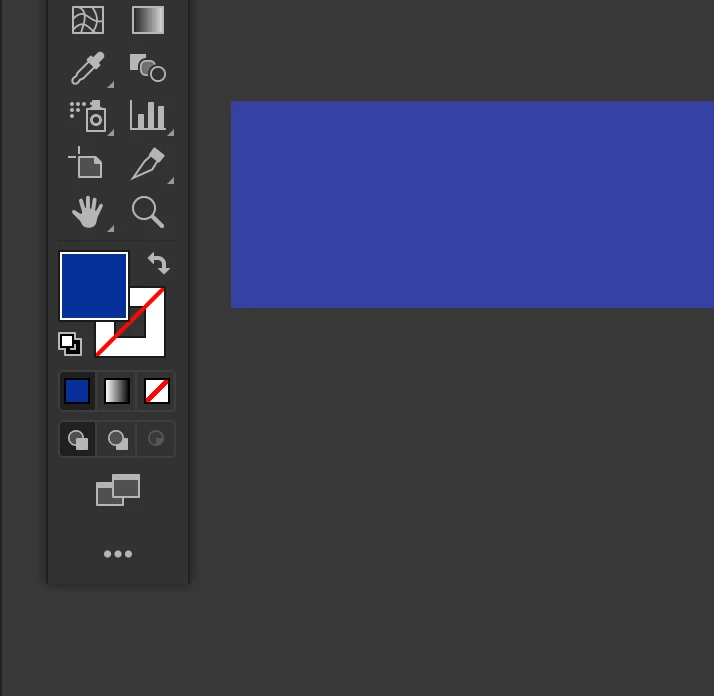
Bonjour, j'ai un souci avec l'affiche de couleur lorsque je fais une forme.
La couleur ne correspond pas exactement à la couleur que je sélectionne, au départ, je pensais à un bug d'affichage, mais le problème persiste malgré les redémarrages...

Je sais pas si sur la photo on vois clairement mais les couleurs ne sont pas identique. 😞 


Avez-vous une idée ?

Merci à ceux qui prendrons le temps de me lire.
This topic has been closed for replies.
Correct answer Ton Frederiks

Your Settings are: Emulate Illustrator 6, which turns color management off.

This issue will be fixed when you update your Photoshop app to the latest version(v22.3.1) and after that set  your Color Settings to the way you want them to be.  

Please find more information about this on Adobe Illustrator UserVoice: https://illustrator.uservoice.com/forums/601447-illustrator-desktop-bugs/suggestions/42892902-illustrator-v25-2-1-color-profile-keeps-changing-t

1 reply

Monika Gause
Community Expert
Community Expert
April 13, 2021

Which color definition do you set up?

Which document color mode is the document?

Which preview is selected? Is color proof turned on?

How is color management set up?

April 20, 2021

Je travaile en CMJN, et mon aperçu : CPU. 


Je ne sais pas répondre au autre question. J'ai mis une photo, je ne sais pas si cela peut aider.

Ton Frederiks
Community Expert
Ton FrederiksCommunity ExpertCorrect answer
Community Expert
April 20, 2021

Your Settings are: Emulate Illustrator 6, which turns color management off.

This issue will be fixed when you update your Photoshop app to the latest version(v22.3.1) and after that set  your Color Settings to the way you want them to be.  

Please find more information about this on Adobe Illustrator UserVoice: https://illustrator.uservoice.com/forums/601447-illustrator-desktop-bugs/suggestions/42892902-illustrator-v25-2-1-color-profile-keeps-changing-t