Participant
May 3, 2023
Answered

Illustrator crashes: ILL-USE-TRAITOR

  • May 3, 2023
  • 3 replies
  • 2864 views

Dear All,


Is there someone else out there expiriencing sudden Illustrator quits...even when doing... nothing at all? Just looking at your screen to think of the next move... and 'plop'... she's gone. Of course something is saved...unfortunately never the version you want it to be. It gets very frustrating to work this way... time is of the essence, works needs to be done, customers are waiting...

What could be helpfull?


This topic has been closed for replies.
Correct answer FredGuyot

Happy to help. I know how you feel about the aggravation. My installation of Illustrator simply doesn't work with either of the Wacom driver updates released in January. I wouldn't get much farther than opening a layout and making a few changes before the application window would hang and disappear. Wacom released a newer driver for the OSX platform. I'm wondering how that one is faring compared to the Windows drivers. 


Hello ! Back for a good news for Windows Users : Today Wacom release the 6.4.2-1 Driver and referring to the release notes, it's fix the crash when using Adobe Illustrator, Corel Painter, or Autodesk Maya.

I just made the update and it seems to work perfectly now ! I don't have any Illustrator crashing as before with the previous driver (version 6.4.1-3). Great news !
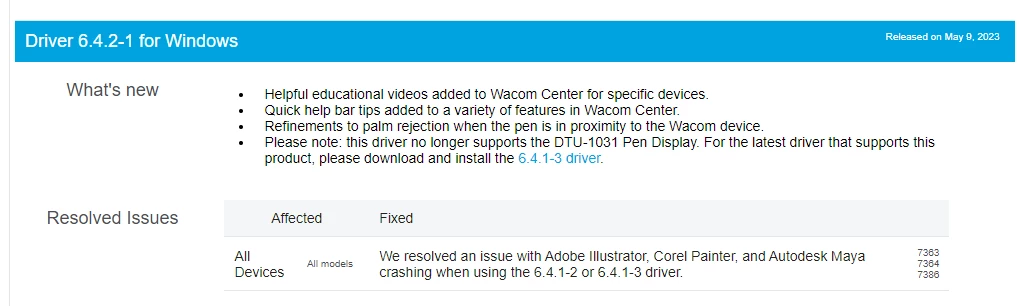


The release note here : Wacom driver Windows 6.4.2-1 Release Notes 
The Download link here (check for your's product and sytem compatibility) :
Pilote 6.4.2-1 (Windows 7, 8, 10 et 11.) (64-bit) - 108 Mo 

3 replies

Participant
May 21, 2023

wonderfull

FredGuyot
Participating Frequently
May 18, 2023

Well, another episode to the Wacom driver saga !
Despite the fact that the Update 6.4.2-3 solved the crashing issue with illustrator, it's seem's to be another bug with Photoshop now... I've experiencing screen freezing whith the hand tool while scrolling my artwork. I've desintalling and retro-Update to the old 6.4.0-11 Wacom Drivers and all is back to normal now. Can't be sure at 100% that the new driver is the only cause but the old one fix the problem so...Is there anyone else had the issue too ? Now just waiting for another Wacom update that should fix both of Illustrator and photoshop !
To be continued...

Community Expert
May 18, 2023

Well that's disappointing! It's a good thing Wacom has an "older versions" page of drivers on their web site. Not everyone provides access to old drivers. Hopefully it doesn't take them long to release version "6.4.2-4" or whatever it's going to be called pretty soon. It was a long wait from January to May for them to fix the problem that was crashing Illustrator.

FredGuyot
Participating Frequently
May 18, 2023

You're totally right : Wacom do a pretty good job on their Hardware, and thankfully keep access on his previous drivers (my purpose wasn't to bashing Wacom products, that i use long since times ago, just sharing experience and helping people having with same issue).
I keep the driver's old version installer on a folder on my disk just in case, so i be able o try new version as soon it's release, and be able to easily step back in just few step if it's something wrong.

Monika Gause
Community Expert
Community Expert
May 3, 2023

Please tell us your system, Illustrator version and hardware.

Do you have any third party plugins installed?

A wacom?

Does this happen when a file is open? Or also without an open file?

Where do you save your files?

What's in your files? 

Text? Are all your fonts OK? Are you sure?


Participant
May 3, 2023
Illustrator

* Version 27.5
* Happens with file open
* In my files are vector drawings, applied pattern swatches & brushes, gardients, text, nothing complicated
* Fonts are all standard Illustrator fonts
* File sare saved on the harddisk
* No third party plugins


System

* RAM 32,0 GB (31,8 GB free)
* 64-bits, x64 processor
* Intel(R) Core(TM) i7-8700 CPU @ 3.20GHz 3.19 GHz

Wacom?

* Yes, Intuos Pro large


Met vriendelijke groet,
Warm regards,

Katja Donders
The Future Now BV
Monika Gause
Community Expert
Community Expert
May 3, 2023

Do you have a printer set up and turned on? If you do not have one, please try and set up a PDF printer. If you have already done that in the past, please do it again.