Participant
April 18, 2020
Answered

Illustrator cropping when I try to export as PNG

  • April 18, 2020
  • 1 reply
  • 18175 views

Whenever I try to export a PNG from Illustrator, the top and bottom of the image get cropped. I don't know of anywhere where I would have specified it to crop like this, or how to specify it to export the image just like it's shown inside illustrator.


Can anyone help me?


Sincerely, 

High School Illustrator Noob

Correct answer rcraighead

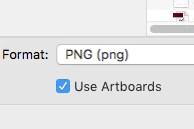
It looks like you're using the "Export As" option. In the first dialog you should see an option to "Use Artboard". This is required if you don't want the transparent pixel area to be cropped off.


1 reply

rcraighead
rcraigheadCorrect answer
Legend
April 18, 2020

It looks like you're using the "Export As" option. In the first dialog you should see an option to "Use Artboard". This is required if you don't want the transparent pixel area to be cropped off.


Participant
August 26, 2024

Any solutions if it's still cropping even with "Use Artboards" selected?

Community Manager
August 26, 2024

Hello @Creative369816995rjt,

We understand that encountering technical issues can be frustrating. I tried replicating this on my end but was unable to do so. Would you mind sharing some more details, like the exact version of the OS/Illustrator, a public link to a sample file after uploading it to Dropbox/Google Drive/etc., and a screen recording of the problem (https://adobe.ly/3yKj146), so we can investigate this further?

Looking forward to hearing from you.


Thanks,

Anubhav