
November 30, 2012
Answered

Illustrator CS6 not showing Paintbucket

  • November 30, 2012
  • 2 replies
  • 297661 views

Friends,

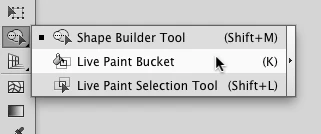
I cannot see the Paintbucket tool in Illustrator CS6. I googled it and some users said it is in the menu together the Gradient Tool, however, my Gradient Tool button doesn't have a menu.

How can I enable the Paintbucket?
This topic has been closed for replies.
Correct answer _scott__

Click and hold the Shape Builder Tool

2 replies

jamisonl77755271
Participating Frequently
August 17, 2018

Somebody at Adobe believed people didn't need the paint bucket tool in Illustrator. Go figure.

Needing to do an internet search for the simple paint bucket tool in something like Illustrator is absolutely ridiculous! On the next software update, they're going to hide the "Live Paint Bucket" setting and make people manually put it on the screen via a long rabbit hole of "mess." Watch!

Monika Gause
Community Expert
Community Expert
August 17, 2018

jamisonl77755271  schrieb

Somebody at Adobe believed people didn't need the paint bucket tool in Illustrator.

Do you want your tool panel in 10 columns of tools, because nobody dares to decide which ones to group?

If you need it that often, then you might want to learn the shortcut.

Participant
January 8, 2020

i do believe he ment how there is no regular paint tool in illustrator. its crazy there should be a regular paint tool under the live paint tool. every other program has it and this is supposed to be the best for vector art. utterly rediculous to have to select what you want to paint, especially for such an expensive program

_scott__
_scott__Correct answer
Legend
November 30, 2012

Click and hold the Shape Builder Tool

thedoka
Participant
January 23, 2015

Then what? I'm trying to paint the background and I can't

Monika Gause
Community Expert
Community Expert
January 23, 2015

Unfortunately most of us aren't that good at fortunetelling.

You might get better answers if you show us what exactly it is you want to "paint"