Participant
April 10, 2018
Answered

Illustrator Dashed Line has light solid grey line - how to remove

  • April 10, 2018
  • 2 replies
  • 12817 views

I created a simple dashed line in illustrator. When I print it, the light grey (guide?) line behind the dashes also prints (also visible on the screen). How can I make it go away? Or at least not print!
This topic has been closed for replies.
Correct answer Monika Gause

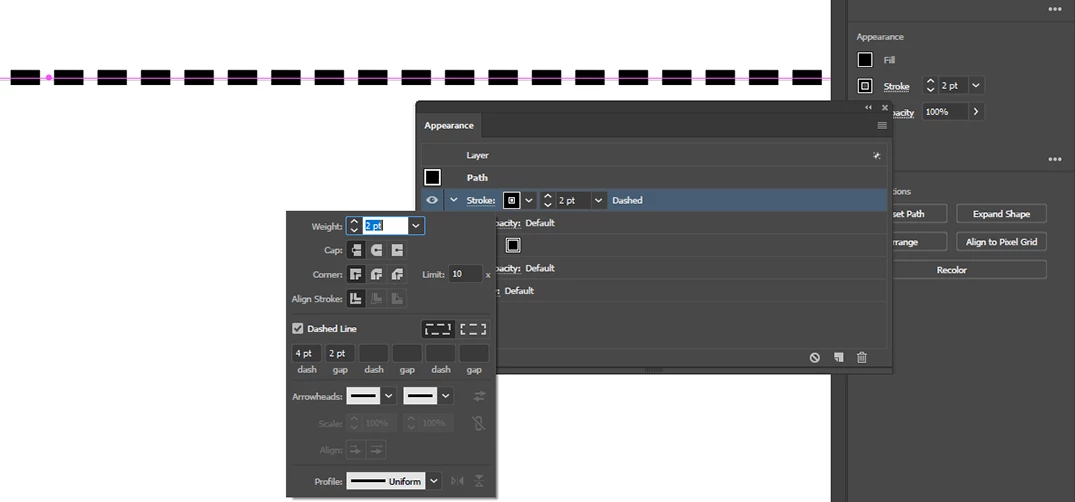
Yes, the line is not selected, but there is still a grey line behind it. Here is a picture with the line selected. Now there are three lines (dashed, grey, and purple)... but it is still only one line. You can see the purple line now, but the grey line is still there below it. Note that the purple selected line is completely on top, but the grey line is only in the gaps.


There is something applied at layer level and it looks like there is a fill.

Can you perhaps hide that stroke panel? And show the complete artwork (not just this small part)?

2 replies

chanaart
Community Expert
Community Expert
April 10, 2018

Please post a snap shot of the image or the AI file. Is it a line that you did not see?

Take a look at the Appearance panel.

Take a look at the Stroke panel and the way the stroke is as well. (Round, Butt , ...etc)

Chana

Participant
April 10, 2018

See the light grey line behind the dashed line? This is not an extra line. There is only one line.

Also, in this guy's video, you can see the exact same light grey line.

https://www.youtube.com/watch?v=IKQtciTeHVc

Doug A Roberts
Community Expert
Community Expert
April 10, 2018

in his video, i can see a blue line, because that's the colour of the layer he's drawing paths on.

in your screenshot, that's something else, because it's behind the dashes and you don't have the line selected.

please select it and post a screenshot with the appearance panel open.

Mike_Gondek10189183
Community Expert
Community Expert
April 10, 2018

Select your line and take a look in the appearance palette for unwanted stroke or fill assignments at all levels (if you have groups assigned).

Should you still need help please post a screenshot of your appearance palette, and remove any groupings on the line so we can see what is assigned. Please also confirm you have no extra lines underneath.