

Illustrator decided I can't work with 100K black
This is a problem that, undauntadly, costed me and my clients about $400, because simple black is simple black, and rich black, rich black. I did not noticed that the files I sent to the printer were in rich black, but the printer did not care lol. I have Illustrator CC 2017 at my work computer, but I've noticed it since I used Illustrator CS6, in my college.
Everytime, when I set any element to use a color in the gray scale, or simple black (in other words, with C0, M0 and Y0 and only using the variable K), the program decides I could not work with this scale, and as soon as I do OK in the Color Picker window, and reopen it, the colors were set entirely different, using rich black (or, using the C, M and Y variables also to complete the color tone, a thing I don't want to happen).
For example, I want to set this text with 90% of black ONLY:
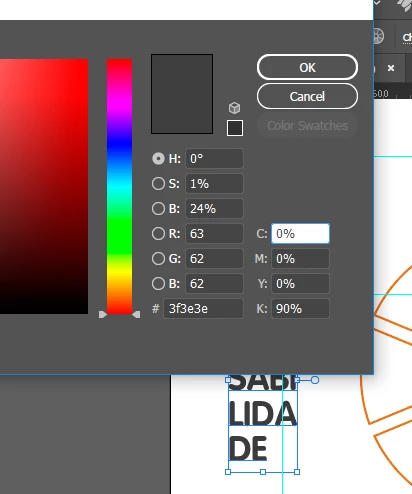
So I press OK, and close the Color Picker, and when I reopen it, the surprise:
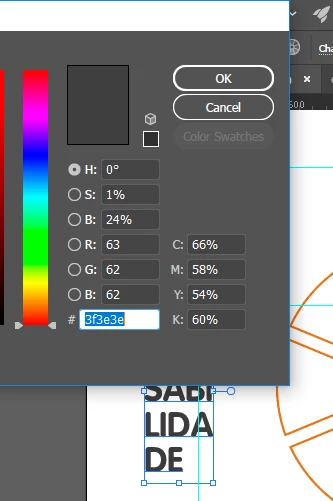
Illustrator converted the C0, M0, Y0, K90 to C66, M58, Y54, K60. What?!
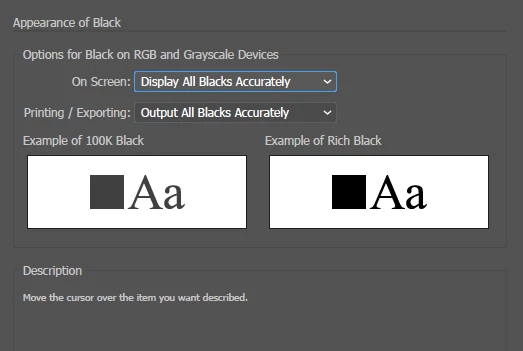
I've even changed Illustrator settings (Appearance of Black sections), to Output and show blacks accurately, but apparently it did not changed anything in my situation.
How can I proceed?
 AdChoices