
drazens4756860
Participant
September 8, 2017
Answered

Illustrator does not display correctly on another monitor

  • September 8, 2017
  • 1 reply
  • 922 views

Two monitors.

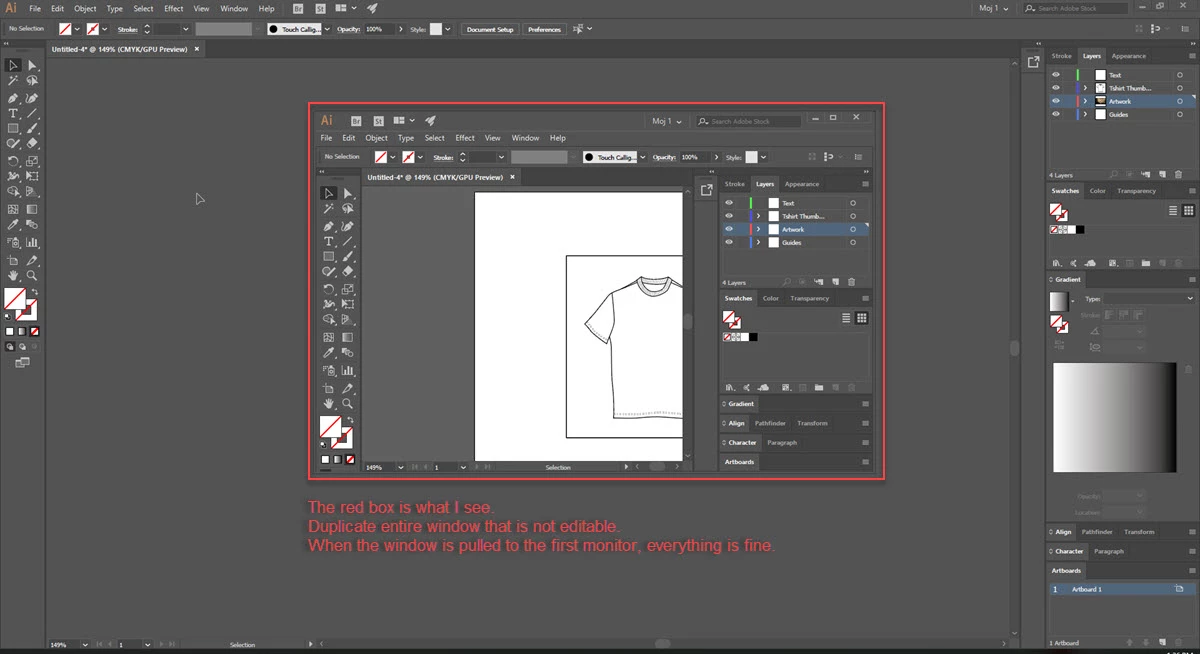
Another does not display the Illustrator window properly.

Indesign and PhotoShop windows are displayed correctly.

The red box is what I see. Duplicate entire window that is not editable.

When the window is pulled to the first monitor, everything is fine.

OS: Windows XP

App: Adobe Creative Cloud

Monitor: HP Compaq LA2306x and Lenovo T23i-10
This topic has been closed for replies.
Correct answer drazens4756860

Photoshop and other graphic tools are different code.


The solution is to properly connect your monitor and computer. In my case, it was necessary to connect the monitor cable (hdmi) to the computer in the slot of the graphics card.
That's the solution.

1 reply

Monika Gause
Community Expert
Community Expert
September 8, 2017

There are issues with specific graphic cards and/or their drivers (depending on versions sometimes).

There are issues when you attach a low-res monitor to an otherwise Hi-DPI system.

Is any of this the case with your setup?

drazens4756860
Participant
September 11, 2017

I do not know.

I will try to do something with the drivers for the monitor, or change the connection cables (HDMI).
But still i do not know why only Illustrator creates a problem ... Photoshop and other graphic tools do not ??

Thank you for your reply

Monika Gause
Community Expert
Community Expert
September 11, 2017

Photoshop and other graphic tools are different code.