
Qwertyfly___
Legend
April 8, 2015
Question

Illustrator error occurred: 1346458189 ('PARM')

  • April 8, 2015
  • 4 replies
  • 9483 views

I'm so sick of these errors,

never had an issue before CC

anyone know what is causing these errors?

have been using this script all day and now it bugs out on me.
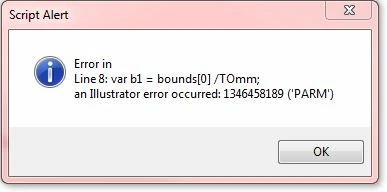
full script is below:

var doc = app.activeDocument;

var sel = doc.selection;

var TOmm = 2.83466796875;

Dim(sel);

function Dim(objs) {

    for (var i=objs.length-1;i>=0;i--) { // loop through your collection of objects

        var bounds = objs.visibleBounds; // Get visibal bounds, which are only visable bounds in some cases...

        var b1 = bounds[0] /TOmm;

        var b2 = bounds[1] /TOmm;

        var b3 = bounds[2] /TOmm;

        var b4 = bounds[3] /TOmm;

        var W = Math.abs(b3-b1).toFixed(1);

        var H = Math.abs(b4-b2).toFixed(1);

        var txt = doc.textFrames.add(); // Create the text frame

        txt.contents = "Size:  "+ H + " x " +W + " mm W";  // Adds contents to frame

        txt.position = [objs.left,objs.top - objs.height - 20]; // Positions the frame

  };  

};

Am I missing something in the quality of the Code?

This topic has been closed for replies.

4 replies

Known Participant
December 19, 2016

OK, I am pretty sure I found out what was causing the issue. A lot of my coworkers are signed into online libraries. I tried signing into one and I started getting the error more frequently. I then signed out of the library and the errors went away for the most part. I got one of my coworkers to leave his online libraries and he stopped getting the errors.

I hope this helps someone! Be sure to actually leave the libraries, if you just exit out of your library panel you will still be signed in.

Trevor:
Legend
November 14, 2016

Hi

I have found that wrapping each scripts in a named function solves these errors.

This is documented by adobe somewhere (Google it for yourselves)

I used to get the errors a very lot but since doing the wrapping can't remember getting them.

Wrapping them with anonymous functions does not solve the problem.

Missing out vars can mess things up even when wrapped

Silly-V​ do you wrap yours scripts in name or anonymous functions?

Hope this helps someone

Trevor

Silly-V
Legend
November 14, 2016

I always wrap mine in a named function.

#target illustrator

function test(){


};

test();

^^^ I have this actually set as a hotstring on all my various workstations.

However, it still does not solve the issue in some situation. Closing the documents in a batch causes it as well as other not-easily-reproducible things such as when using UI's Undo after running a script to undo its effects and then re-running it. Weird stuff like that.

Known Participant
November 29, 2016

Has anyone messed with not using the "main" engine? I assume the main engine is what Illustrator defaults to if not specified. Would just using the "session" or "transient" engine make a difference when it comes to freeing memory assuming that is the issue? Having trouble finding documentation about how the engines all work. I have wrapped my scripts in functions and I am still getting errors.

Known Participant
November 8, 2016

I recently "upgraded" to creative cloud so I am going through these issues currently. So far as possible solutions other than having to restart Illustrator I got from reading threads:

  1. Wrap script in a function to get rid of global variables.
  2. Try hitting tab to get rid of panels before executing script.
  3. Make all variables null (but doesn't wrapping the script in a function take care of this?)

Please let me know if I am missing other solutions and I will come back here if I have any success. Thanks everyone!

Silly-V
Legend
November 8, 2016

I used to declare variables in loops and have stopped maybe 2 years ago, not sure if this helped. Now I put them all up into the top and initialize them below.

Before:

for(var i=0; i<x.length; i++){

  var item = x;  

};

After:

var item;

for(var i=0; i<x.length; i++){

  item = x;  

};

Let me know if it helps!

Silly-V
Legend
April 8, 2015

I wonder what kinds of objects are in the selection, and if it could have anything to do with how Illustrator will allow things inside a selection which are not visible? (this happens rarely, but I have seen it)

Qwertyfly___
Legend
April 8, 2015

It's not to do with the Selection.

once it starts throwing the error it will do so even with a simple rectangle.

Restart illustrator and its fine again for an indeterminate amount of time.

Some times I will go days without seeing it.

At other times it hits me many times a day.

Silly-V
Legend
April 8, 2015

Hmm, so are you by any chance shuffling between documents?

By the way, do you ensure that all the ones you run are in a closure?

Okay, I know as much about these as the next guy a few years in the game, but I can tell you of some crazy situations where I have encountered this error which would be seemingly unreasonable.

1) variables referring to page items between different documents. Sad, but true.

2) creating outlines from a text frame, and trying to work on compound paths which are produced.  Some come out bad (contained pathItem is Object is Invalid, What??), some don't, so I eventually just made it do try-catch to repeat my process until it worked.

3) Document spot colors in a batch process, where some documents would open up and for no reason at all, some of the spot colors' properties would be invalid, leading to this error.  I made it try-catch close document, open back up, until it worked.

I truly feel you pain, if that helps any.