


Inspiring
June 19, 2025
Answered

Illustrator ExtendScript dropdownlist buggy display
  • June 19, 2025
  • 2 replies
  • 492 views

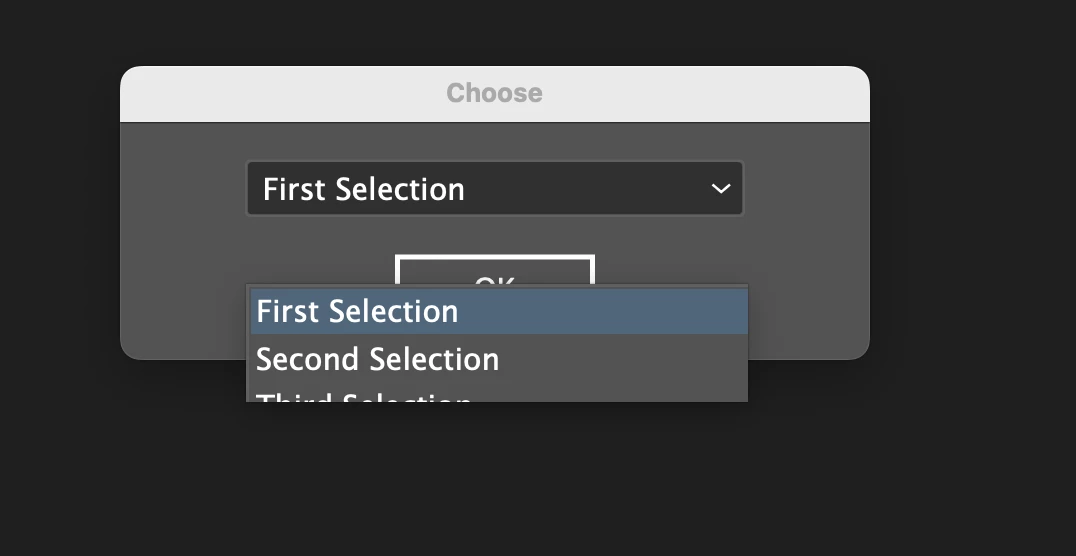
When using the Extendscript code below to display a dialog in Illustrator, the dropdownlist display is buggy the first time entering the window, either showing things in duplicate or making a larger size.

Troubleshooting:

  • Widened the popup and dialog widths and heights and still had the issue
  • Tried Illustrator 2024 and 2025 - both problematic
  • The same code doesn't present any issues when run within Photoshop


Testing Environment:

  • 2023 MacBookPro M3 Max
  • macOS Sequoia 15.5
  • Adobe Illustrator 2025 (29.5.1) and 2024


var dialog = new Window("dialog", "Choose");
//dialog.preferredSize.width = 300; 

var popup = dialog.add("dropdownlist", undefined, ["First Selection", "Second Selection", "Third Selection"]);
popup.selection = 0;
//popup.preferredSize.width = 200; 

dialog.add("button", undefined, "OK", { name: "ok" });
dialog.show();
Correct answer Chris.S

I believe it was a font cache issue... clearing htem out appears to have resolved it.

2 replies

Silly-V
Legend
June 19, 2025

This appears to be an issue with UI scaling. Try to edit UI scaling in your Display resolution on your operating system.
It may then show all the items, but your screen may get really small-detailed.
However, it's possible to cycle the dropdown options using the arrow keys, and it may be also an alternative to create a custom "popup" dialog which has a ListBox, and here you can build in a fuzzy-search input to help filter or find any list items.

Chris.SAuthorCorrect answer
Inspiring
June 20, 2025

I believe it was a font cache issue... clearing htem out appears to have resolved it.

Silly-V
Legend
June 20, 2025

That's good to know! Thanks for sharing the solution which worked for you.

m1b
Community Expert
Community Expert
June 19, 2025

Hi @Chris.S I tested your code on MacOS 15.5, AI 29.5.1 and it worked normally—no glitching. What platform and Illustrator version are you running? Also does it persist after restarting Illustrator?

- Mark

Chris.SAuthor
Inspiring
June 20, 2025

Tested on MacOS 15.5, AI 29.5.1 (and 28.7.7) with my 2023 MacBookPro M3 Max. Same issue whether on the laptop display, LG, Studio Display or EIZO. Issue persisted after resetting Illustrator preferences, restarting Illustrator and restarting the computer. Changing display resolution and refresh rate had no impact. I believe cleaning the font caches was the solve.