Participant
October 18, 2018
Answered

Illustrator File Opening Launches Photoshop

  • October 18, 2018
  • 1 reply
  • 4726 views

After the latest update to CC 2019, when I open an ai file, it launches Photoshop each time instead of Illustrator. Why?

Correct answer kregslist

Hi! I just did this and still open .ai files in photoshop help anyone?


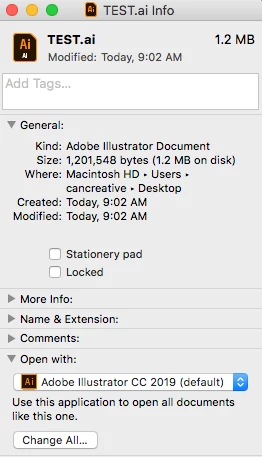
You have to click on an AI file, then "Get Info" (Command I), then unlock it by putting in your Mac credentials, then click on the dropdown for "Open with", and choose Illustrator, then click "Change All" so that going forward, AI files will open with Illustrator. Don't know why it got switched to Photoshop after the CC update, but this fixes it.

1 reply

Just Shoot Me
Legend
October 18, 2018

Somehow the File Association has been set to PS for AI files. you can change that in either Windows or OS X. I suggest you google "Change File Association" for the OS you are using for detailed instruction on how to do that.

kregslistAuthor
Participant
October 18, 2018

Thank you! You have to click on the GET INFO option (command I) then change the "Open With" option to Illustrator, then click CHANGE ALL so that every AI file will open with Illustrator. Don't know why the default would have switched to Photoshop.

Participant
October 19, 2018

Hi! I just did this and still open .ai files in photoshop help anyone?