

Jason Burnett
Inspiring
September 22, 2020
Answered

Illustrator Gradient Tool Not Expanding Correctly

  • September 22, 2020
  • 4 replies
  • 1778 views

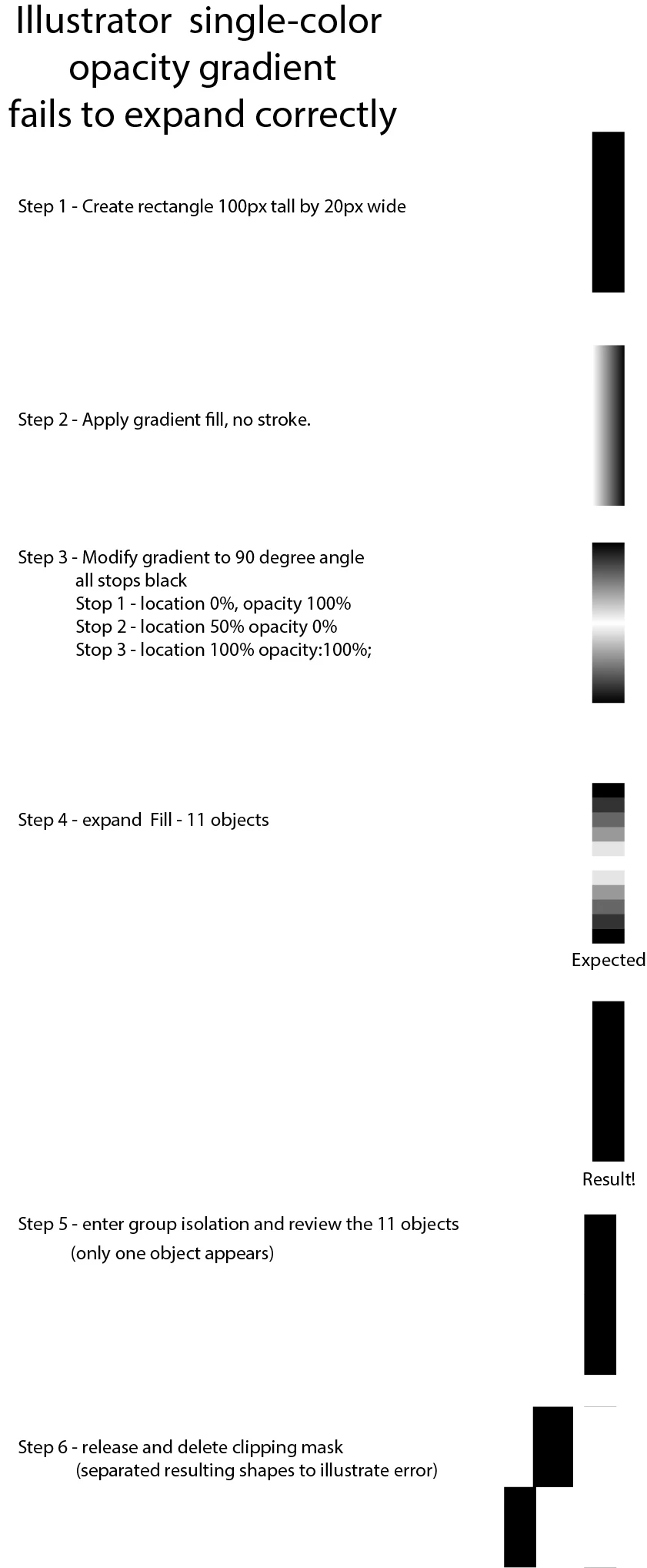
When creating a single color opacity gradient and then expanding the shape to create separate objects, you get messed up results: A clipping mask with two solid rectangles in it regardless of how many objects you told it to create when you expanded the shape.

Here are the steps I took and the results I expected vs what I got. Before I report this as a bug, does anyone want to tell me how stupid I am and that this is a feature of Illustrator and not a bug? 


If not, I will report this as a bug. I don't want to waste the dev's time if this is the expected behavior and I am just expecting too much. 
Correct answer Myra Ferguson

I tried your steps and got something similar, but it wasn't exactly the same. I got 3 rectangles with the top one more of a charcoal gray. I also only got the horizontal line at the top. It does seem like there's something not quite right with it. I also tried it with white in the center at 100% opacity. Expanding that yieled the expected result. If you want various levels of opacity, you could also try making a blend. Also, if you haven't already reported the bug, you can report it to Uservoice.

4 replies

Participant
August 21, 2024

I have this issue in 2024...

Monika Gause
Community Expert
Community Expert
August 21, 2024

@William38090600mwyp  schrieb:

I have this issue in 2024...


Please show screenshots?


Are you also working with transparency in the gradient? 

Ton Frederiks
Community Expert
Community Expert
October 8, 2020

It may be related to the impossibility to add transparent colors to the swatches panel.

Something else I noticed there is also a path generated that has only 2 points and is at the same time a closed object.

Anna Lander
Inspiring
October 8, 2020

yes, looks like a bug in ransparency module. Usnig B-W-B gradient, all works fine, but with 100-0-100 Black it creates (in my case) 4 rectangles: dark gray - black - black - dark gray. 

Myra Ferguson
Community Expert
Myra FergusonCommunity ExpertCorrect answer
Community Expert
October 7, 2020

I tried your steps and got something similar, but it wasn't exactly the same. I got 3 rectangles with the top one more of a charcoal gray. I also only got the horizontal line at the top. It does seem like there's something not quite right with it. I also tried it with white in the center at 100% opacity. Expanding that yieled the expected result. If you want various levels of opacity, you could also try making a blend. Also, if you haven't already reported the bug, you can report it to Uservoice.

Jason Burnett
Inspiring
October 8, 2020

Thanks for trying it out. I will submit a bug report now that someone else has tried it. I always like to ask here first because some things that I consider to be bugs because they defy all logic turn out to be what the developers had in mind. Now that I have confirmation that something strange is going on, I'll submit the bug report and begin holding my breath (just kidding).