
Participant
August 23, 2022
解決済み

Illustrator Graph tool problem

  • August 23, 2022
  • 返信数 2.
  • 420 ビュー

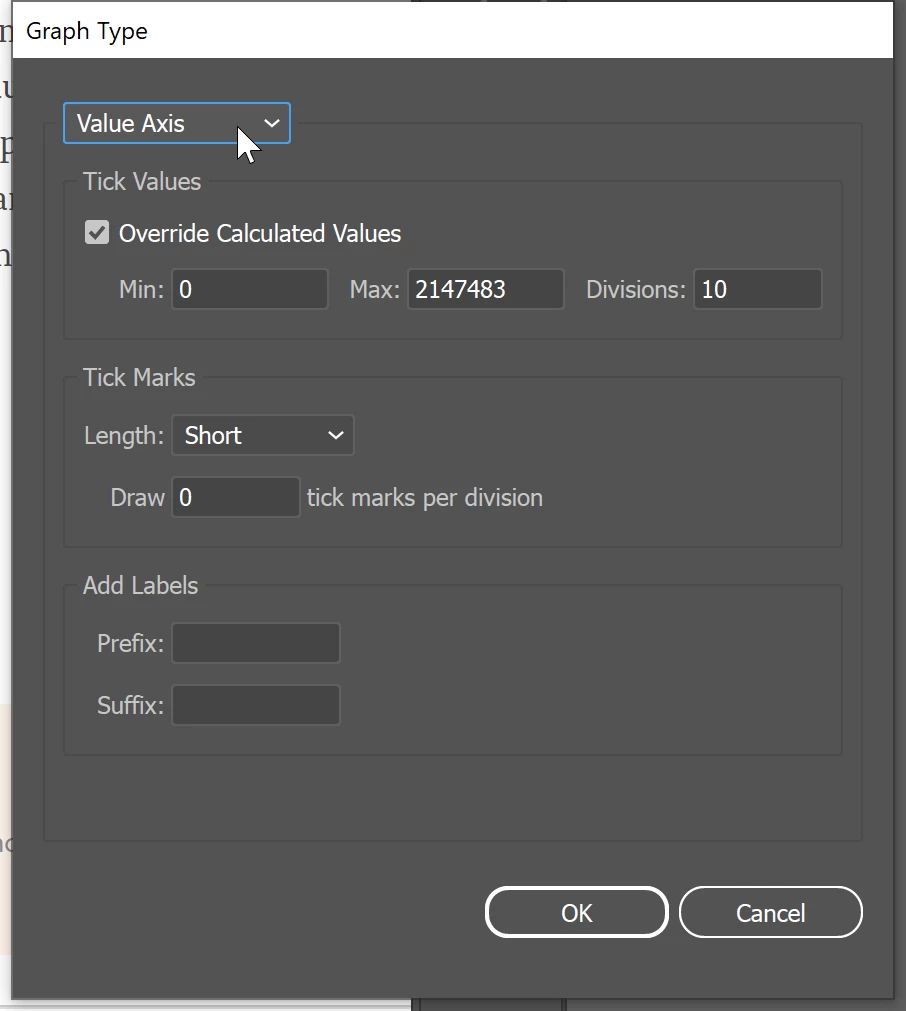
I am trying to make a graph using the graph tool. I have been doing the same thing for several months for a regular report and it has always worked without any dramas. But now, when I try to enter the Max Value (in this case 4,500,000 with 9 divisions) - the max value defaults to 2147843 with 5 divisions. I tried to update my existing graph and this happened. I tried closing and reopening illustrator and the same thing happens. I created a new file and recreated the graph from scratch and the same thing happens. It appears that no matter what I do, I can no longer set the Max value for the graph. 

Can anyone help? 
このトピックへの返信は締め切られました。
解決に役立った回答 barbara_a7746676

As far as setting the number of divisions, select the graph you created. Choose Object > Graph > Type. In the drop down menu choose Value Axis, tick Overide Calculated Values and enter the number of divisions desired.

As far as 4,500,000, you've run into a limitation in Illustrator and would need to edit the text and enter values manually.

返信数 2

barbara_a7746676
Community Expert
Community Expert
August 23, 2022

As far as setting the number of divisions, select the graph you created. Choose Object > Graph > Type. In the drop down menu choose Value Axis, tick Overide Calculated Values and enter the number of divisions desired.

As far as 4,500,000, you've run into a limitation in Illustrator and would need to edit the text and enter values manually.

Participant
August 23, 2022

Also - Illustrator keeps "Not responding" and quitting. 😞