

TheSquirrelNutkin
Participant
June 1, 2026
Answered

Illustrator home screen GenAI / adverts taking up too much space

  • June 1, 2026
  • 10 replies
  • 246 views

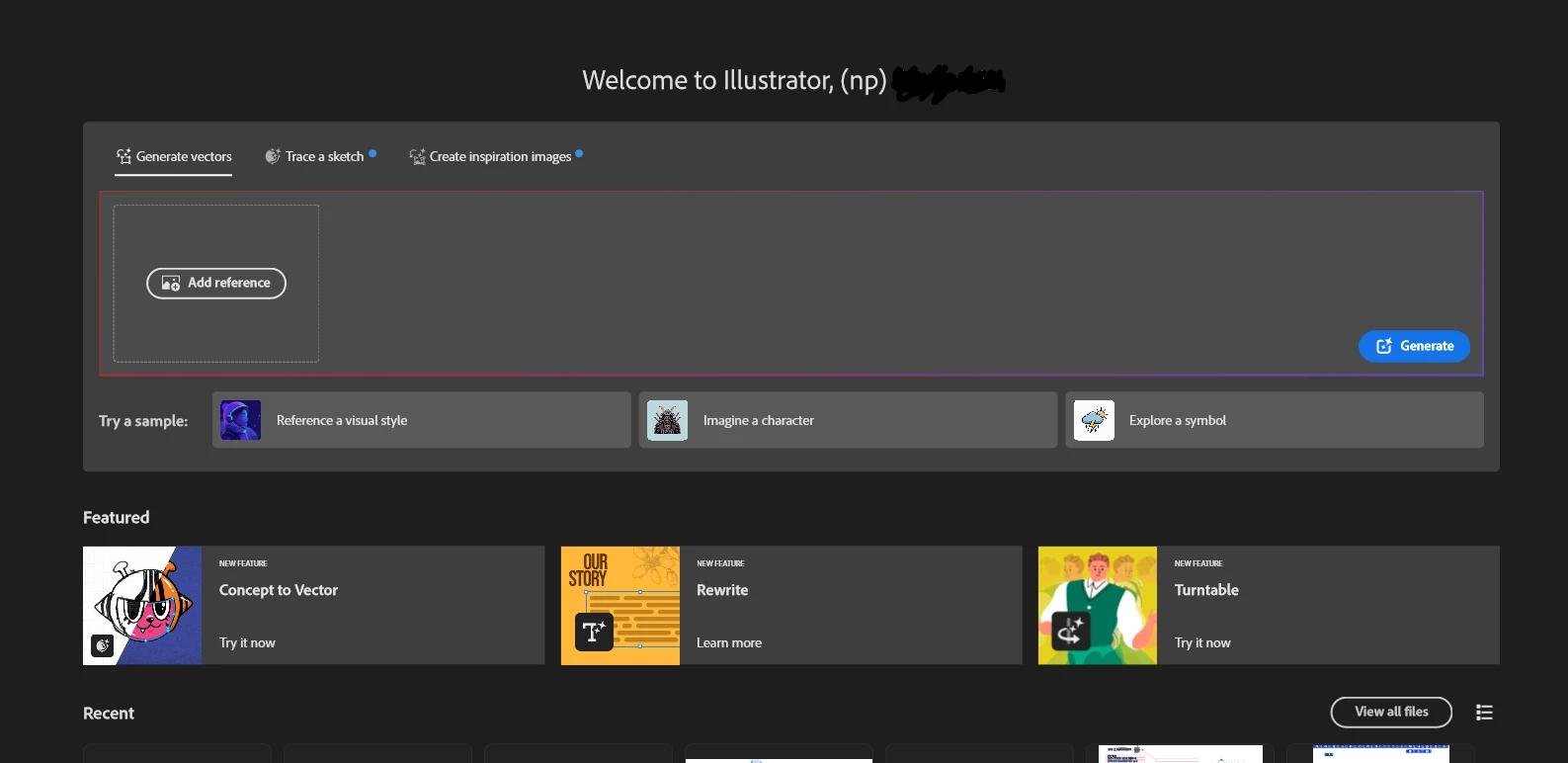
Is there any way to remove the GenAI creation fields from Illustrator’s home screen? It’s just in the way. It’s frustrating to now have to scroll past a massive AI box plus featured ads before I can properly see my recent files list.


Either give me an option to hide AI and featured items or at least put them below my recents. They shouldn’t be taking up the screen like this.


    Correct answer TheSquirrelNutkin

    @Cheesusmice ​@graphics_4075 ​@mhendonewspro ​@gareth-lner ​@SMVeez ​@Sjo-Cal Speedtoys ​@Susan Jazzy ​@Onno------ 

    I have added this as a User Voice request if anyone wants to add a vote: https://illustrator.uservoice.com/forums/333657-illustrator-desktop-feature-requests/suggestions/51443023-reduce-ai-clutter-on-illustrator-home-screen 👍

    10 replies

    TheSquirrelNutkin
    TheSquirrelNutkinAuthorCorrect answer
    Participant
    June 26, 2026

    @Cheesusmice ​@graphics_4075 ​@mhendonewspro ​@gareth-lner ​@SMVeez ​@Sjo-Cal Speedtoys ​@Susan Jazzy ​@Onno------ 

    I have added this as a User Voice request if anyone wants to add a vote: https://illustrator.uservoice.com/forums/333657-illustrator-desktop-feature-requests/suggestions/51443023-reduce-ai-clutter-on-illustrator-home-screen 👍

    Cheesusmice
    Participating Frequently
    June 18, 2026

    Takes up a huge amount of space, and also the homepage feels very laggy now.. I don’t want to use your gen ai, least of all as a starting point.

    graphics_4075
    Inspiring
    June 17, 2026

    The only option to “remove” the Gen AI stuff from your home screen is to remove the home screen completely in the settings.


    What my Illustrator opens up to

    It removes the ability to easily open recent files but the added +5s to my workflow keeps me just a little bit more sane..

    Cheers
    mhendonewspro
    Participant
    June 17, 2026

    Adding my voice to the gallery, because this critical UX/UI oversight needs to be addressed.


    Participant
    June 9, 2026

    I’ve just updated to 30.5.1 and now the welcome screen has a series of generative AI features and prompts pushed above the list of my recent documents. I sincerely assume that Adobe haven’t just pushed this on us with no way of removing it, so can someone advise how I hide this please? Thanks.

    SMVeez
    Participant
    June 8, 2026

    How do I hide all this nonsense on the Illustrator Home Screen so I can see my actual files?

    Anubhav M
    Community Manager
    Community Manager
    June 9, 2026

    Hi @SMVeez @Sjo-Cal Speedtoys,
     

    Thanks for sharing your feedback. At the moment, there isn't an option to hide only the GenAI and Featured sections while keeping Recent Files visible on the Illustrator Home Screen.
     

    I understand how important this is to your workflow, and I'm sorry it isn't available right now. In the meantime, the best way to push for this is to post a request on UserVoice: https://adobe.ly/4nXDxmO
     

    Adding it there helps the team track demand and prioritize. Once you've created the request, please share the link here so other community members can upvote and add their input.


    Looking forward to your update.

    Anubhav

    SMVeez
    Participant
    June 9, 2026

    Disappointing, but not unexpected.

    Can’t wait for this AI bubble to burst.

    Sjo-Cal Speedtoys
    Participating Frequently
    June 3, 2026

    So annoying this, don’t you understand people use your software to earn their money? The homescreen worked great, now it's slowing me down.

    Susan Jazzy
    Participating Frequently
    June 2, 2026

    I'm having the same issue. There is no option to hide, or close. It forces me to scroll down every time I open the app just to see my recent work.


    Participating Frequently
    June 1, 2026

    Agreed, this is once again a very annoying addition that further sloppifies Illustrator. 

    Abhishek Rao
    Community Manager
    Community Manager
    June 1, 2026

    Hi @TheSquirrelNutkin,


    Thanks for sharing your feedback. As of now, there isn't currently an option to hide only the GenAI and Featured sections while keeping the Recent Files section visible on the Illustrator Home Screen. To be certain, I'm also checking this with the product team and will update this thread if I receive any additional information.

    I understand how important this functionality is to your workflow, and I apologize that this level of customization isn't available right now. In the meantime, would you mind creating a UserVoice request for this feature here: https://adobe.ly/4nXDxmO? Adding your feedback there helps the team track demand, prioritize requests, and keep you informed of any updates.

    Once you've created the UserVoice request, please share the link here in the thread so other community members can upvote it and add their feedback as well.


    Looking forward to your update.

    Abhishek

    Abhishek Rao
    Community Manager
    Community Manager
    June 22, 2026

    Hi ​@TheSquirrelNutkin,


    I wanted to provide a quick update after checking with the product team.

    At this time, there is no option to hide or disable only the GenAI and Featured sections while keeping the Recent Files section visible on the Illustrator Home Screen. The product team has confirmed that this level of customization is not currently available.

    I understand the concerns raised here about these sections taking up valuable space and impacting access to recent files, and I've shared the feedback from this thread with the team. If you haven't already done so, I would still encourage creating a UserVoice request, as those requests are actively tracked and help the team understand the demand for specific improvements.


    Thank you again for taking the time to share your feedback and workflow concerns.

    Regards,
    Abhishek


    <Marking as correct for better visibility>