inhabitart
Participant
March 25, 2018
Answered

Illustrator Image Trace

  • March 25, 2018
  • 2 replies
  • 746 views

Hello Guys!

I want to understand why are there two sets of Image trace presets.

We can use the drop down presets from three sources: Control Panel, Properties Panel and from the Image trace panel.

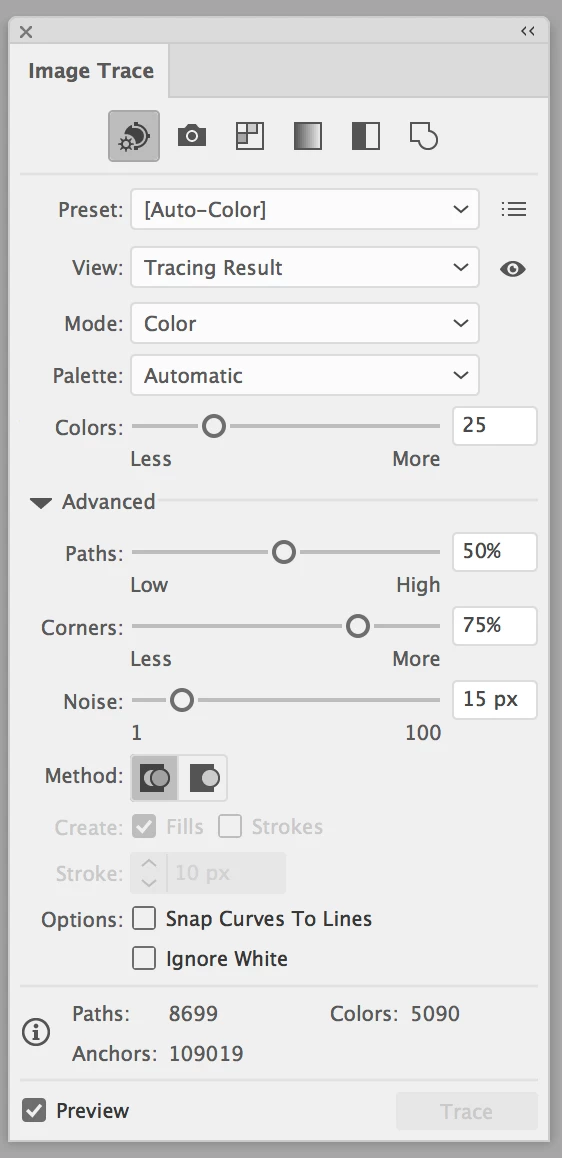
But the Image trace panel has another set of presets (shown as icons), when I searched about them, are considered as the Basic presets.

Two questions:

1. If these presets, icons in Image trace panel, are basic presets or most commonly used presets, why are they not shown on the control panel and properties panel?

2. Why do we have to show two different sets of presets, can't we merge them as one set of preset options?
This topic has been closed for replies.
Correct answer Anna Lander

check please the lists: the basic sets are the same. Naturally, the Image Trace panel has more settings for more flexible work, but there are no contradictions between two lists.

2 replies

barbara_a7746676
Community Expert
Community Expert
March 25, 2018

This is typical of Adobe applications -- there is usually more than one way to do things, and often more than two ways. The reason is because everyone has their own preferred way to work, and this gives people options and the freedom to choose which way they prefer. Depending on what they are working on, a person may prefer one way in one circumstance, and another way in a different circumstance.

Anna Lander
Anna LanderCorrect answer
Inspiring
March 25, 2018

check please the lists: the basic sets are the same. Naturally, the Image Trace panel has more settings for more flexible work, but there are no contradictions between two lists.