

hannesf79732303
Participating Frequently
February 9, 2021
Answered

Illustrator interface resolution issue

  • February 9, 2021
  • 3 replies
  • 1673 views

after reinstalling my mac and adobe creative suite i see that only illustrator has a poor resolution. indesign looks good. how can i fix this? thanks.

This topic has been closed for replies.
Correct answer carlosgarro

Hi.

Try the following.

Go to Preferences > User Interface
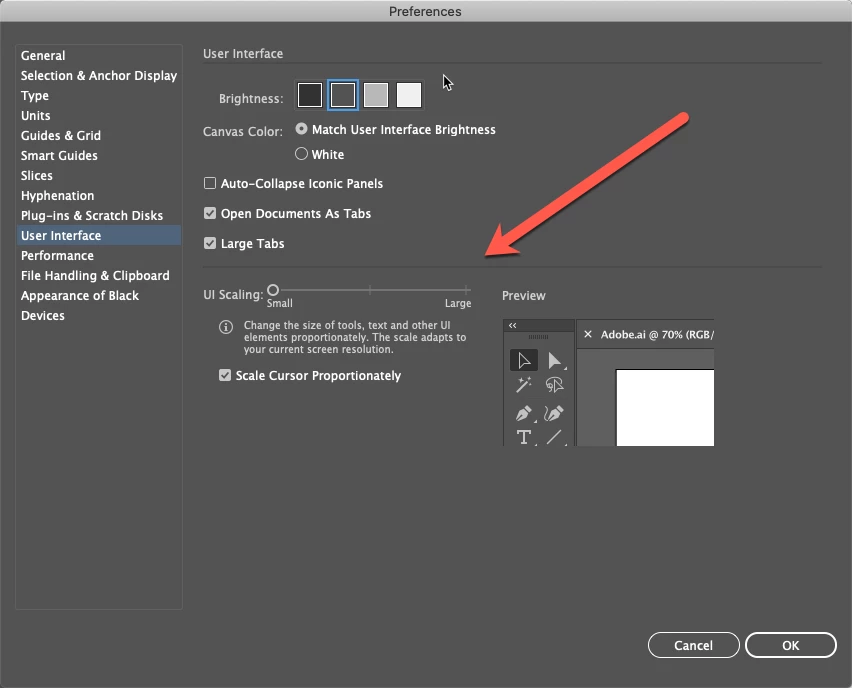
Modify the UI Scaling to a different value (move to the right)

Close Illustrator.

Open it again then adjust the UI Preference to your taste.

Best Regards


3 replies

carlosgarro
carlosgarroCorrect answer
Adobe Expert
February 21, 2021

Hi.

Try the following.

Go to Preferences > User Interface

Modify the UI Scaling to a different value (move to the right)

Close Illustrator.

Open it again then adjust the UI Preference to your taste.

Best Regards


hannesf79732303
Participating Frequently
February 22, 2021

working great! thanks carlos

hannesf79732303
Participating Frequently
February 16, 2021

anyone with a solution?

Ashutosh_Mishra
Inspiring
February 9, 2021

Hi there,


Thanks for reaching out. Looks like you're talking about interface here. I don't see any problem with the resolution. Please click on Window > Control in order to get the control bar on the top. I am also attaching a screenshot for your reference:

Hope it helps.

Let us know if you're looking for something else. We'll be happy to assist.


Regards,

Ashutosh


hannesf79732303
Participating Frequently
February 10, 2021

hi ashutosh,


thanks for fast reply. you don't understand what i mean. please take closer look to screenshot. it is the interface of indesign and illustrator on same screen. you see that indesign has a fine and sharp resolution of toolbars and hole illustrator has a poor resolution, toolsbar seems bigger and unsharper.


i would like to have illustrator "sharp" like indesign. 


regards

hannes