
Typhonart
Inspiring
December 1, 2017
Answered

Illustrator is lagging

  • December 1, 2017
  • 2 replies
  • 3339 views

Pretty much to the point it's completly unusable and frustrating. Selecting any object cause in minor few second lag, moving object with Wacom pen does not work, switching between objects make it lag even more, not to mention changing the points of a curve. And with using Wacom tablet, everytime I want to operate on text or change text layer name, screen keyboard pops up. I can turn it off manually in services, but doing it everytime I want to use Illustrator?

Is there any magical fix to it, or it's just simply useless program and Affinity or God pleas no Corel is the way to work with vectors? In Photoshop there is not a single problem with anything. Every single driver is up to date, reinstaling do completly nothing.
This topic has been closed for replies.
Correct answer Typhonart

Hello!

Nvidia GeFroce GTX 760M. At the moment it kinda turns out it was a Wacom problem, somehow it works fine in Photoshop, but in Illustrator I had to rearange the files with drivers to make it work again, but some sort of a delay is still visible, that is not occuring while using a mouse (but still maybe 1/10 launches mouse is also causing some lags).

2 replies

wrensauer
Inspiring
December 6, 2017

Hi Typhonart,

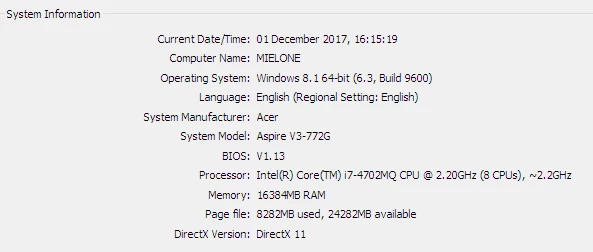
Can you tell me what graphics card your computer is using, as well as which build of Illustrator? I'm not seeing it in the system specs you provided. Based on the lag you've described with Illustrator, it could be a GPU Performance issue.

Best,

Wren

Typhonart
TyphonartAuthorCorrect answer
Inspiring
December 6, 2017

Hello!

Nvidia GeFroce GTX 760M. At the moment it kinda turns out it was a Wacom problem, somehow it works fine in Photoshop, but in Illustrator I had to rearange the files with drivers to make it work again, but some sort of a delay is still visible, that is not occuring while using a mouse (but still maybe 1/10 launches mouse is also causing some lags).

Typhonart
TyphonartAuthor
Inspiring
December 1, 2017

Oh, and if I finally menage to move the object with a touchpad or mouse, it only shows the numbers of transformation, but not  single line to visually adress where the object would land.

Participant
December 4, 2017

When this happeneds to me, I shut everything down, and restart my computer. Seems to work.