


Participant
November 25, 2024
Question

Illustrator is spying on me. Recording my screen without permission MACOS

  • November 25, 2024
  • 6 replies
  • 7912 views

Adobe software is spying on me. It is recording my screen without my permission again and again. and no it is not something that I haven't previously disabled on settings. It is getting activated again! I never give my permission for this. and it is breaking my privacy. Even with the permission disabled and app sometimes offline it continues to record the screen. 
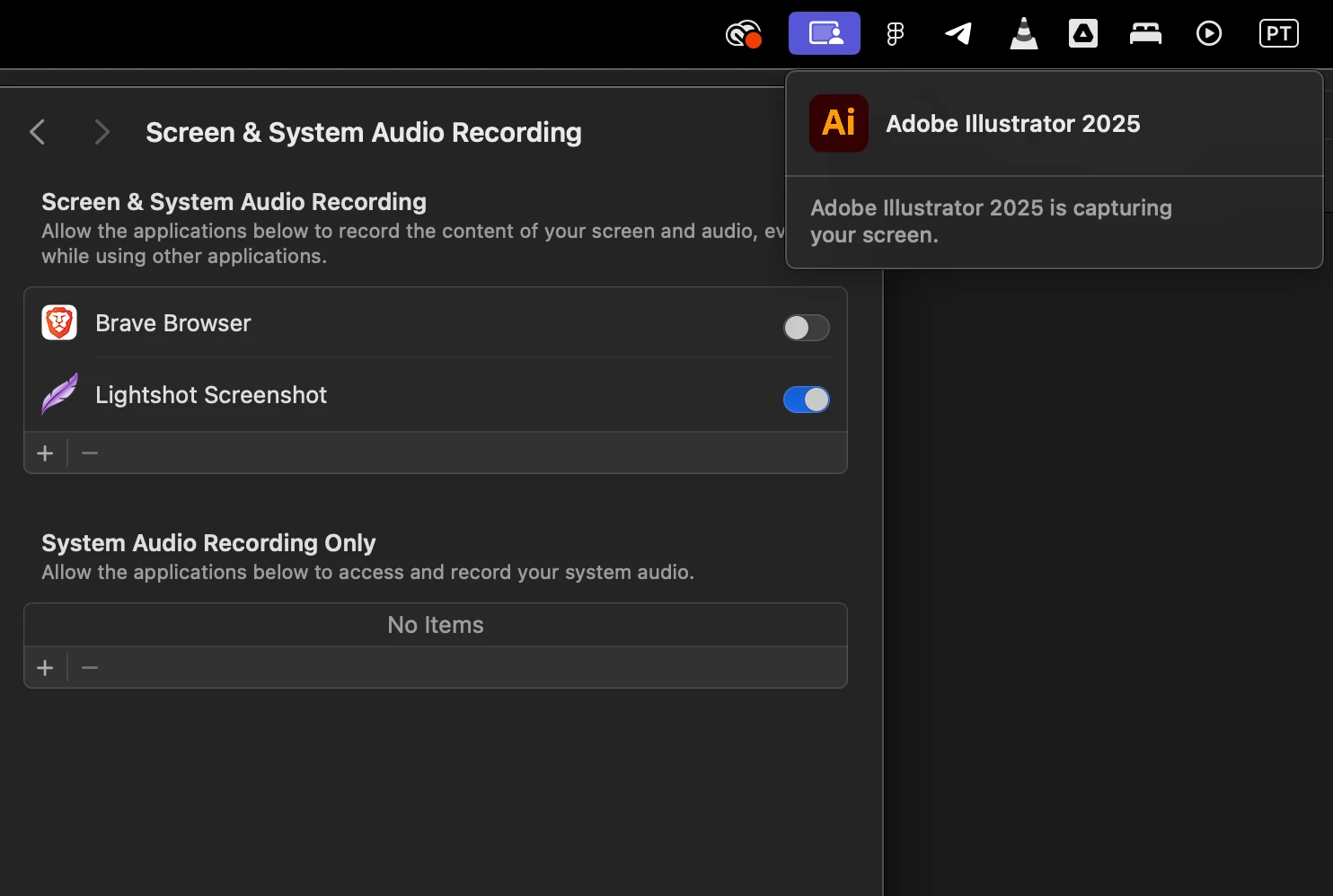


I have googled similar problems from other people they just say that they have to do it to get the colors with is lie. It works perfectly without a need to record the screen. It is a direct interference with my privacy.
Anyone has any idea how to disable that? I have tried everything.

6 replies

silk-m
Community Expert
Community Expert
September 24, 2025

There seems to be a slight misunderstanding.
Older versions of macOS were a little more lax about privacy infringement, so Adobe software and others were allowed to record the screen (including picking up colors from the screen) without explicit permission being given.
The newer macOS has become stricter about privacy and requires users to grant permission.
So, just because you didn't explicitly give permission in older versions of macOS didn't mean that things weren't allowed, but rather that everything was allowed.


In my case, I allow as many programs as possible, which will reduce the chances of problems.

--Susumu Iwasaki
Participant
October 17, 2025

This just happened to me in Animate, seems that it was triggered by color selection. However, when I checked my Screen Recording settings on my Mac, they were all toggled off. Officially creeped out.

Ton Frederiks
Community Expert
Community Expert
October 17, 2025

Did you read the pinned reply?

Anshul_Saini
Community Manager
Community Manager
March 18, 2025

Hi All,


I am able to replicate this behavior on my end, even after denying screen recording permissions. After checking with the product team, they’ve confirmed that Illustrator uses Apple’s screenshot API to pick colors (CGDisplayCreateImageForRect API to read pixels for colors). This allows our apps to capture a 1 px pixel’s color within the app window itself or outside if permission is granted. Even if screen recording permissions are denied, our apps can still pick colors from within its window.


With the recent changes introduced by Apple in macOS Sequoia, new privacy and security notifications now appear when an app accesses screen content. It can be 1 pixel, and still, this notification will pop up. This is why you see the “Adobe Illustrator 2025 is capturing your screen” message— this is an expected behavior. macOS notifies users whenever an app is accessing screen content, even if it’s just for picking the color of a single pixel. So, even though you’ve denied permission for Illustrator to pick a pixel color outside the app, it can still capture colors within the Illustrator window, and this notification will appear. There’s nothing to be concerned about.


Moreover, we have raised an internal ticket with Apple regarding this. Also, this is being triggered by ArtOnPathBrush, EyeDropper, ColorPicker, and ScatterToolBrush plugins.


Let me know if you need further clarification!


Best,

Anshul

Participant
December 4, 2024

YES. I agree. This is a total breach of privacy. Even though I deny the recording, Adobe has recorded my screen while working in Adobe Premiere and After Effects anyway!

Community Manager
December 6, 2024

Hello @Cheryl26731285ptqb, @ivan_7227,

Thanks for reaching out and sharing your concerns. As Monika and Ton rightly pointed out, the screen recording permission was introduced in macOS Catalina (10.15). Illustrator only requires this permission if you need to use the Eyedropper Tool to sample colors outside the Illustrator window. If you do not need this feature, you can disable the permission under system preferences.

Learn more here: (https://adobe.ly/4gn6ROB).

Feel free to reach out if you have more questions or need assistance. We'd be happy to help.


Anubhav

Participating Frequently
December 10, 2024

I’m experiencing the same privacy issue. I haven’t been asked for permission to record my screen, the Screen & Audío Recording permission toggle is set to off, I’ve never used the Eyedropper Tool to sample colors outside Illustrator, and my Mac keeps warning me occasionally that Illustrator is recording my screen. Can you please provide a solution to this problem? Thanks.

Ton Frederiks
Community Expert
Community Expert
November 26, 2024

Which version of MacOS and Illustrator are you using?

If I turn off the setting to record my screen, Illustrator can still pick up colors with the eyedropper from within the document. If I move the eyedropper outside the Illustrator window it does not pick up colors from my screen.

Monika Gause
Community Expert
Community Expert
November 25, 2024

How do you find out that it is actually recording?

The permission is need to pick up colors from placed images and gradients.

ivan_7227Author
Participant
November 25, 2024

you don't need any permission to record the screen in order to extract the color as you have all the colors within the file / app code. call it whatever. you never needed to record a screen before, al lthe information is there. the screen record never was necessary. this is an excuse to get access to whole screen and continuous recordings.

secondly I never gave my permission for screen recording, and it is reappearing as activated, even after me disabling it — meaning that the app is also outpassing the system settings without my permission. You see a sample on the screenshot provided — this is something that should never happen.

Monika Gause
Community Expert
Community Expert
November 26, 2024

This is a public forum with 95% of people not being staff. The colors in placed images have always been calculated from the screen representation. ANd that permission was required, has been caused by a Mac OS update some years back. 


If you want to talk the the engineers, please post there: https://illustrator.uservoice.com

If you want Illustrator to ask for permission, please make a feature request. 

kglad
Community Expert
Community Expert
November 25, 2024

in the future, to find the best place to post your message, use the list here, https://community.adobe.com/

p.s. i don't think the adobe website, and forums in particular, are easy to navigate, so don't spend a lot of time searching that forum list. do your best and we'll move the post (like this one has already been moved) if it helps you get responses.


<"moved from cc desktop bugs">