
Participant
Nov 25, 2026 8:41 AM UTC
Question

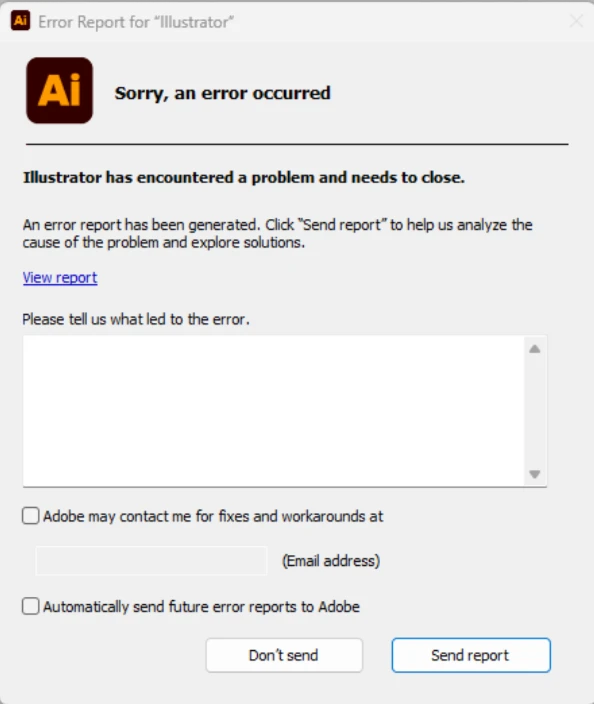
Illustrator keeps crashing and displays “Illustrator has encountered a problem and needs to close.” What could be causing this issue?
 

Hello guys!

There is user is experiencing an issue where Adobe Illustrator unexpectedly crashes while in use. When the crash occurs, Illustrator closes and displays the error message: “Illustrator has encountered a problem and needs to close.”

I have attached a screenshot of the error message for reference.

We would like to understand what may be causing Illustrator to crash and what troubleshooting steps are recommended to identify the root cause.

Please let us know if there are any specific crash reports, logs, Illustrator settings, GPU information, or other diagnostic information that we should provide.

    3 replies

    Abhishek Rao
    Community Manager
    Community Manager
    Nov 25, 2026 9:08 AM UTC

    Hi ​@Lavish_Marshmallowa243,


    Thanks for reaching out and sharing the screenshot. Sorry to hear that Illustrator keeps crashing.

    The screenshot shows the Adobe Crash Reporter, which doesn't indicate the exact cause of the crash. To help us investigate, could you please share the following details?

    • Exact Illustrator version and operating system version.

    • System specifications, including RAM, GPU and graphics driver version.

    • Whether Illustrator crashes randomly or while performing a specific action.

    • Whether the issue occurs with all documents or only specific files.

    In the meantime, please try these steps:

    1. Go to Edit > Preferences > Performance, disable GPU Performance, restart Illustrator and check whether the issue persists.

    2. Test the same workflow in a completely new Illustrator document.

    3. If the issue continues, back up and reset Illustrator preferences, and temporarily disable any third-party plug-ins, if installed.

    Helpx troubleshooting guide:
    https://helpx.adobe.com/illustrator/desktop/troubleshoot/application-crash-issues/fix-illustrator-crash-issues.html

    Additionally, when the Crash Reporter appears, please enter the steps leading to the crash along with your email address and click Send report. Kindly share the same email address with me via DM.

    Please also collect the system information file and crash diagnostics using the instructions here:
    https://helpx.adobe.com/illustrator/desktop/troubleshoot/application-crash-issues/share-crash-reports-with-adobe.html

    If the issue is reproducible, a short screen recording demonstrating the complete workflow leading to the crash, along with an affected sample AI file, would be helpful for further investigation.


    Looking forward to your update!

    Abhishek

    Translate
    Participant
    Nov 26, 2026 7:57 AM UTC

    Hi Abhishek,

    Thanks for the reply, I’m an IT Support and this user actually happens on one of my users. Here are all the details needed:

    • Exact Illustrator version and operating system version:

      • Adobe Illustrator 2026 - 26.5.2

    • System specifications, including RAM, GPU and graphics driver version:

      • Device Model: Dell Pro Max 16 MC16250

      • OS: Windows 11 Enterprise Edition (x64)

      • RAM: 32GB

      • Processor: Intel(R) Core(TM) Ultra 5 235H

      • GPU: Intel(R) Arc(TM) 140T GPU (16GB)

      • Graphic Driver Version: 32.0.101.8991

      • NPU: Intel(R) AI Boost

    • Whether Illustrator crashes randomly or while performing a specific action.

      • It doesn’t seem completely random. Illustrator normally works fine with one file open. The issue tends to happen when multiple files are open and the designs are more complex. The mouse cursor gradually becomes laggy and delayed, sometimes followed by a white screen and then the crash/error window. There is also noticeable lag when using the Shape Builder Tool on detailed vector artwork.

    • Whether the issue occurs with all documents or only specific files.

      • It doesn’t seem to be tied to any specific file. It can happen with different files when the artwork is heavy or complex, while simpler designs generally work fine.

    I’ll let my user follow the guide first, and I’ll collect more information regarding this situation.

    Thanks again!

    Translate
    Harshika Verma
    Community Manager
    Community Manager
    Nov 27, 2026 3:14 PM UTC

    Hi ​@Lavish_Marshmallowa243,

    Thank you for taking the time to share the requested details. It appears that you're currently using an older version of Illustrator. Since Illustrator 31.0 is now available, could you please let us know if there's a specific reason you're continuing to use the older version?

    We'd recommend updating Illustrator to the latest version (31.0) and checking whether the issue persists.

    Please let us know how it goes. If the issue continues after updating, we'll be happy to investigate further.

    Thanks,

    Harshika

    Translate