
Inspiring
August 26, 2024
Answered

Illustrator keeps embedding images that I had linked

  • August 26, 2024
  • 3 replies
  • 1442 views

When I drag and drop an image into Illustrator, the image is linked and not embedded by default. However when I save it and close it and reopen it, the images embed with clipping masks around them. Why does it keep doing this?
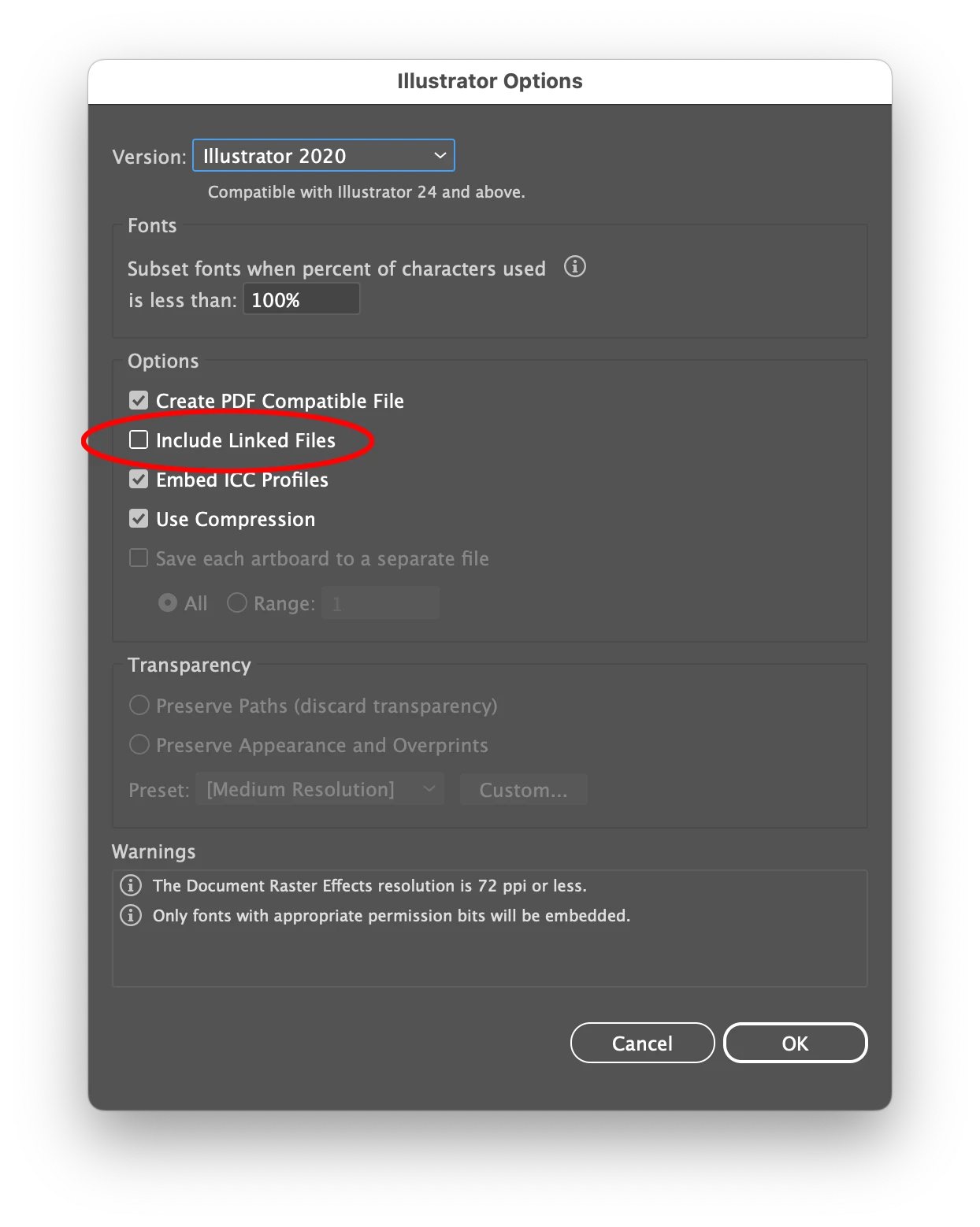
This topic has been closed for replies.
Correct answer Ton Frederiks

Make sure you leave "Include Linked Files"  unchecked when saving.

3 replies

Ton Frederiks
Community Expert
Ton FrederiksCommunity ExpertCorrect answer
Community Expert
August 26, 2024

Make sure you leave "Include Linked Files"  unchecked when saving.

Inspiring
August 26, 2024

Thank you!

I was trying to look through my settings and found nothing related. I guess when I open a file I need to do a 'Save As' then uncheck that box, then I can save with linked images.

Ton Frederiks
Community Expert
Community Expert
August 26, 2024

Once they are embedded when the "Include Linked Files" was checked, they will stay embedded.

A Save As does not help since there are no Linked Files anymore.

Replace them Linked or Unembed them to save the file without embedded images.

Monika Gause
Community Expert
Community Expert
August 26, 2024

Looks like saving goes wrong.

Where do you save files?

If not on your desktop, try that.

Also: turn off the option "Save in background" in the preferences. It can cause this unfortunately.

Anubhav M
Community Manager
Community Manager
August 26, 2024

Hello @Michael30621428f7dz,

I'm sorry to hear about your experience. As I understand, you are linking images into your Illustrator document, and when you open it after a few days, it shows up as embedded. If so, could you confirm the OS/Illustrator version and whether Illustrator behaves this way with all files? Also, are there any specific attributes to the files you're having trouble with (format/file location) that could help us identify the problem?

Looking forward to hearing from you.


Thanks,

Anubhav

Inspiring
August 26, 2024

I edited my post because when I tested it again, when I saved the file and closed it and reopened it today it was embedded again. So it's pretty random when it will do it I guess.


I'm using macOS Sonoma 14.2, Adobe Illustrator 28.1, and the image files are .jpg and .png

Anubhav M
Community Manager
Community Manager
August 26, 2024

Hello @Michael30621428f7dz,

Thanks for sharing the details. Would you mind updating to the latest version of Illustrator (https://adobe.ly/4dCrXaH) and macOS (https://adobe.ly/4dTLXFw) and checking if Illustrator continues to behave this way? Also, check if your files are saved on a removable/network drive or a cloud-synced folder like Dropbox/Google Drive/etc. if so, move them to a local directory like the Desktop/Documents/etc. and share your observations.

Looking forward to hearing from you.


Thanks,

Anubhav