
Participant
July 15, 2023
Answered

Illustrator - lost files

  • July 15, 2023
  • 5 replies
  • 1346 views

Hi team,

I've been working on a document within Illustrator the last few days, but my daughter was playing on my laptop earlier and appears to have closed the document. I'm looking to recover it. 

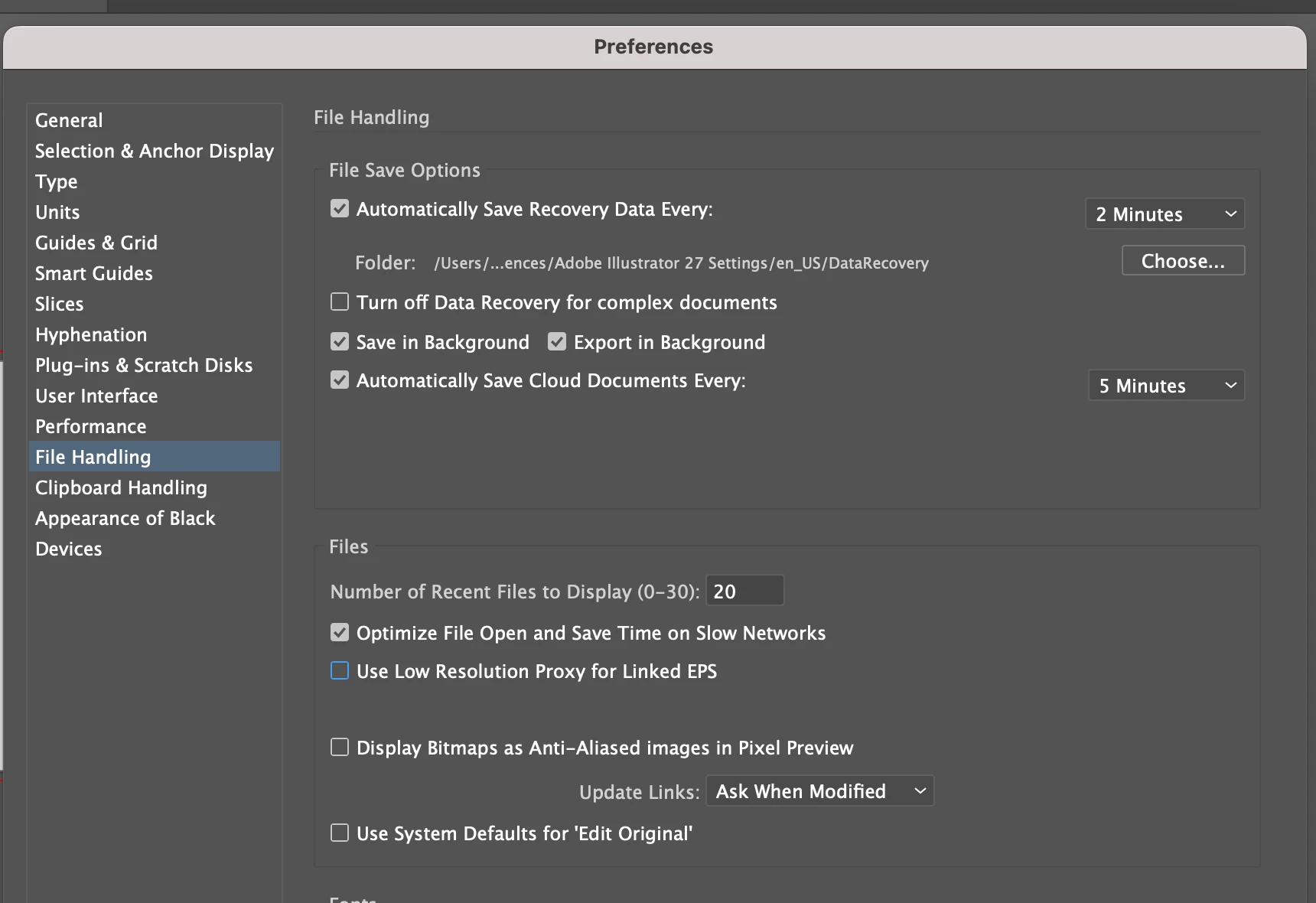
The ai file was saved to my desktop, and when I open it now it's a very old version from a couple days ago. It hasn't backed up to the creative cloud, and the 'Data Recovery' folder also seems to be entirely empty.

Screenshot of my File Handling preferences are below.

Anyone have any ideas at all?


Thank you!
 

This topic has been closed for replies.
Correct answer thejanebradbury

Files are not routinely "backed up" to the cloud if they are saved locally to the hard drive. Cloud documents are files initially saved to the cloud and are denoted with .aic in the file suffix. Those are the files that are referenced there in the Automatically Save Cloud Documents Every: option. 


As Illustrator seems not to have crashed but the file simply closed without saving I expect that is why there is nothing in the data recovery folder. 

I'm sorry but it's likely the only version of your file will be the one you have found from a couple of days ago. 

5 replies

Community Expert
July 15, 2023

This situation reminded me of the Adobe Acrobat "baby proof" commercial:
https://www.youtube.com/watch?v=Z7j9V8BjXQ4


Generally speaking, it's not good to leave a computer unattended with documents open with editing in progress. Aside from what other people inside the office or home could do to the open documents while you're away all sorts of other things can happen. It's the old Murphy's Law thing and Murphy does like to have his fun. In my workplace I have my network share settings restricted; they can open files on my machine but cannot save any changes or move files to my computer. If I have to leave my computer for more than a couple of minutes I'll save my changes and log out.

I recommend using Astute Graphics' Autosavior plugin. It will do timed back-ups and provide save reminders. It will let you create multiple backups in multiple locations. The plugin is available for free by starting a trial subscription; if you cancel the trial the plugin is yours to keep. Astute Graphics' plugin suite is pretty awesome though.
https://astutegraphics.com/plugins/autosaviour 

Participant
July 16, 2023

Thanks for all your replies, team. Lesson learned! All documents getting saved to both the computer and CC from now on. I'll also check out Autosaviour.

Thank you again

Mike_Gondek10189183
Community Expert
Community Expert
July 15, 2023

Did you ever manually save the document to lock in the edits you are lookng for? What was the exact filepath to where you last saved the document, please note if that was to cloud or your hard drive?


She may have simply hit the hotkey to do a Save As or saved to the cloud instead of your drive.


You may have more than one file on your drive(s) with the same name. Try

  • Illustrator: file > Open Recent Files
  • Illustrator: file > Open > Click open Cloud Document
  • Your OS: search the drive for the filename


We used to rarely have posts of lost files until the cloud option was added a few years ago. I sometimes question whether the cloud option does more harm than good. 

Monika Gause
Community Expert
Community Expert
July 15, 2023

@Mike_Gondek10189183  schrieb:


We used to rarely have posts of lost files until the cloud option was added a few years ago. I sometimes question whether the cloud option does more harm than good. 


That was also the time around which the iPad was introduced with its automatically saving of files. Taking stuff out of peoples' hands and control. 

Ton Frederiks
Community Expert
Community Expert
July 15, 2023

As was mentioned, making backups is essential to limit the loss.

It does not help you right now, but you have a CC account, so you can sync your files by saving them in your local CC files folder.

They automatically get versioned (you can go back to previous file versions for at least 10 days ago).

And still make traditonal backups as well...

Sync:

https://helpx.adobe.com/creative-cloud/help/sync-files.html

Versioning:

https://helpx.adobe.com/creative-cloud/help/versioning-faq.html


Monika Gause
Community Expert
Community Expert
July 15, 2023

Please take this as the wake-up call to make a backup strategy for your files.

Don't ever rely on the computer doing anything automatically. It will fail when you most need it. Any power outage can ruin everything.

You should regularly save your file. And then also amke backup copies and save different versions of the file at least daily if not more often. Because saving can go completely wrong anytime.

Turn on the Time Machine on your Mac (on top of all that).


An additional harddisk is always cheaper than having to rebuild your files. 

sara_pixels
Inspiring
March 3, 2024

I didn't need a wake up call.  I already put things where I wanted them to be.  Then every cloud service got super grabby.  I have decades of work, and I'm having to hide things now.  It's a nightmare.  

Monika Gause
Community Expert
Community Expert
March 3, 2024

Maybe you just start with describing what is happening in your system. If this is about non-Adobe services, you might need to ask in other forums. 

thejanebradbury
Community Expert
thejanebradburyCommunity ExpertCorrect answer
Community Expert
July 15, 2023

Files are not routinely "backed up" to the cloud if they are saved locally to the hard drive. Cloud documents are files initially saved to the cloud and are denoted with .aic in the file suffix. Those are the files that are referenced there in the Automatically Save Cloud Documents Every: option. 


As Illustrator seems not to have crashed but the file simply closed without saving I expect that is why there is nothing in the data recovery folder. 

I'm sorry but it's likely the only version of your file will be the one you have found from a couple of days ago. 

sara_pixels
Inspiring
March 3, 2024

This is not correct.  I have never selected an automatic backup or synching and 4 different cloud services all started doing it.