



micah_4555
Participant
March 17, 2026
Question

Illustrator Not Displaying Replacement Character (FFFD) Correctly with Noto Sans

  • March 17, 2026
  • 2 replies
  • 24 views

Hello!

In Adobe Illustrator, as for the Unicode Replacement Character on FFFD, the glyph for Noto Sans font
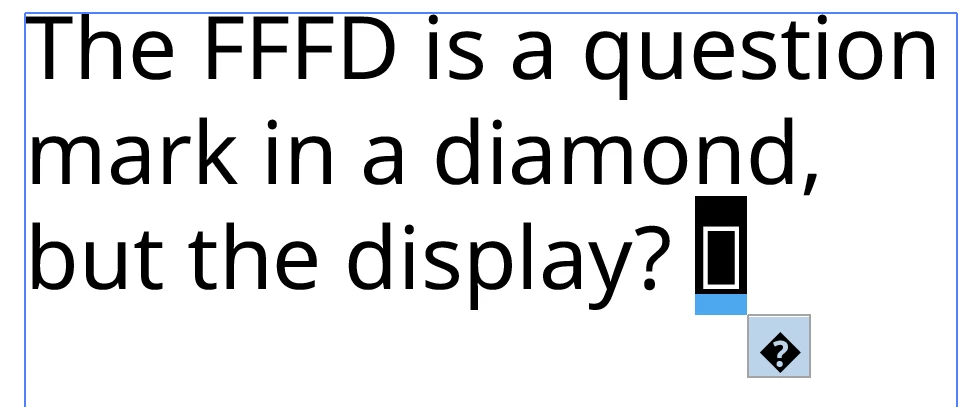
The text is just a tofu, not a black question mark with a diamond symbol.

is a black diamond with a question mark symbol. Even if the glyph is included, it does'nt display on the text box, just a tofu box. Help me please fix it, even it’s not correct!

    2 replies

    Community Expert
    March 17, 2026

    Which version of Noto Sans are you using? The one offered at Adobe Fonts or the version from Google Fonts? The version at Google Fonts includes two variable fonts along with 72 “static” fonts. It’s possible the builds of the fonts at Adobe Fonts and Google Fonts could be different.

    Abhishek Rao
    Community Manager
    Community Manager
    March 17, 2026

    Hi @micah_4555,


    Sorry to hear you're running into this issue. Could you please confirm the Illustrator version and your OS details so I can check this further on my end? Also, let me know if you've tested this with any other fonts.

    In the meantime, please try clearing the font cache by following this guide: https://adobe.ly/4lyxkfL

    You can also try inserting the character directly from the Glyphs panel instead of typing or pasting it, as this can force Illustrator to use the font's actual glyph if available. Additionally, testing with another font or installing extended Noto variants like Noto Sans Symbols may help improve the rendering.


    Please try these steps and let me know how it goes.

    Abhishek

    micah_4555
    Participant
    March 17, 2026

    Hello, replacement character in FFFD is a special character that is not often used. Even the glyph is included, it’s just displayed as a tofu box inside the text on the page.