


Illustrator not recognizing NVIDIA RTX 5070 - shows Microsoft Corporation instead
I'm experiencing an issue with Illustrator not properly recognizing my dedicated GPU for hardware acceleration. Here are the details:
System Configuration:
GPU: NVIDIA GeForce RTX 5070 Laptop GPU (8GB VRAM)
OS: Windows 11
NVIDIA Driver: Studio Driver 581.57 (latest, installed clean)
Adobe Illustrator: 2026
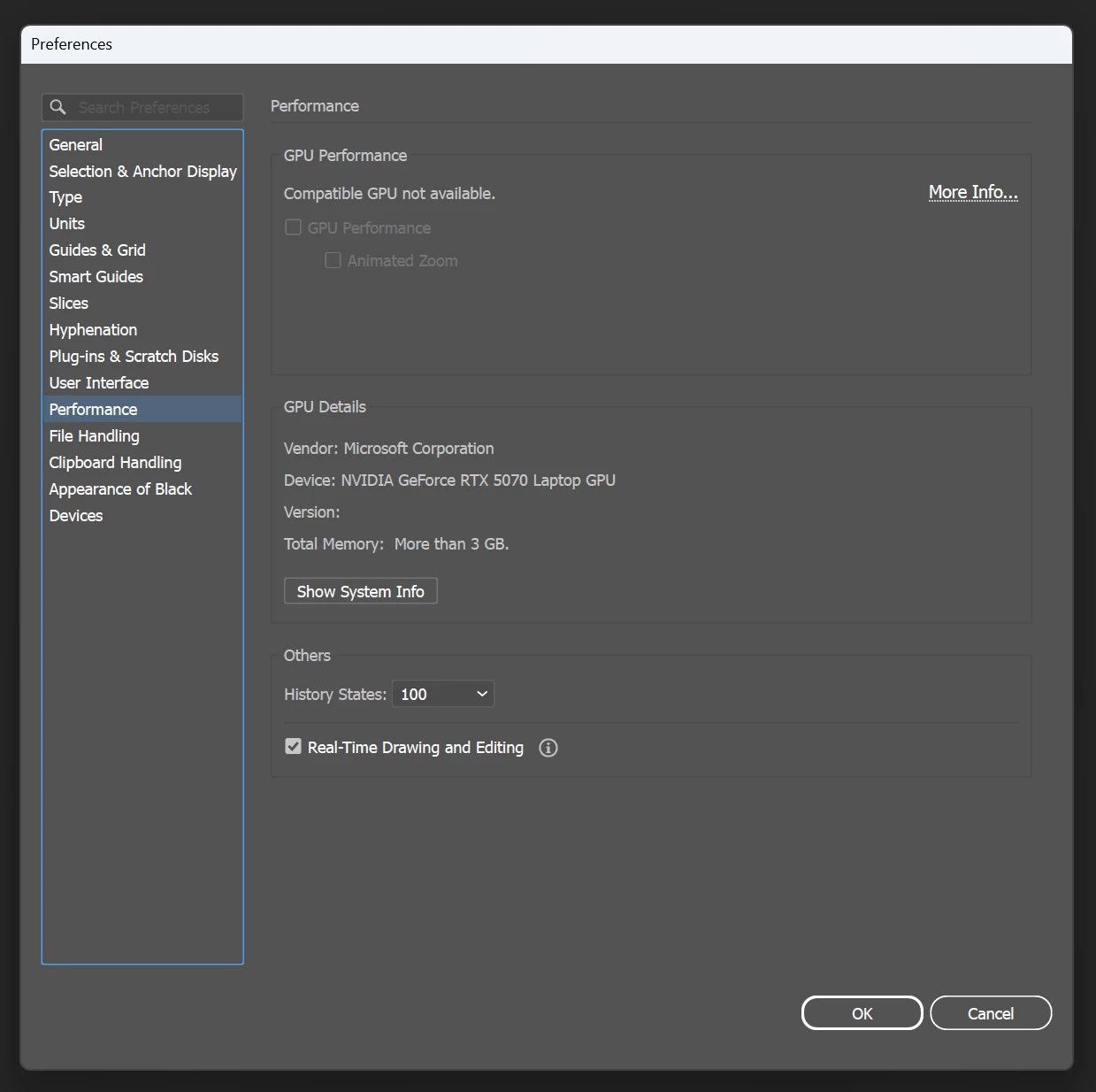
Problem: In Illustrator Preferences → Performance → GPU Details, I see:
Vendor: Microsoft Corporation (should be NVIDIA Corporation)
Device: NVIDIA GeForce RTX 5070 Laptop GPU
Status: "Compatible GPU not available"
GPU Performance checkbox is grayed out
What I've Already Tried:
✅ Installed latest NVIDIA Studio Driver (581.57) with clean installation
✅ Configured NVIDIA Control Panel → Program Settings → Illustrator → High-performance NVIDIA processor
✅ Set Windows Graphics Settings → Illustrator → High performance (RTX 5070)
✅ Restarted computer multiple times
✅ Reset Illustrator preferences (Ctrl+Alt+Shift on startup)
✅ Verified GPU is working properly in other Adobe apps and system
Additional Info:
The RTX 5070 is detected correctly by Windows Device Manager
Other graphics-intensive applications recognize the GPU properly
NVIDIA Control Panel shows the GPU is active and functioning
I'm working directly on the machine (not via Remote Desktop)
Question: Why is Illustrator showing "Microsoft Corporation" as the vendor instead of "NVIDIA Corporation"? This prevents me from enabling GPU acceleration features.
Has anyone encountered this issue with RTX 5070 or similar newer GPUs? Any suggestions for additional troubleshooting steps?
Thanks in advance for your help!
 AdChoices