Participant
February 13, 2026
Question

illustrator object

  • February 13, 2026
  • 2 replies
  • 0 views

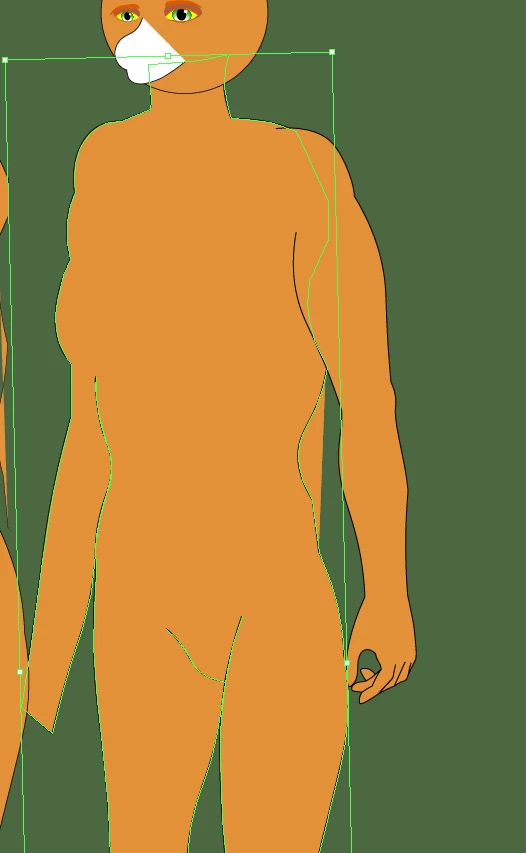
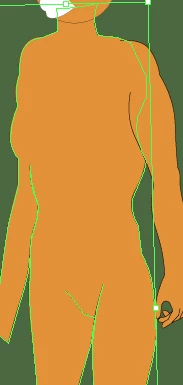
In Illustrator, I am working on this figure of a tiger woman. I cut a section of the body, and when I attempted to move it, the whole body moved.


    2 replies

    Jacob Bugge
    Community Expert
    Community Expert
    February 13, 2026

    Robert,


    If you wish to literally cut the face part out of the body/head and move it, so that the face part is shown outside the body/head leaving a hole where it was, it can be done, but the exact way depends on the structure of the paths.


    It is safest to keep a backup of artwork about to be changed irreversibly; and remember that you can use Undo to get back.


    It looks as if your selection consists of one or more other paths on top of the body/head (maybe including an open path at the side with the hand) with the same fill as the unselected body/head, maybe grouped and maybe having parts of paths running back and forth on top of themselves, along with the white facial part; and the body unselected body/head may also consist of open/closed paths maybe grouped.


    If/when you have one path that face part can be out of, the simplest way may be to:select both that path and the cutout path, then use Pathfinder>Divide make the cutout (both forming a Group), then deselect and with the Direct Selection Tool ClickDrag the cutout part to the desired place.


    Jacob Bugge
    Community Expert
    Community Expert
    February 13, 2026

    Robert,


    In your images, parts of the body seem to be selected, but not the open white path.


    It looks as if the open white path is just placed on top of the body.


    What happens if you deselect everything, then select that open white path with the Direct Selection Tool by Clicking on the white fill, then ClickDrag to move it? You can use Undo to bring it back