
aj20982
Participating Frequently
July 5, 2023
Answered

Illustrator object color problem

  • July 5, 2023
  • 2 replies
  • 267 views

Hello,

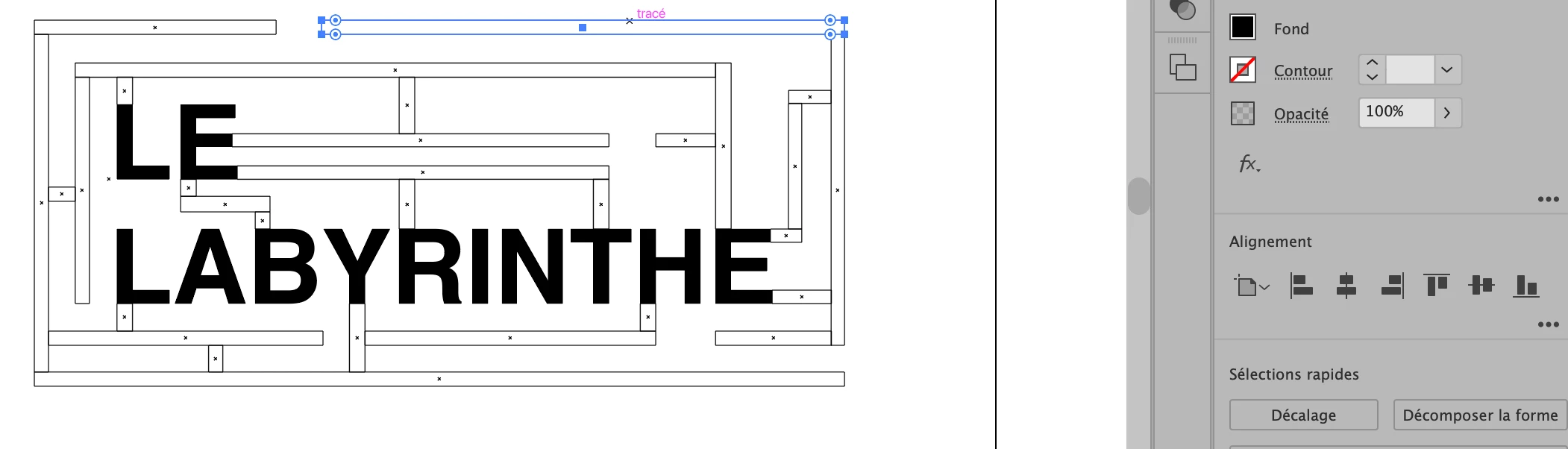
I have a problem with Illustrator. I made a wrong manipulation and I can't solve it. I created a project with rectagles and they all became "transparent". In the tools panel on the right, where you can change the color of shapes etc., my rectangles are black when I select them. But on my work surface, they're not. You can see this in the screenshot I took.

Thanks in advance!!!
This topic has been closed for replies.
Correct answer Ton Frederiks

Good to hear that helped.

2 replies

aj20982
aj20982Author
Participating Frequently
July 5, 2023

Thank you very much Ton Frederiks, I've managed to restore my project presentation!

Ton Frederiks
Community Expert
Ton FrederiksCommunity ExpertCorrect answer
Community Expert
July 5, 2023

Good to hear that helped.

Ton Frederiks
Community Expert
Community Expert
July 5, 2023

You are probably in Outline Preview. Select from the View menu > View using GPU or CPU