
Inspiring
July 12, 2024
Answered

illustrator öffnet normal, ist dann aber nicht mehr bedienbar

  • July 12, 2024
  • 3 replies
  • 983 views

Hallo zusammen,


folgendes Problem gestaltet sich aktuell: 

wenn ich Illustrator öffne, funktioniert alles wie gewohnt. Die Datei die ich aufrufe läd, dann kann ich aber nichts mehr machen. Selbst die Werkzeugleiste und ebenen usw. erscheinen nicht. Wenn ich ob über das Bedienfeld Fenster die Werkzeuge als beispiel auswähle, passiert einfach nichts. Es kam kein  Fehlermeldung . Illustrator ist auf dem neusten Stand. Mein Mac Betriebssystem auch. Ich habe das Programm auch schon einmal neu installiert. 



Wenn ich die BETA Version öffne kommt folgende Fehlermeldung:
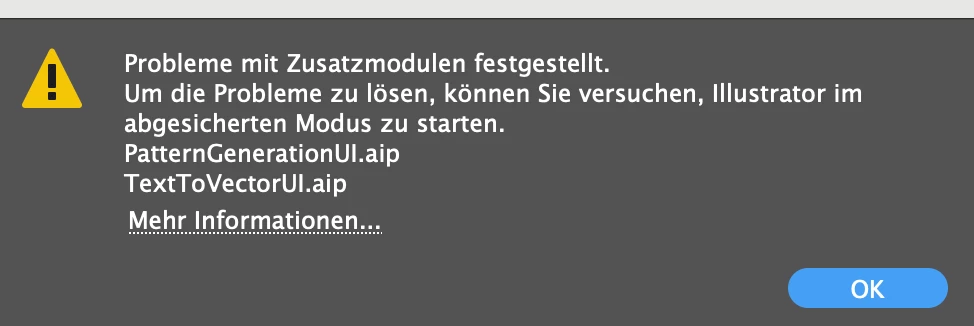
 

Kann mir jemand weiterhelfen ?


This topic has been closed for replies.
Correct answer Anna385699825f0i

War das vorherige Betriebssystem auch Sonoma?

Funktioniert das Ganze, wenn Du den Rechner in den Safe Mode startest?


Ok, im Safe Modus hat es jetzt funktioniert. Danke!!!

3 replies

Ton Frederiks
Community Expert
Community Expert
July 15, 2024
Inspiring
July 15, 2024

It worked now with the safe Modus! Thank you!!

creative explorer
Community Expert
Community Expert
July 13, 2024

@Anna385699825f0i  .aip is an Adobe Illustrator Plugin. Try disabling the plugins and see if your Illustrator files load! For your Mac, Command K (keyboard shortcut) to get to the Plugins in your Illustrator Preferences. Select Plug-ins on the left-side, and and choose your plugins to disable.

If by chance, when you updated your Adobe Illustrator, the plugin may not be compatible. Verify if the plugins are compatible with your specific version of Illustrator. You can find compatibility information on the plugin developer's website or documentation. It might be a simple update or re-install of that plugin. If the plugin was found creative cloud app, you can easily uninstall and reinstall the plugin. 

A part of me is curious, if it's a bigger problem. Can you open a simple file? If yes, could it be the file itself then?


m
Monika Gause
Community Expert
Community Expert
July 13, 2024

@creative explorer  schrieb:


If by chance, when you updated your Adobe Illustrator, the plugin may not be compatible. Verify if the plugins are compatible with your specific version of Illustrator. 


Both of the plugins listed in that error are part of Illustrator and that error message is a known issue with the Beta.

Monika Gause
Community Expert
Community Expert
July 12, 2024

Welche Hardware ist das?

Hat es schonmal irgendwann funktioniert?

Betriebssystem ist also Sonoma 14.5?


Läuft auf dem Rechner Magnet oder Rectangle?

Inspiring
July 15, 2024

 Infos über meinen Rechner sind folgende: 


Illustrator hat letzte Woche noch hervorragend funktioniert. Ohne ein Update zu machen oder irgendwas zu ändern funktioniere es plötzlich nicht mehr. 


Habe dann Illustrator bereits deinstalliert und neu installiert. Habe meinen Mac geupdated. Habe Illustrator geupdated. Funktioniert immernoch nicht. 


Ich kann, wenn ich Illustrator geöffnet habe nicnts mehr im Programm vornehmen. Weder komme ich in die Voreinstellungen, noch zur Werkzeugleiste oder irgendwas anderes. Shortcuts funktionieren auch nicht. 

Er zeigt mir allerdings nicht an, dass er abgestürzt sei. 


Bei der Beta Version bekomme ich dann folgenden Hinweis:

Monika Gause
Community Expert
Community Expert
July 15, 2024

War das vorherige Betriebssystem auch Sonoma?

Funktioniert das Ganze, wenn Du den Rechner in den Safe Mode startest?