Participant
March 14, 2022
Question

illustrator opening local file, verfying access to "192.168.xxxxxxxxxx" and keep loading

  • March 14, 2022
  • 1 reply
  • 529 views

Hi everyone,


Whether I open any file in my local drive, illustrator will spend a very long time (complete frozen) to check for a network drive (that doesnot exist in my network now).
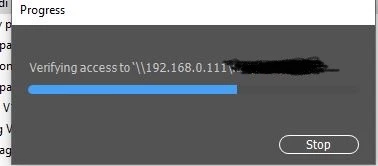
 

The 192.168.0.111 currently doesnot exist in my network. That network was in my office's network. I dont know why it comes to here.


I tried uninstalled AI completely but it doesnot help.


Can somebody help please?


Thanks a lot

This topic has been closed for replies.

1 reply

@mj
Community Expert
Community Expert
March 14, 2022

Hi @Meeow ,

Do you have any links in the Ai file you're trying to open?

If yes, are those links on the network drive?

If you have access to that network, open the file then package it for remote use. Here's how: https://helpx.adobe.com/illustrator/using/package-files.html

Here are some suggestions from Adobe. See the Suggestions for troubleshooting toward the bottom of the thread. https://helpx.adobe.com/illustrator/kb/illustrator-support-networks-removable-media.html


Let us know how you go.

mj


Mohammed Jogie |
Adobe Certified Associate |  Expert | Instructor |
Adobe Community Professional | Creative Ambassador | User Group Manager |
Member International Society of Typographic Designers | Lifetime Friend International Council of Design | Interaction Design Association Local Leader |
Member Pan Afrikan Design Institute | Ambassador Visual Arts Network South Africa | Central Executive Committee Member Printing SA |


MeeowAuthor
Participant
March 14, 2022

Thanks for your info.

I also found out the problem.


In my file, there is a picture which is NOT LINKED.


I tried to create a same copy of this file, removing the picture. The problem is solved.

I reembeded the photo from the clean file, the problem is solved too.


I guess AI kinda keep the linked info from the previous embedded picture? (bug?)


Thanks a lot for the help!


@mj
Community Expert
Community Expert
March 14, 2022

Oh wicked,


Glad you're sorted


Besr

mj