


Participant
October 22, 2025
Answered

Illustrator oversized UI issue

  • October 22, 2025
  • 1 reply
  • 117 views

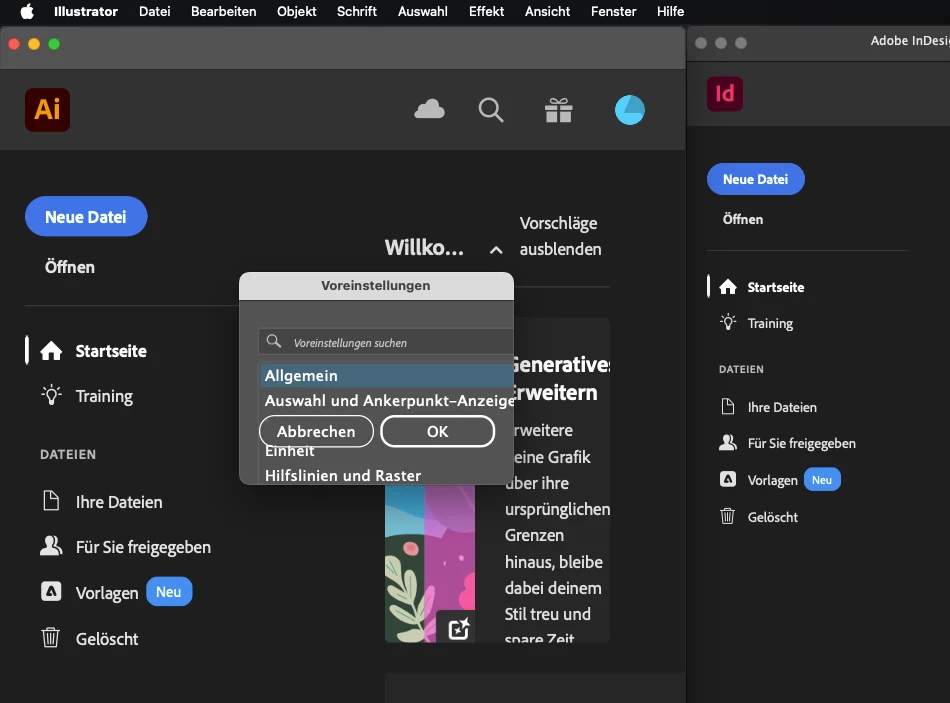
I'm having an issue in which the UI of Illustrator is somewhat oversized compared to the other Adobe programs, it's not unusable but the difference is noticable enough to be a bother (screenshot shows comparison to indesign). I haven't been able to check out the UI scaling settings within the program, as the preferences window is also bugged out in some way (way too small to access any of the settings and cannot be resized; also included in the screenshot) -- this is arguably a bigger problem than the oversized UI itself.


I have tried reinstalling Illustrator, installing older versions and manually resetting the preferences, none of which have had any effect on the issue. I'm currently on Ai version 29.8.2 operating on macOS Sequoia 15.5.


I'd be glad for any suggestions on how to fix this problem.
 

Correct answer Abhishek Rao

Hi @katjag3663319,


Sorry to hear about the oversized UI and the issue with the Preferences window. Could you please try changing your Mac's display resolution temporarily and then relaunch Illustrator to see if the Preferences window appears correctly? You can follow these steps here: Change your Mac display’s resolution – Apple Support (IN). Once it opens, go to Preferences > User Interface and adjust the UI scaling to your preference.

If the issue continues, please try renaming the following folders to reset related components:

Rename the CEP folder to CEP.old from this location:
/Library/Application Support/Adobe

If that doesn’t help, rename the UXP folder to UXP.old from these locations:
/Library/Application Support/Adobe
~/Library/Application Support/Adobe

After that, relaunch Illustrator and check if the issue persists. Please share a short screen recording of the behavior if it continues, so I can review it further.


Looking forward to your update.

Abhishek

1 reply

Abhishek Rao
Community Manager
Abhishek RaoCommunity ManagerCorrect answer
Community Manager
October 22, 2025

Hi @katjag3663319,


Sorry to hear about the oversized UI and the issue with the Preferences window. Could you please try changing your Mac's display resolution temporarily and then relaunch Illustrator to see if the Preferences window appears correctly? You can follow these steps here: Change your Mac display’s resolution – Apple Support (IN). Once it opens, go to Preferences > User Interface and adjust the UI scaling to your preference.

If the issue continues, please try renaming the following folders to reset related components:

Rename the CEP folder to CEP.old from this location:
/Library/Application Support/Adobe

If that doesn’t help, rename the UXP folder to UXP.old from these locations:
/Library/Application Support/Adobe
~/Library/Application Support/Adobe

After that, relaunch Illustrator and check if the issue persists. Please share a short screen recording of the behavior if it continues, so I can review it further.


Looking forward to your update.

Abhishek

Participant
October 22, 2025

Hi Abhishek,

relaunching Illustrator after changing the Mac's display resolution seems to have done the trick, thank you so much!
