


charlotten86139972
Inspiring
August 25, 2017
Answered

ILLUSTRATOR PATTERN FILES TOO BIG

  • August 25, 2017
  • 2 replies
  • 6779 views

Hi,

I made my jpegs small before i dropped them into illustrator to be made into patterns. they are about 90 kb each, low res of 150. When i drop them in i rasterize them with a transparet background and clipping mask around the edges options are checked. I then clipping mask around the jpeg because i find rasterixing it gives this annoying white border. Then I make it into a pattern.

I have made the patterns collumn tiled and 2/5 offset.

But these patterns seem to be making my file huge and slow running.

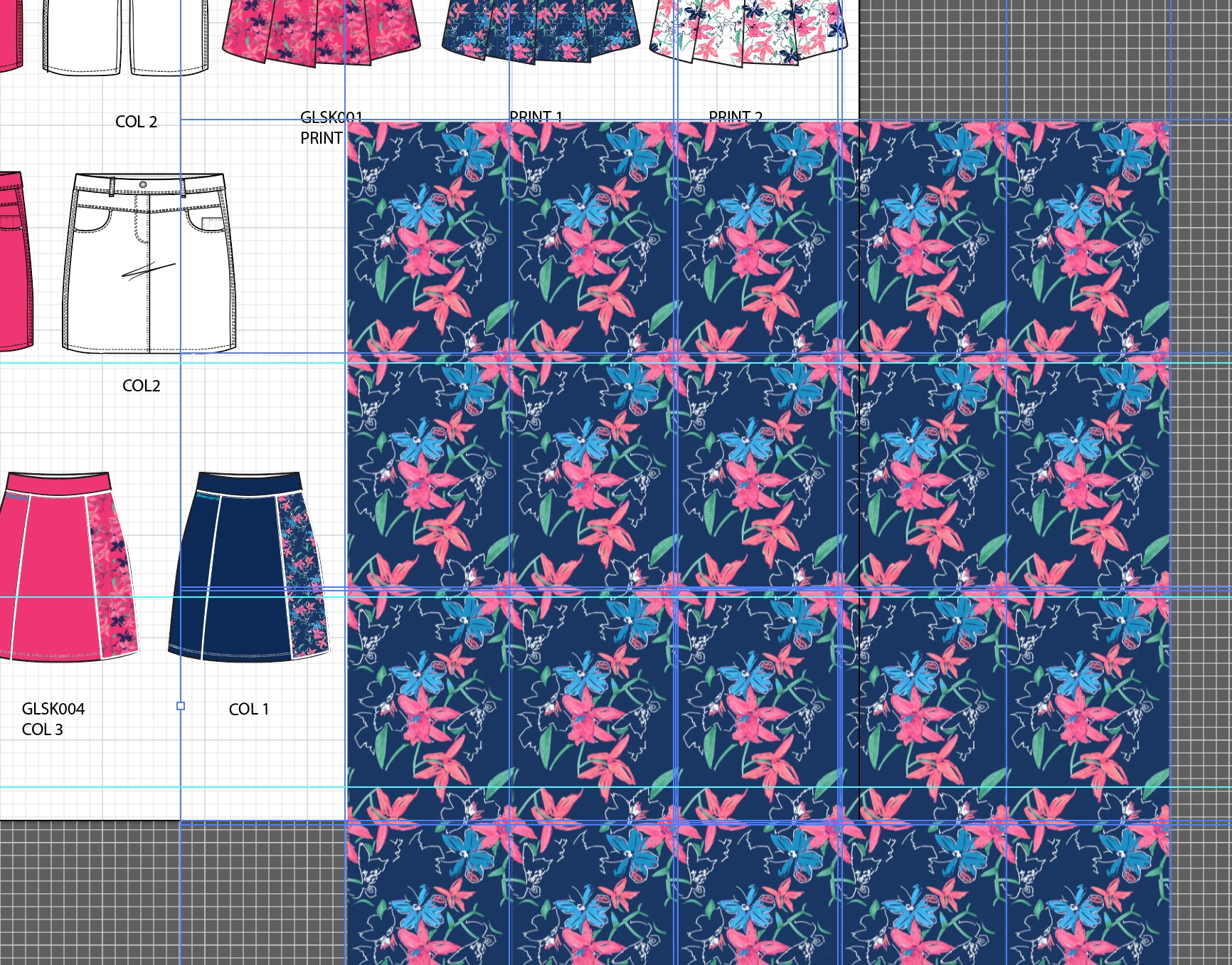
When i goto edit these patterns, or drag them out of the swatches file, it looks like Illustrator has multiplied the object into lots of tiles to create the pattern (see photo). Why does it do this? Is this what is making my file so large?? I have noticed it does this before but now I am wondering if it is the cause of the ridiculous file size..
I deleted the pattern swatches and made new ones today and the file sizes have dropped by like 20 MB ....

but when i close and reopen the file illustrator has made the patterns into multiple tiles again..

Plz help!

This topic has been closed for replies.
Correct answer Ton Frederiks

Charlotte,

I made my jpegs small before i dropped them into illustrator to be made into patterns. they are about 90 kb each, low res of 150.

I have made the patterns collumn tiled and 2/5 offset.

This is the normal behaviour, your jpegs are compressed and small, but when you use them in Illustrator they get uncompressed and large. A jpeg of 90 kb can easily become 3,5 mb.

The repetition is necessary and influencens by the typr of pattern and the Offset you specify. 1/2 will result in less copies than the 2/5 you use.

Multiply the number of copies by the uncompressed amount and you will understand what causes the large filesize.

2 replies

Mike_Gondek10189183
Community Expert
Community Expert
August 25, 2017

Try File >> Save As and turn OFF the checkmark for PDF compatible. Compression should be checked on by default.

Ton Frederiks
Community Expert
Community Expert
August 25, 2017

I wonder if that has a real impact on the file size.

For linked images, turning off PDF compatibility reduces the file size by preventing them from becoming embedded in the PDF part.

When images are used in patterns, they must be embedded.

The pdf file format is very efficient with patterns.

Turning off PDF compatibility does not reduce the file size that much.

An experiment:

9 objects filled with a pattern made of an image and saved as .ai with pdf compatibility results in an 38,5 MB file.

Without PDF compatibilty it is 37,1 MB.

Just PDF without preserving AI editing capabilities it is 1,4 MB.

Mike_Gondek10189183
Community Expert
Community Expert
August 25, 2017

Hi Ton,

My test was on a 22" x 17" canvas and I got about half file size savings.

Unless Charlotten needs PDF compatible ON for InDesign or After Effects would recommend to turn off. 

We only have about several files at go bad on our server to resurrect from backup, and  100% of the time from the minority of users that keep PDF compatible on their files. We deal with linked images so the difference in file size is more significant, but the numbers suggest there is more to this such as the save routine pushing the server to hard when both parts are being saved. I really do not want to see people lose valuable work so in addition to some file size savings wanted to suggest that to Charlotte.

Ton Frederiks
Community Expert
Ton FrederiksCommunity ExpertCorrect answer
Community Expert
August 25, 2017

Charlotte,

I made my jpegs small before i dropped them into illustrator to be made into patterns. they are about 90 kb each, low res of 150.

I have made the patterns collumn tiled and 2/5 offset.

This is the normal behaviour, your jpegs are compressed and small, but when you use them in Illustrator they get uncompressed and large. A jpeg of 90 kb can easily become 3,5 mb.

The repetition is necessary and influencens by the typr of pattern and the Offset you specify. 1/2 will result in less copies than the 2/5 you use.

Multiply the number of copies by the uncompressed amount and you will understand what causes the large filesize.