
Participant
September 14, 2022
Question

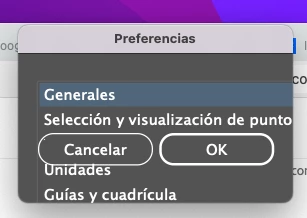
Illustrator Preferences opens a tiny window with cancel or ok

  • September 14, 2022
  • 1 reply
  • 577 views

Hi everyone. Anyone has this problem? When I try opening preferences I get this tiny window with no access to the options. I'm running the latest Illustrator version 26.5 with Creative Cloud installed on a Macbook Pro 2017 with MacOS Monterrey 12.5.1


Thank you
This topic has been closed for replies.

1 reply

Anubhav M
Community Manager
Community Manager
September 14, 2022

Hello Antonio5FC2,


Sorry to hear about this experience. I would request you try resetting the Display Resolution and Scaling under the System Preferences to default and relaunch Illustrator to check if it helps.


Also, try resetting Illustrator's preferences by following the steps shared in this article (https://helpx.adobe.com/illustrator/kb/troubleshoot-preference-issues.html) and sharing your observations.

Disclaimer: Please note that resetting preferences will remove all custom settings, and Illustrator will launch with the defaults. You may take a backup of these settings from the location mentioned in the article. 

Looking forward to hearing from you.


Thanks,
Anubhav

Participant
September 15, 2022

Hi Anubhav. Thank you for your anwer. The only thing that did the trick was using the MacBook Pro screen as the main one. If I use the external monitor as the main screen, preferences show up like in the screenshot attached. Restoring Illustrator preferences didn't help. This was not a problem in previous versions. I also updated MacOS to the lates version 12.6. Any ideas? Thank you


Anubhav M
Community Manager
Community Manager
September 20, 2022

Hello @Antonio5FC2,


Thanks for confirming that. Kindly try the following steps and check if it helps:

  • Close all Adobe applications
  • Rename the UXP folder to UXP.old from:
    Macintosh HD/Library/Application Support/Adobe/UXP
  • Rename the CEP folder to CEP.old from
    /Library/Application Support/Adobe/CEP
    /Users/<username>/Library/Application Support/Adobe/CEP
  • Relaunch Illustrator


Also, try running Illustrator under the root user account and share your observations. Looking forward to your response.


Looking forward to your response.

Regards