Participating Frequently
February 6, 2022
Question

Illustrator recognizing compression artifacts as editable elements

  • February 6, 2022
  • 4 replies
  • 507 views

Hi,

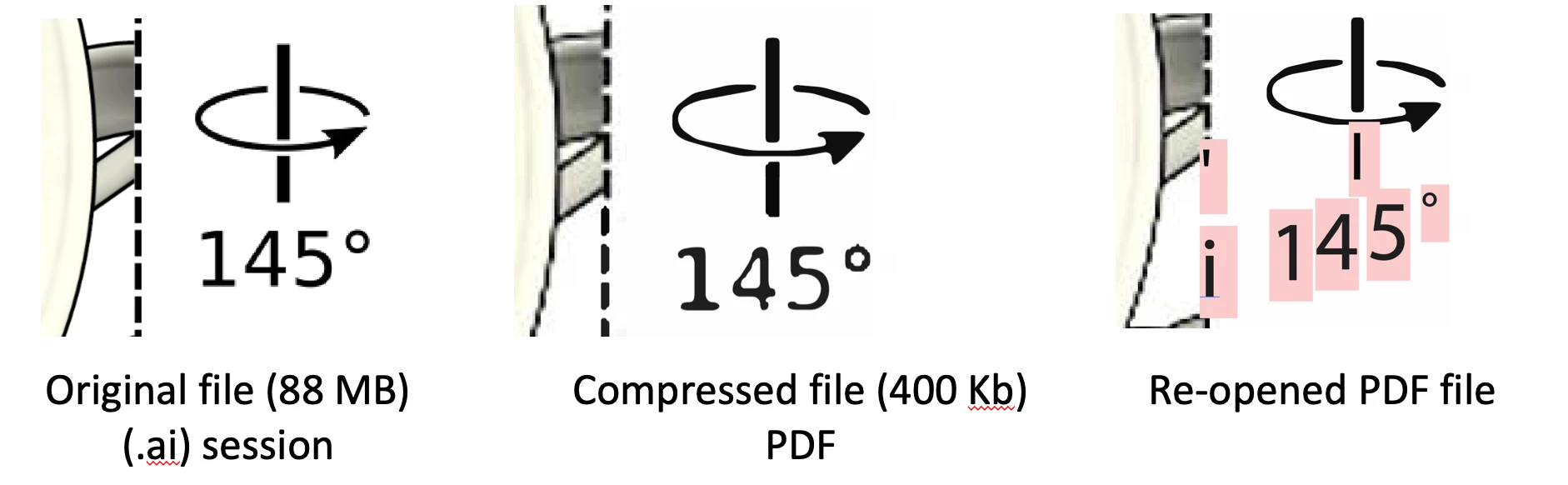
I am looking for an expert opinion who can answer two questions about a problem found when compressing files in Adobe Illustrator (see images below):

1- How during compression these artifacts are generated? I got a glimpse of this explanation in this video (https://www.youtube.com/watch?v=Kv1Hiv3ox8I), however I would like to know how these artifacts have been converted in some kind of vector graphics in the final PDF file retrieved by the program as you can see in the pictures

2- How and why are these artifacts then recognized as editable elements when re-opened the PDF file in Illustrator?

I am not interested in how to avoid this problem, that I already learned. I am just in need of an explanation of how the algorithms might have work to generate automatically these artifacts and being interpreted as editable elements. I will be glad to pay for a specialized diagnostic (from a professional) analyzing the original and corrupted files that I can provide. But any comment in this matter would be highly appreciated.

Thank you



This topic has been closed for replies.

4 replies

Legend
February 7, 2022

I can only guess at this, but given that the new elements are text, it must be that Optical Character Recognition has been applied to the file at some point in the process.

John Mensinger
Community Expert
Community Expert
February 7, 2022

When you compressed the second time in Reader, you wrote a file that was no longer Illustrator-compatible. Upon re-opening in Illustrator, the application was forced to re-interpret all the code, rather than reading the portion of Illustrator-written code it would normally read to successfully parse the file's contents. It appears as though the text got broken up, and perhaps corrupted as well, judging from the re-opened view where there are missing font highlights and dud-glyphs.


For what it's worth, the workflow you've described is not intended, so the result being unpredictable or not readily explained is not surprising. You really haven't shown us anything that would prove your sequence of operations resulted in "compression artifacts recognized as editable vector objects".

Ton Frederiks
Community Expert
Community Expert
February 6, 2022

Illustrator does not compress images and uses non destructive compression for vector elements.

What you are looking at is compression applied when creating a PDF and in your case 2 times the compression.

I think it is better to ask PDF compression questions in the Acrobat forum:

https://community.adobe.com/t5/acrobat/ct-p/ct-acrobat?page=1&sort=latest_replies&lang=all&tabid=all

Participating Frequently
February 6, 2022

Thank you for the suggestion! I just posted it now in that other forum as well. I hope someone can help.

Monika Gause
Community Expert
Community Expert
February 6, 2022

What are we looking at?

Exactly how did you create it?

Exactly how did you create the PDF?

And what did you do with the PDF between saving it and reopening it in Illustrator?

Participating Frequently
February 6, 2022

What are we looking at?

You are looking at screenshots of specific regions of the entire file where the artifacts appeared.

In the left panels how looks in the original file the .ai illustrator session, in the middle how looks the compressed PDF view in Adobe Acrobat, and in the right how looks the compressed PDF opened in Illustrator where the artifacts are recognized as editable elements.


Exactly how did you create it? Exactly how did you create the PDF?

The original Illustrator session was a composite of JPEG and PNG images togehter with texts. I created the PDF output file using the "save as"->"PDF" and then changing manually the downsampling of the "Compression" option tab. It might be worth to mention that the original file was 88 MB and I compressed to a factor of around 20, since the last PDF output was around 400 kbytes only.


And what did you do with the PDF between saving it and reopening it in Illustrator?

I used two rounds of compression on the same PDF file, first using Illustrator, and then again using Adobe Acrobat Reader DC because I needed a smaller PDF file size and Illustrator was only capable to reduce it until until 12 MB without compromissing an acceptable look. So I gave a try combining with this different program from the same Adobe company that somehow had a stronger compression option. The result was quite good in general, but when zoomed in then you see this artifacts that, if you re-open the PDF in Illustrator they are recognized as additional editable elements or objects....which they were not hand made. So how the algorythms operate to have this outcome? That is my main question.

Monika Gause
Community Expert
Community Expert
February 7, 2022

So the final compression has been done in Acrobat? There you have your explanation.