
Participant
December 7, 2024
Question

Illustrator | Record Action | Not recording Image Tracing drop down actions.

  • December 7, 2024
  • 2 replies
  • 264 views

Hello there

I am recording an action titled " Rasterize to Vector" 

The idea is to ceate a single action that converts an object with strokes and text and shapes into a single vector object:

Step 1: Create new set -> Name and Record -> Rasterize with a white bg 
Step 2: Select Image Tracing - Default
Step 3: Select Image Tracing options -> Toggle down "Advanced" arrow - Select "Ignore Color" -> i drop the white bg -> Close panel -> Select "Expand" -> End record
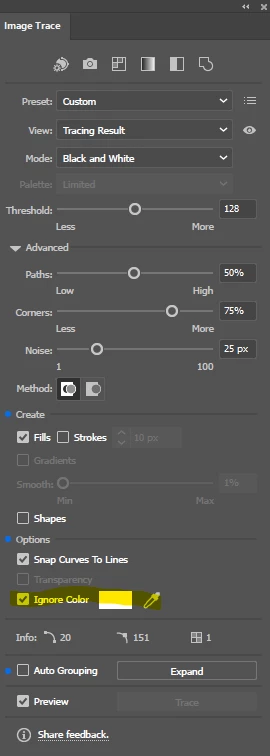
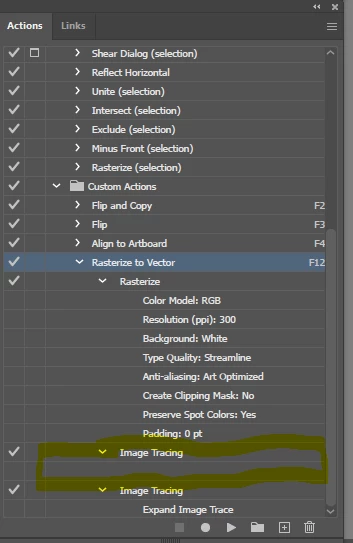
When I do this action while I record it completely removes the bg while converting the object int to a solid detailed vector. However when playing it back it gets as far as converting the rasterised image with the white bg into a vector with the white back ground still present.

- The action is not recording the Advanced drop down squence where I select Igonring Color and selecting the white bg section to be removed. 

Any solutions of this issue? 

Thanks in advance 🙂

This topic has been closed for replies.

2 replies

m1b
Community Expert
Community Expert
December 8, 2024

Hi @cayleeh70446036, I know you are working with Actions, but perhaps you can achieve what you want via scripting? I'm not sure, but here is a script with 3 examples. You will need to comment/uncomment them by adding/removing "//" at the start of the lines I've noted in the script.


If this is useful, you will want to adjust the TracingOptions configuration function as you like.

- Mark


/**
 * @file Image Tracing Examples.js
 * Example showing the various Image Tracing options
 * including functions for performing the image trace
 * and configuring the tracing options.
 *
 * @author m1b
 * @discussion https://community.adobe.com/t5/illustrator-discussions/illustrator-record-action-not-recording-image-tracing-drop-down-actions/m-p/15025291
 */
(function () {

    var doc = app.activeDocument,
        item = doc.selection[0],
        tracedItem;

    /* note: uncomment one of the below to try each example */
    
    tracedItem = imageTrace(item, '16 Colors', false); // example 1: use tracing preset
    // tracedItem = imageTrace(item, myCustomTracingOptions, false, false); // example 2: use custom tracing options
    // tracedItem = imageTrace(item, myCustomTracingOptions, true, true); // example 3: use custom tracing options, then expand and remove last traced path

    if (!tracedItem)
        return;

})();

/**
 * Configures the provided TracingOptions object.
 * Adjust this to suit your needs.
 * Comment out lines to use default values.
 * @param {TracingOptions} to - the tracing options to configure.
 */
function myCustomTracingOptions(to) {

    to.autoGrouping = false;
    to.colorFidelity = 100;
    to.colorGroup = 'All';
    to.cornerFidelity = 100;
    to.fills = true;
    to.grayLevels = 256;
    to.ignoreWhite = true;
    to.maxStrokeWeight = 10;
    to.noiseFidelity = 0;
    to.padding = 0;
    to.palette = ['NoLib', 'Document Library', 'Full Tone'][0];
    to.pathFidelity = 50;
    to.snapCurveToLines = false;
    to.strokes = false;
    to.threshold = 128;
    to.tracingColors = 30;
    to.tracingColorTypeValue = [TracingColorType.TRACINGFULLCOLOR, TracingColorType.TRACINGLIMITEDCOLOR][0];
    to.tracingMethod = [TracingMethodType.TRACINGMETHODABUTTING, TracingMethodType.TRACINGMETHODOVERLAPPING][0];
    to.tracingMode = [TracingModeType.TRACINGMODEBLACKANDWHITE, TracingModeType.TRACINGMODECOLOR, TracingModeType.TRACINGMODEGRAY][1];
    to.viewMode = [ViewType.TRACINGVIEWIMAGE, ViewType.TRACINGVIEWVECTOROUTLINES, ViewType.TRACINGVIEWVECTOROUTLINESWITHTRACING, ViewType.TRACINGVIEWVECTORTRACINGRESULT, ViewType.TRACINGVIEWVECTORWITHTRANSPARENTIMAGE][3];

};

/**
 * Performs Image Trace on given Raster Item or PlacedItem.
 * @author m1b
 * @version 2024-12-08
 * @param {PlacedItem|RasterItem} item - the item to trace.
 * @param {String|Function} preset - can be a tracing preset name, or a function that configures a TracingOptions object.
 * @param {Boolean} [expandAfterTracing] - whether to expand the tracing.
 * @param {Boolean} [removeLastTracedPath] - if `expandAfterTracing` whether to remove the last traced path.
 * @returns {PluginItem?|GroupItem?}
 */
function imageTrace(item, preset, expandAfterTracing, removeLastTracedPath) {

    if (!item.hasOwnProperty('trace'))
        return alert('imageTrace: item supplied has not trace method.');

    if (undefined == preset)
        return alert('imageTrace: no preset supplied.');

    var selected = item.selected;

    // perform Image Trace
    var tracedItem = item.trace();

    if ('String' === preset.constructor.name) {

        // find the preset
        for (var i = 0; i < app.tracingPresetsList.length; i++) {
            if (app.tracingPresetsList[i] === preset) {
                preset = app.tracingPresetsList[i];
                break;
            }
        }

        if (!preset)
            return alert('imageTrace: could not find Tracing Preset "' + preset + '".');

        // load tracing preset
        tracedItem.tracing.tracingOptions.loadFromPreset(preset);

    }

    else if ('Function' === preset.constructor.name) {

        // configure tracing options with a custom function
        preset(tracedItem.tracing.tracingOptions);

    }

    else {
        // supplied preset
        return alert('imageTrace: supplied preset was the wrong type (expected String or Function).');
    }

    if (expandAfterTracing) {

        tracedItem = tracedItem.tracing.expandTracing();

        if (
            removeLastTracedPath
            && tracedItem.pageItems.length > 1
        )
            // remove the last item, which is often a background
            tracedItem.pageItems[tracedItem.pageItems.length - 1].remove();

    }

    if (selected)
        tracedItem.selected = true;

    return tracedItem;

};
Kurt Gold
Community Expert
Community Expert
December 7, 2024

To put it mildly, Illustrator's Image Trace is imperfectly implemented to use it as part of actions. In fact, only two functions can be recorded: The Trace button and the Expand button, but none of the advanced settings.


That means you have to remove the unwanted white filled objects after expanding the Image Trace object (which is rather easy with an action).


Sometimes using Illustrator's Image Trace in Adobe Bridge may be another option, but some users have already reported that this is too cumbersome.