Participant
August 11, 2025
Answered

Illustrator red Ai square

  • August 11, 2025
  • 2 replies
  • 399 views

Hi everyone!

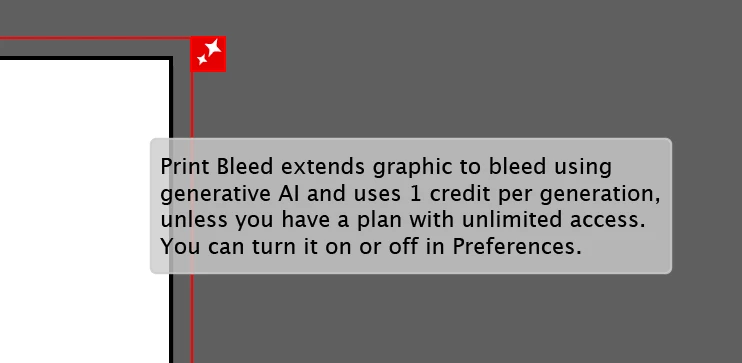
Could someone please tell me what this is and how I can turn off this annoying red square? I guess it's some kind of AI tool or AI tip that's ruining my scrolling and navigation in my Illustrator file.


Correct answer Ton Frederiks

You can turn the generative print bleed option off in Preferences.

2 replies

Abhishek Rao
Community Manager
Community Manager
August 11, 2025

Hi @iwc_9441,


The expert is correct. You can disable it by going to Edit > Preferences > General and unchecking the option for Show print bleed generative AI button on bleed.


Give that a try and let me know if the red square is gone.

Abhishek 

Participant
February 3, 2026

I have it disabled, but still see the red box (minus the AI tag). I need this gone.

Anubhav M
Community Manager
Community Manager
February 3, 2026

Hello ​@marci_4474 


I’m sorry to hear you’re having similar trouble with Illustrator. Would you mind trying to reset Illustrator's preferences as described in this article (https://helpx.adobe.com/illustrator/kb/troubleshoot-preference-issues.html) and then turning off the option to see if it helps?


Disclaimer: Please note that renaming preferences folders will remove all the custom settings, and Illustrator will launch with default settings. You can also save a backup of the folders in case you want to. The location is mentioned above.
 

Looking forward to hearing from you.
Anubhav

Ton Frederiks
Community Expert
Ton FrederiksCommunity ExpertCorrect answer
Community Expert
August 11, 2025

You can turn the generative print bleed option off in Preferences.