


Inspiring
Nov 26, 2024 11:11 AM UTC
Answered

Illustrator replaceing times new roman with weird font?

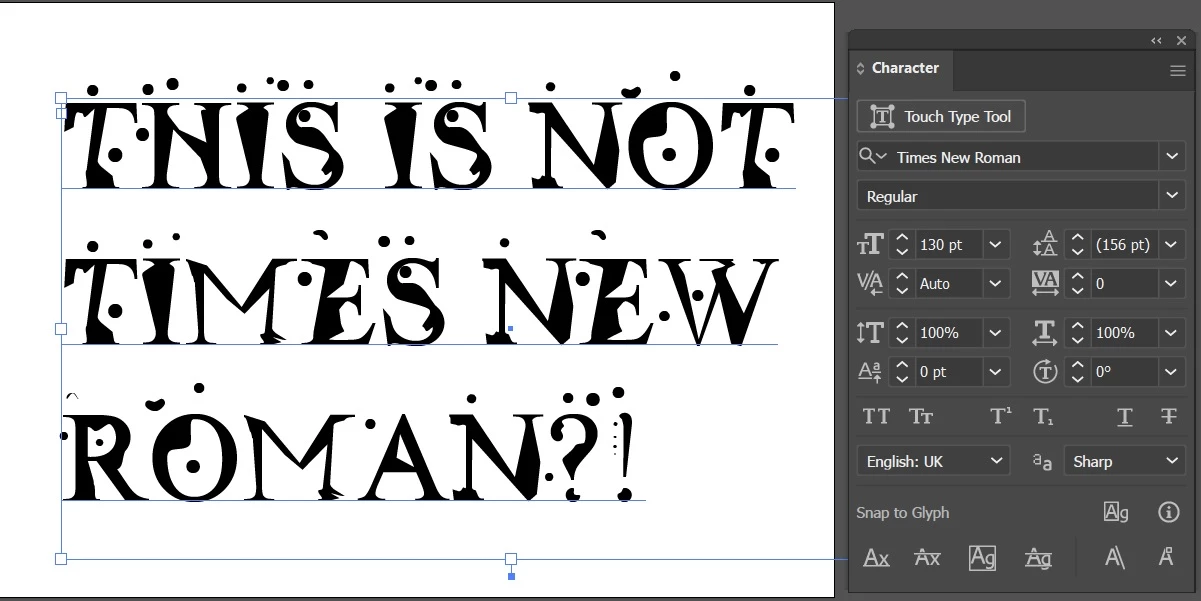
I don't know if anyone has ever encountered this, but my Illustrator refuses to use the Times New Roman font. It wont even show in the font list. I can find it if I choose the bold version and then switch to the regular version. But it keeps showing the  font  show below somehow.
I've tried deleting the IllustratorFnt.lst file, replacing the font itself (several times from several sources). But it refuses to acknowledge the fact the font exists and it's driving me crazy because I litteraly can't use one of the most widely used fonts on the planet and unfortunately I have several clients that use this font.


smeckdesignsCorrect answer
Inspiring
Nov 26, 2024 11:55 AM UTC

After some digging, testing and wrecking things I accidentally found out the standard Windows font "Radioactive" causes this issues (oh the irony). 
Deleting this font from the windows font folder resolves the issue for all Adobe apps.
I hope this will also narrow this down for the product team to resolve this issue without having to resort to removing fonts.

7 replies

Participating Frequently
Jan 2, 2025 9:28 PM UTC

I might have a similar issue. Recently I am constantly encountering a bug where any text typed in switched to Times despite the font styles that the textbox has been set in. What can I do about this? If this persists, I don't know how I could continue to use the program.  So many bugs...

Translate
Monika Gause
Community Expert
Community Expert
Jan 2, 2025 10:12 PM UTC

Turn off Missing glyph protection in the preferences > type

Translate
Srishti_Bali
Legend
Nov 26, 2024 11:32 AM UTC

Hi @smeckdesigns 


I’m sorry to hear about your experience. Our product team is aware of this issue and is actively investigating it. Please stay tuned for updates on UserVoice: https://adobe.ly/40Xoikv.

In the meantime, you can try reverting to Illustrator 29.0.1 and let us know your observations.


If you have any further questions or need assistance, feel free to reach out. We’re here to help!


Regards,

Srishti

Translate
smeckdesignsAuthorCorrect answer
Inspiring
Nov 26, 2024 11:55 AM UTC

After some digging, testing and wrecking things I accidentally found out the standard Windows font "Radioactive" causes this issues (oh the irony). 
Deleting this font from the windows font folder resolves the issue for all Adobe apps.
I hope this will also narrow this down for the product team to resolve this issue without having to resort to removing fonts.

Translate
AlanGilbertson
Community Expert
Community Expert
Nov 26, 2024 5:08 PM UTC

For clarity, "Radioactive" is not a standard Windows font (whatever that is). It's a badly constructed free font obtainable from sites like fontriver.com. It's not untypical that malformed free fonts create problems, especially with InDesign or Illustrator.

Translate