
Known Participant
August 25, 2023
Question

Illustrator :: Script :: How to find Dimensions Value for Linked Images

  • August 25, 2023
  • 3 replies
  • 791 views
Hi All,
 
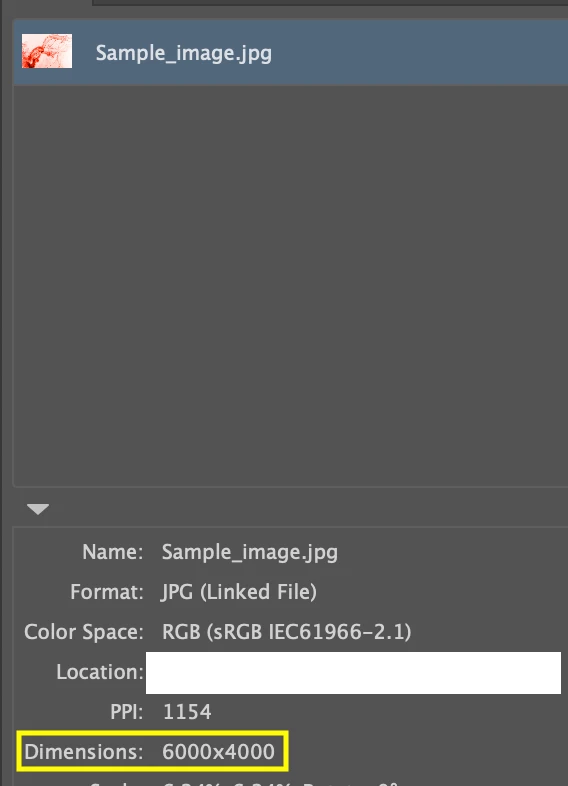
I am relatively new to this. I'm creating a script to get the Dimensions value for linked images in an illustrator file.
 
Please can any one help me to find this.
 
Thanks in advance!
 
Reference screenshot:
 

This topic has been closed for replies.

3 replies

Known Participant
August 28, 2023

Please can any one help me to find this.

CarlosCanto
Community Expert
Community Expert
August 28, 2023

I posted the same answer in your previous post. I'm just posting it here as well for posterity


try this, it is essentially m1b script, I just returned dimensions (that the previous script already calculated) instead of ppi

/**
 * Displays the Dimensions of the selected item.
 * @author m1b
 * @discussion https://community.adobe.com/t5/illustrator-discussions/illustrator-script-how-to-find-linked-images-ppi-value/m-p/14034494
 */
(function () {

    var doc = app.activeDocument,
        item = doc.selection[0],
        ppi = getPPI(item);

    if (ppi)
        alert(ppi);

})();

/**
 * Returns resolution (ppi) of item.
 * Note: see known limitation in getLinkScaleAndRotation.
 * @Param {RasterItem|PlacedItem} item
 * @Returns {Array<Number>} [X-ppi, Y-ppi]
 */
function getPPI(item) {

    if (!(
        item.constructor.name == 'RasterItem'
        || item.constructor.name == 'PlacedItem'
    ))
        return;

    // get current scale and rotation
    var sr = getLinkScaleAndRotation(item),
        rotation = sr[2];

    // duplicate and "unrotate"
    var workingImage = item.duplicate();
    var tm = app.getRotationMatrix(-rotation);
    workingImage.transform(tm, true, true, true, true, true);

    // calculate ppi
    var ppi = [Math.abs(round(72 / app.selection[0].matrix.mValueA, 0)), Math.abs(round(-72 / app.selection[0].matrix.mValueD, 0))];

    var dims = [Math.abs(round(app.selection[0].width / sr[0]*100)), Math.abs(round(app.selection[0].height / sr[1]*100))];
    // clean up
    workingImage.remove();

    //return ppi;
    return dims;
};

/**
 * Return the scale, rotation and size of
 * a PlacedItem or RasterItem.
 * IMPORTANT: this relies on Illustrator's
 * 'BBAccumRotation' tag to determine rotation.
 * Files converted to Illustrator format from
 * other sources may not have this and will
 * show 0 rotation, and the ppi will be
 * incorrectly calculated.
 * @author m1b
 * @version 2023-03-09
 * @Param {PlacedItem|RasterItem} item - an Illustrator item.
 * @Param {Boolean} round - whether to round numbers to nearest integer.
 * @Returns {Array} [scaleX%, scaleY%, rotation°, width, height]
 */
function getLinkScaleAndRotation(item, round) {

    if (item == undefined)
        return;

    var m = item.matrix,
        rotatedAmount,
        unrotatedMatrix,
        scaledAmount;

    var flipPlacedItem = (item.typename == 'PlacedItem') ? 1 : -1;
/*
    try {
        rotatedAmount = item.tags.getByName('BBAccumRotation').value * 180 / Math.PI;
    } catch (error) {
        rotatedAmount = 0;
    }
*/
rotatedAmount = 0;
    unrotatedMatrix = app.concatenateRotationMatrix(m, rotatedAmount * flipPlacedItem);

    if (
        unrotatedMatrix.mValueA == 0
        && unrotatedMatrix.mValueB !== 0
        && unrotatedMatrix.mValueC !== 0
        && unrotatedMatrix.mValueD == 0
    )
        scaledAmount = [unrotatedMatrix.mValueB * 100, unrotatedMatrix.mValueC * -100 * flipPlacedItem];
    else
        scaledAmount = [unrotatedMatrix.mValueA * 100, unrotatedMatrix.mValueD * -100 * flipPlacedItem];

    if (scaledAmount[0] == 0 || scaledAmount[1] == 0)
        return;

    if (round)
        return [round(scaledAmount[0]), round(scaledAmount[1]), round(rotatedAmount)];
    else
        return [scaledAmount[0], scaledAmount[1], rotatedAmount];

};

/**
 * Rounds `n` to `places` decimal places.
 * @Param {Number} n - the number to round
 * @Param {Number} places - number of decimal places, can be negative
 * @Returns {Number}
 */
function round(n, places) {
    var m = Math.pow(10, places != undefined ? places : 3);
    return Math.round(n * m) / m;
};


CarlosCanto
Community Expert
Community Expert
August 25, 2023
CarlosCanto
Community Expert
Community Expert
August 25, 2023

oh sorry about my previous post, you're asking about dimmensions this time, your previous post was about ppi

Known Participant
August 28, 2023

Okay, how to get the Dimensions value for linked images in an illustrator file?

Known Participant
August 25, 2023

Please can any one help me to find this.