
January 31, 2018
Question

Illustrator Script to Remove Sublayers By Name Automatically

  • January 31, 2018
  • 5 replies
  • 4216 views

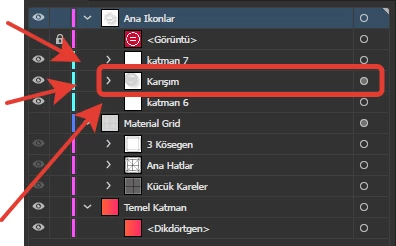
I've over 2000 file and all these files have named "Karışım" sublayers under main layer which named "Ana Ikonlar" and I've to remove all sublayers. İf I remove one by one, it takes over 2 days but I need to make it automatically with  scripts.

Anybody know how to remove them automatically with scripts?

I tried lots of scripting but none of them remove sublayers.
This topic has been closed for replies.

5 replies

Participant
November 15, 2022

I'm trying to use a script for illustrator 2023 to delete a layer named "o" for individual documents.

What could I use for that?

femkeblanco
Legend
November 15, 2022

You can change the name of the layer you want to delete in line 1.

var targetName = "o";
recurse(app.activeDocument.layers);
function recurse(_layers) {
    for (var i = _layers.length - 1; i > -1 ; i--) {
        if (_layers[i].name == targetName) {
            _layers[i].remove();
            continue;
        }
        recurse(_layers[i].layers);
    }
}
BRODZELi
Participating Frequently
January 17, 2021


// Deletes all layers whose name begins with "Karışım" in all open documents

var layersDeleted = 0;
for (var i = 0; i < app.documents.length; i++) {
  var targetDocument = app.documents[i];
  var layerCount = targetDocument.layers.length;

  // Loop through layers from the back, to preserve index
  // of remaining layers when we remove one
  for (var ii = layerCount - 1; ii >= 0; ii--) {
    var targetLayer = targetDocument.layers[ii];
    var layerName = new String(targetLayer.name);
    if (layerName.indexOf("Karışım") == 0) {
      targetDocument.layers[ii].remove();
      layersDeleted++;
    }
  }
}


Lumenn
Inspiring
July 31, 2019

You have to change layers to pageItems, so iterate through pageItems, and if it has correct name add it to selection.

robinfredericf
Participating Frequently
January 31, 2018

Hi, you can try this — but with caution — on a folder containing only the files that you need to modify (designed for files with extension ai)

#target "Illustrator";

var myFolder = Folder.selectDialog("Select folder");

var myFiles = myFolder.getFiles ("*.ai");

for (i=0; i<myFiles.length; i++) {

    var myDoc = app.open(myFiles);

    try {

        myDoc.layers.getByName("Ana Ikonlar").layers.getByName("Karışım").remove();

        myDoc.close(SaveOptions.SAVECHANGES);

    } catch (e) {

        //alert (e);

        myDoc.close(SaveOptions.DONOTSAVECHANGES);

    }

}

Loic.Aigon
Legend
January 31, 2018

hi robinfredericf

Lets'merge the best of our respective scripts:

#target "Illustrator"; 

var main = function() {

var myFolder = Folder.selectDialog("Select folder"),

myFiles, i = 0, n = 0, nDoc, layers, layerName = "yolo";;

if( !myFolder ) return;

myFiles = myFolder.getFiles ("*.ai");

n = myFiles.length;

if( !n) {

alert("No files found, sorry" );

return;

}


for (i=0; i<n; i++) { 

nDoc = app.open(myFiles); 

layers = nDoc.layers;

n = layers.length;

while ( n-- ) removeLayer ( layers, layerName );

nDoc.close ( SaveOptions.SAVECHANGES );

}

}

function removeLayer ( layer, layerName ) {

var subLayers = layer.layers, n = subLayers.length;

if ( layer.name == layerName ) {

layer.remove();

return;

}

while ( n-- ) removeLayer ( subLayers, layerName );

}

main();

robinfredericf
Participating Frequently
January 31, 2018

I was trying to edit my 1st answer to say more precisely

Hi, you can try this — but with caution — on a folder containing only the files that you need to modify, to remove only the unwanted "Karışım" sublayer from all these files (assuming that the files are in *ai format and can be simply saved in the current used Illustrator version without changing any option)

if this is actually the only task Mr. Ulas wants to achieve, but it is useful to try to write a more versatile script instead of a customized for unique use.

Loic.Aigon
Legend
January 31, 2018

var main = function() {

var doc, layers, n = 0, layerName = "yolo";

if ( !app.documents.length ) {

alert("This scripts needs an open document !");

return;

}

doc  = app.activeDocument;

layers = doc.layers;

n = layers.length;

while ( n-- ) removeLayer ( layers, layerName );

}

function removeLayer ( layer, layerName ) {

var subLayers = layer.layers, n = subLayers.length;

if ( layer.name == layerName ) {

layer.remove();

return;

}

while ( n-- ) removeLayer ( subLayers, layerName );

}

main();

Known Participant
July 31, 2019

I'm trying to use this script to remove any pageItems called "yolo", but as it is, this script will only delete a sub group/folder called that, how can I make it remove or just select actual individual page items (elipses) with the name "yolo"?

Thanks!