Community Expert
June 15, 2025
Answered

Illustrator scripting - dialog box with scrollable checkbox list

  • June 15, 2025
  • 1 reply
  • 339 views

I wonder if it is possible to make a list of checkboxes scrollable within a dialog box...

using a listbox is not an issue at all but working with checkboxes almost drives me crazy...

maybe it has to be nested somehow?

pls check out the following script:

var objects = [];
for (var i = 1; i <= 50; i++) {
    objects.push("Object " + i);
}

var dialog = new Window("dialog", "Choose from objects");
    dialog.preferredSize = [300, 200];

var scrollPanel = dialog.add("panel", undefined, "Select Objects");
    scrollPanel.preferredSize = [280, 130];
    scrollPanel.orientation = "column";

var checkboxGroup = scrollPanel.add("group");
    checkboxGroup.orientation = "column";
    checkboxGroup.alignment = "left";

var selectAllCheckbox = checkboxGroup.add("checkbox", undefined, "Select all");
    selectAllCheckbox.value = false;

var checkboxes = [];
for (var i = 0; i < objects.length; i++) {
    checkboxes.push(checkboxGroup.add("checkbox", undefined, objects[i]));
}

selectAllCheckbox.onClick = function() {
    var selectAll = selectAllCheckbox.value;
    for (var i = 0; i < checkboxes.length; i++) {
        checkboxes[i].value = selectAll;
    }
    updateSelectAllCheckboxState();
};

function updateSelectAllCheckboxState() {
    var allSelected = true;
    for (var i = 0; i < checkboxes.length; i++) {
        if (!checkboxes[i].value) {
            allSelected = false;
            break;
        }
    }
    selectAllCheckbox.value = allSelected;
}

function onCheckboxChange() {
    updateSelectAllCheckboxState();
}

for (var i = 0; i < checkboxes.length; i++) {
    checkboxes[i].onClick = onCheckboxChange;
}

dialog.add("button", undefined, "OK", {name: "ok"});
dialog.add("button", undefined, "Cancel", {name: "cancel"});

var result = dialog.show();

if (result == 1) {
    var selectedObjects = [];
    for (var i = 0; i < checkboxes.length; i++) {
        if (checkboxes[i].value) {
            selectedObjects.push(objects[i]);
        }
    }
    alert("Selected Objects: " + selectedObjects.join(", "));
} else {
    alert("Canceled");
}

thanks in advance 

Nils

Correct answer m1b

Hi @Nils M. Barner I'm sure someone must have addressed this issue before, but I couldn't find it.


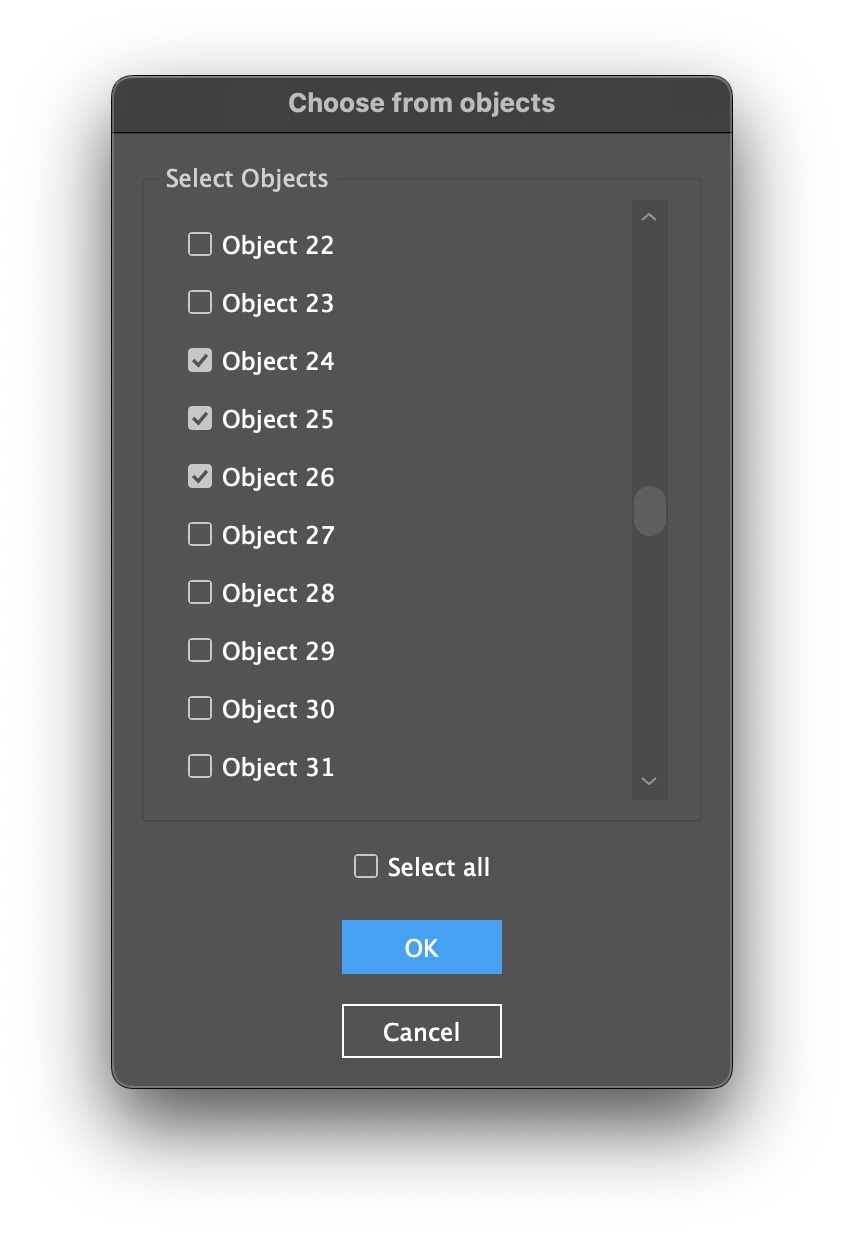
Anyway I've made an attempt and written a constructor I call a "ScollingCheckBoxPanel" which is a scriptUI panel that shows a set number of checkboxes, with a scroll bar. Bugs aside, this should be able to be reused in other projects—just give it different checkboxTitles and values arrays.


So there are two script files: the main script and ScrollingCheckBoxPanel.js constructor script. Keep them in the same folder because the main script `includes` the constructor file. (Or you can move it somewhere else if you change the path in the main script.)


Main script:

/**
 * Demonstration of "ScrollingCheckBoxPanel" experiment.
 * @author m1b
 * @version 2025-06-16
 * @discussion https://community.adobe.com/t5/illustrator-discussions/illustrator-scripting-dialog-box-with-scrollable-checkbox-list/m-p/15371451
 */
//@include 'ScrollingCheckBoxPanel.js'
(function () {

    // how many checkboxes to see at once
    // this will dictate the height of the dialog
    const CHECKBOX_COUNT = 10;

    var showUI = true;

    // some mock objects and their values
    var objects = [];
    var values = [];
    for (var i = 0; i < 50; i++) {
        objects[i] = "Object " + (i + 1);
        values[i] = false;
    }

    // putting the UI in a separate function is nice, because it allows
    // use to run the script with no UI.
    if (showUI) {

        var result = ui(objects, values, CHECKBOX_COUNT);

        if (result === 2)
            // user cancelled
            return;

    }

    // here is the main script, after user has used UI

    var selectedObjects = [];

    for (var i = 0; i < objects.length; i++) {

        if (values[i])
            selectedObjects.push(objects[i]);

    }

    alert("Selected Objects: " + selectedObjects.join(", "));

})();

/**
 * UI to select from a list of checkboxes.
 * Requires ScollingCheckBoxGroup.js
 * @param {Array<String>} objects - the checkbox titles.
 * @param {Array<Boolean>} values - the initial checkbox values.
 * @param {Number} checkboxCount - the number of checkboxes to display.
 * @returns {1|2} - SUI dialog result code where 2 means user cancelled.
 */
function ui(objects, values, checkboxCount) {

    var dialog = new Window("dialog", "Choose from objects");

    // create an instance of a "scrolling checkbox group"
    var scrollingCheckboxes = new ScrollingCheckboxPanel(dialog, objects, values, checkboxCount || 10);

    // this checkbox will set all the checkboxes to match its value
    var selectAllCheckbox = dialog.add("checkbox", undefined, "Select all");
    selectAllCheckbox.value = false;
    selectAllCheckbox.onClick = function () { scrollingCheckboxes.setAllValues(this.value) };

    dialog.add("button", undefined, "OK", { name: "ok" });
    dialog.add("button", undefined, "Cancel", { name: "cancel" });

    dialog.center();

    return dialog.show();

};


This is the ScrollingCheckBoxPanel constructor. It must be named "ScrollingCheckBoxPanel.js" and be saved in the same folder as the main script (unless you change the path and filename).

/**
 * @file ScrollingCheckBoxPanel.js
 *
 * Experimental scrollable ScriptUI panel showing a collection of checkboxes.
 * - Tested only on MacOS Illustrator 29.5.1 and Indesign 20.4.
 *
 * @author m1b
 * @version 2025-06-16
 */

/**
 * A ScriptUI panel containing a pseudo-scrollable list of checkboxes.
 * Note: `texts` and `values` must be arrays of the same length.
 * @constructor
 * @author m1b
 * @version 2025-06-16
 * @param {Window|Group|Panel} container - a ScriptUI container.
 * @param {Array<String>} checkboxTitles - the names for the checkboxes.
 * @param {Array<Boolean>} values - the values for the checkboxes.
 * @param {Number} checkboxCount - the number of checkboxes displayed (default: 10)
 */
function ScrollingCheckboxPanel(container, checkboxTitles, values, checkboxCount) {

    var self = this;

    self.checkboxCount = Math.min.apply(null, [checkboxTitles.length, values.length, checkboxCount || 10]);

    self.checkboxTitles = checkboxTitles;
    self.values = values;

    // first and last indices
    self.start = 0;
    self.end = checkboxCount;

    var scrollPanel = container.add('panel {orientation:"row", text:"Select Objects", alignment:["fill","fill"] }');
    scrollPanel.preferredSize = [280, 130];
    scrollPanel.maximumSize.height = 500;

    var checkboxGroup = scrollPanel.add('group {orientation:"column", alignment:["fill","fill"], alignChildren:["left","top"], margins:[5,15,5,5] }');

    self.scrollbar = scrollPanel.add('scrollbar {alignment:["right","fill"], preferredSize:[18,-1]}');
    self.scrollbar.minvalue = 0;
    self.scrollbar.maxvalue = values.length - self.checkboxCount;
    self.scrollbar.controller = self;
    self.scrollbar.onChange = scroll;
    self.scrollbar.onChanging = scroll;

    self.update = updateCheckBoxes;

    self.checkboxes = [];
    for (var i = 0; i < self.checkboxCount; i++) {
        self.checkboxes[i] = checkboxGroup.add('checkbox {alignment:["fill","center"]}');
        self.checkboxes[i].text = checkboxTitles[i];
        self.checkboxes[i].controller = self;
        self.checkboxes[i].index = i;
        self.checkboxes[i].onClick = function () {
            self.values[self.start + this.index] = this.value;
        };
    }

    function scroll() {
        self.start = Math.floor(this.value);
        self.end = self.start + self.checkboxCount - 1;
        self.update();
    };

    function updateCheckBoxes() {
        for (var i = 0, j = self.start; i < self.checkboxCount; i++, j++) {
            self.checkboxes[i].text = self.checkboxTitles[j];
            self.checkboxes[i].value = self.values[j];
        }
    };

};

/**
 * Set every checkbox value to `value`.
 * @author m1b
 * @version 2025-06-16
 * @param {Boolean} value - the value to set.
 */
ScrollingCheckboxPanel.prototype.setAllValues = function setAllValues(value) {

    for (var i = 0; i < this.values.length; i++)
        this.values[i] = value;

    this.update();

};


Maybe that is useful?

- Mark
 

1 reply

m1b
Community Expert
m1bCommunity ExpertCorrect answer
Community Expert
June 16, 2025

Hi @Nils M. Barner I'm sure someone must have addressed this issue before, but I couldn't find it.


Anyway I've made an attempt and written a constructor I call a "ScollingCheckBoxPanel" which is a scriptUI panel that shows a set number of checkboxes, with a scroll bar. Bugs aside, this should be able to be reused in other projects—just give it different checkboxTitles and values arrays.


So there are two script files: the main script and ScrollingCheckBoxPanel.js constructor script. Keep them in the same folder because the main script `includes` the constructor file. (Or you can move it somewhere else if you change the path in the main script.)


Main script:

/**
 * Demonstration of "ScrollingCheckBoxPanel" experiment.
 * @author m1b
 * @version 2025-06-16
 * @discussion https://community.adobe.com/t5/illustrator-discussions/illustrator-scripting-dialog-box-with-scrollable-checkbox-list/m-p/15371451
 */
//@include 'ScrollingCheckBoxPanel.js'
(function () {

    // how many checkboxes to see at once
    // this will dictate the height of the dialog
    const CHECKBOX_COUNT = 10;

    var showUI = true;

    // some mock objects and their values
    var objects = [];
    var values = [];
    for (var i = 0; i < 50; i++) {
        objects[i] = "Object " + (i + 1);
        values[i] = false;
    }

    // putting the UI in a separate function is nice, because it allows
    // use to run the script with no UI.
    if (showUI) {

        var result = ui(objects, values, CHECKBOX_COUNT);

        if (result === 2)
            // user cancelled
            return;

    }

    // here is the main script, after user has used UI

    var selectedObjects = [];

    for (var i = 0; i < objects.length; i++) {

        if (values[i])
            selectedObjects.push(objects[i]);

    }

    alert("Selected Objects: " + selectedObjects.join(", "));

})();

/**
 * UI to select from a list of checkboxes.
 * Requires ScollingCheckBoxGroup.js
 * @param {Array<String>} objects - the checkbox titles.
 * @param {Array<Boolean>} values - the initial checkbox values.
 * @param {Number} checkboxCount - the number of checkboxes to display.
 * @returns {1|2} - SUI dialog result code where 2 means user cancelled.
 */
function ui(objects, values, checkboxCount) {

    var dialog = new Window("dialog", "Choose from objects");

    // create an instance of a "scrolling checkbox group"
    var scrollingCheckboxes = new ScrollingCheckboxPanel(dialog, objects, values, checkboxCount || 10);

    // this checkbox will set all the checkboxes to match its value
    var selectAllCheckbox = dialog.add("checkbox", undefined, "Select all");
    selectAllCheckbox.value = false;
    selectAllCheckbox.onClick = function () { scrollingCheckboxes.setAllValues(this.value) };

    dialog.add("button", undefined, "OK", { name: "ok" });
    dialog.add("button", undefined, "Cancel", { name: "cancel" });

    dialog.center();

    return dialog.show();

};


This is the ScrollingCheckBoxPanel constructor. It must be named "ScrollingCheckBoxPanel.js" and be saved in the same folder as the main script (unless you change the path and filename).

/**
 * @file ScrollingCheckBoxPanel.js
 *
 * Experimental scrollable ScriptUI panel showing a collection of checkboxes.
 * - Tested only on MacOS Illustrator 29.5.1 and Indesign 20.4.
 *
 * @author m1b
 * @version 2025-06-16
 */

/**
 * A ScriptUI panel containing a pseudo-scrollable list of checkboxes.
 * Note: `texts` and `values` must be arrays of the same length.
 * @constructor
 * @author m1b
 * @version 2025-06-16
 * @param {Window|Group|Panel} container - a ScriptUI container.
 * @param {Array<String>} checkboxTitles - the names for the checkboxes.
 * @param {Array<Boolean>} values - the values for the checkboxes.
 * @param {Number} checkboxCount - the number of checkboxes displayed (default: 10)
 */
function ScrollingCheckboxPanel(container, checkboxTitles, values, checkboxCount) {

    var self = this;

    self.checkboxCount = Math.min.apply(null, [checkboxTitles.length, values.length, checkboxCount || 10]);

    self.checkboxTitles = checkboxTitles;
    self.values = values;

    // first and last indices
    self.start = 0;
    self.end = checkboxCount;

    var scrollPanel = container.add('panel {orientation:"row", text:"Select Objects", alignment:["fill","fill"] }');
    scrollPanel.preferredSize = [280, 130];
    scrollPanel.maximumSize.height = 500;

    var checkboxGroup = scrollPanel.add('group {orientation:"column", alignment:["fill","fill"], alignChildren:["left","top"], margins:[5,15,5,5] }');

    self.scrollbar = scrollPanel.add('scrollbar {alignment:["right","fill"], preferredSize:[18,-1]}');
    self.scrollbar.minvalue = 0;
    self.scrollbar.maxvalue = values.length - self.checkboxCount;
    self.scrollbar.controller = self;
    self.scrollbar.onChange = scroll;
    self.scrollbar.onChanging = scroll;

    self.update = updateCheckBoxes;

    self.checkboxes = [];
    for (var i = 0; i < self.checkboxCount; i++) {
        self.checkboxes[i] = checkboxGroup.add('checkbox {alignment:["fill","center"]}');
        self.checkboxes[i].text = checkboxTitles[i];
        self.checkboxes[i].controller = self;
        self.checkboxes[i].index = i;
        self.checkboxes[i].onClick = function () {
            self.values[self.start + this.index] = this.value;
        };
    }

    function scroll() {
        self.start = Math.floor(this.value);
        self.end = self.start + self.checkboxCount - 1;
        self.update();
    };

    function updateCheckBoxes() {
        for (var i = 0, j = self.start; i < self.checkboxCount; i++, j++) {
            self.checkboxes[i].text = self.checkboxTitles[j];
            self.checkboxes[i].value = self.values[j];
        }
    };

};

/**
 * Set every checkbox value to `value`.
 * @author m1b
 * @version 2025-06-16
 * @param {Boolean} value - the value to set.
 */
ScrollingCheckboxPanel.prototype.setAllValues = function setAllValues(value) {

    for (var i = 0; i < this.values.length; i++)
        this.values[i] = value;

    this.update();

};


Maybe that is useful?

- Mark

 

Community Expert
June 28, 2025

Hi Mark,

sorry for the late response.

This is freaking awesome! What a smart idea! Thank you so much for helping me out!

I would have expected a short comand line for such a feature... but as always: If there is no such feature you got to create the whole microcosmos around 😉

In this case I would never have succeded without you!!


m1b
Community Expert
Community Expert
June 28, 2025

Nice! Glad it was helpful. 🙂


