
Participant
October 14, 2018
Answered

Illustrator Shape Builder Tool Settings

  • October 14, 2018
  • 1 reply
  • 4106 views

Hi All,

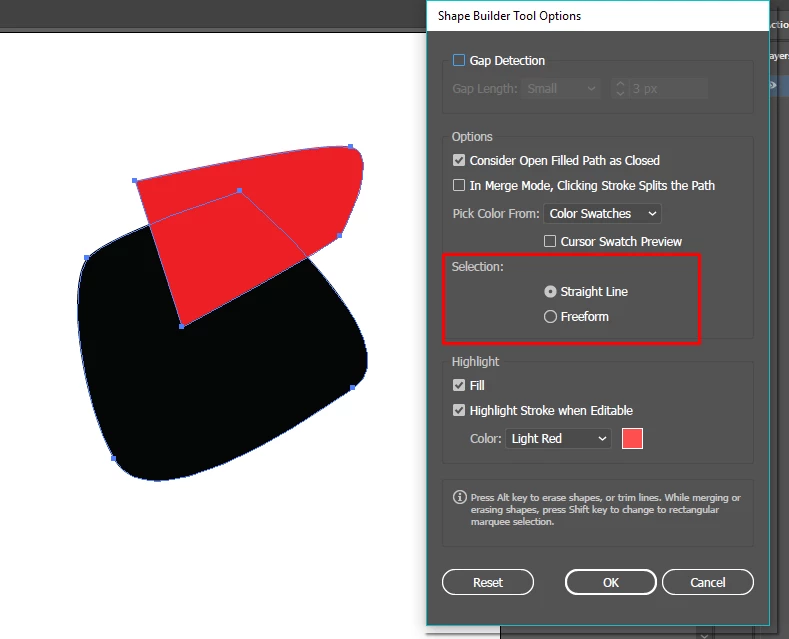
When I first installed and used Illustrator CS6, I was able to use the shape builder to select any areas/shapes, similar to the lasso tool. However, I may have accidentally changed some setting and now the shape builder tool only works in straight lines when cutting across shapes.

If anyone knows what setting I may have accidentally changed or how I may get shape builder to behave like it would normally do, your advise would be much appreciated.

Thank you for your help with this.

Kind Regards.
    This topic has been closed for replies.
    Correct answer Muqqarib Hassan

    Hi, These options are only avail in updated versions. So If you did use it earlier in your Cs6 then I suggest you reset your Illustrator Preferences to default through this you will get your default setting that you used. Thanks.

    To restore preferences quickly using a keyboard shortcut. Press and hold Alt+Control+Shift (Windows) or Option+Command+Shift (macOS) as you start Illustrator. You are prompted to delete the current settings. The new preferences files are created the next time you start Illustrator

    1 reply

    tromboniator
    Community Expert
    Community Expert
    October 14, 2018

    I do not have CS6, but if it is similar to Illustrator CC 2018 then double-clicking on the icon in the Tools panel will open Shape Builder Tool Options. There you should find the choice for Selection of either Straight Line or Freeform. Reset to your liking.

    Peter

    AdobeTCAuthor
    Participant
    October 14, 2018

    Hi Peter,

    Thank you for replying to my question.

    When I double click the shape builder tool, the options I get are as in the screen shot below.

    I cannot see an option for Selection of either Straight Line or Freeform.

    Please let me know if I am looking at the wrong area for the selection.

    Kind Regards.

    Monika Gause
    Community Expert
    Community Expert
    October 14, 2018

    You are looking for an option that doesn't exist in CS6.

    It was introduced later, so you will have to update.