


Participant
October 14, 2026
Question

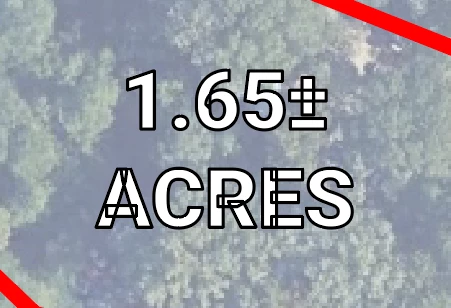
Illustrator started showing lines within text when I apply strokes

Illustrator started showing lines within text when I apply strokes. I thought the file was bad, but it happens even in a new file. I exported it as a JPEG to see if it's only in the program, but it still shows up in the image. Any ideas or suggestions on how to fix it? Let me know if you have any questions.

Thank you!
 

4 replies

Monika Gause
Community Expert
Community Expert
October 14, 2026

That is typical for some variable fonts. You probably do not want to outline the text just for this. Apply Pathfinder unite as an effect or move the stroke below the fill in the Appearance panel.

Translate
Community Expert
October 15, 2026

Lately the situation with fonts whose glyphs have overlapping paths has become more complicated. I’ve seen a growing number of regular “static” fonts whose glyphs have overlapping paths. Roboto (as used in the image heather_2941 posted) is one example. The static versions and variable versions both have overlaps. A bunch of other fonts at the Google Fonts web site have the same traits. I’m at the point now where I check any type objects for overlaps.

Another funny thing is some variable don’t have any overlaps in their glyphs. The Myriad Variable Concept font in Illustrator is one example. Some variable fonts may have a few tiny overlaps that are hard to spot (Heading Now Variable is like this). Then there are other variable fonts loaded with overlaps. Roboto Serif one example. I love the Helvetica Now variable fonts, but the glyphs have lots of overlaps.

If letters have to be cut, engraved or routed into or through some kind of material there is no choice but to convert the letters to outlines and use Pathfinder Unite to remove the overlaps. The tool or blade will cut wherever a path is present.

Translate
Monika Gause
Community Expert
Community Expert
October 15, 2026

It depends on the app people use to make fonts AND on the preparation before actually exporting the font. It makes a lot of sense when drawing shapes to draw them like that for editability and probably for using the font editor’s functionality for making the different weights of the font. But then also you have to get rid of all that before exporting.

Translate
Tina_Irvine
Community Expert
Community Expert
October 14, 2026

​@heather_2941,

It looks like your text is made up of different shapes. Try using Pathfinder to merge (“unite”) each letter together. For shapes with holes in them, you’ll likely need to also use the “exclude” option to knock out the holes.

Translate