
Participant
June 10, 2021
Answered

Illustrator starts flashing on and off on screen?

  • June 10, 2021
  • 18 replies
  • 23660 views

I have noticed this flashing occurring on the last 2 updates of Illustrator (Currently 25.3), and it usually stops if I quit one of my more memory intensive programs like Photoshop, InDesign or Excel, I have 40 GB of additiopnal ram installed. Are the updated Illustrator much more memory intensive or is this some kind of bug? Please help.
This topic has been closed for replies.
Correct answer IngmarSpit

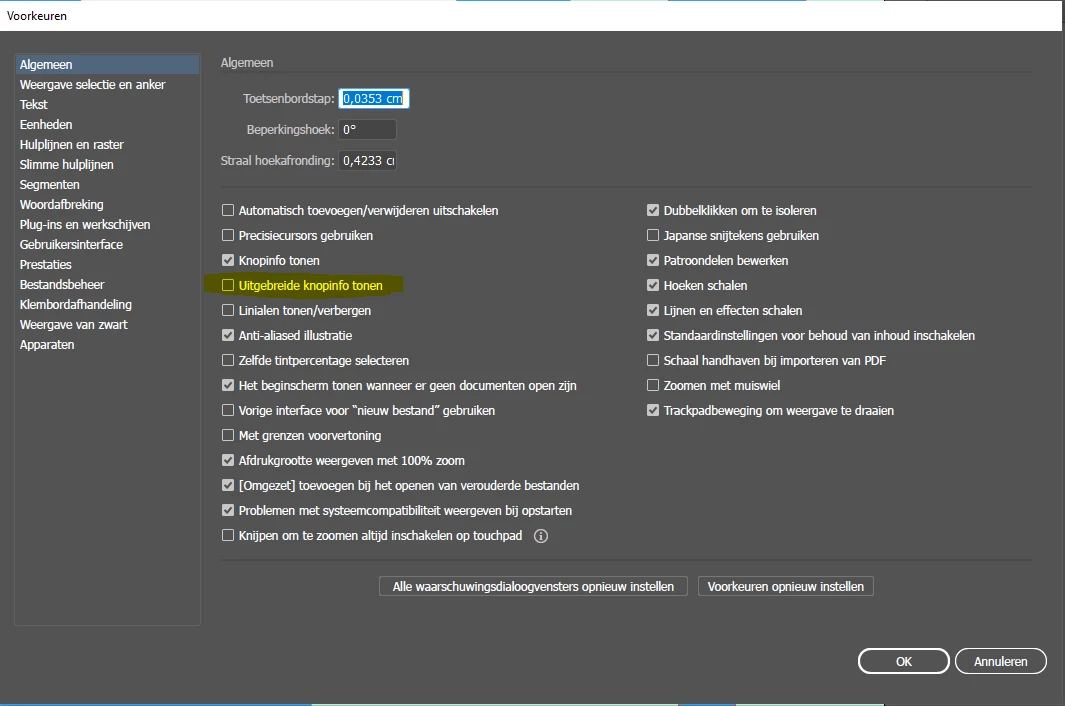
Ive attached a screenshot, but it is in Dutch, sorry. Apparanlty I have to completely reinstall my apps to switch to the english international UI. Bizarre.


18 replies

Participant
June 23, 2021

The new Adobe Illustrator v. 25.3.1 has a badly flickering white background on a Mac M1.

That did not occur in v. 24.

I had to switch back to beta.

The beta version 25.4 does not flicker, so there is nothing wrong with the computer itself.


Participant
June 23, 2021

I just reopened AI 25.3.1 with that file, and the screen flicker is gone.


I had several big files open at the time.

The M1 chip does a very sophisticated video memory management.

So my guess is that it was the fault of the chip, in a vicious cycle.

Inspiring
June 16, 2021

Illustrator, since the update, when waking from sleep, or even just display sleep - has started to resize the main app window to about 2/3 height of the screen and then when transforming objects (any movement or rotation etc) the pasteboard flickers. The pasteboard also changes shade when shifting bewteen tools - again only after waking from sleep.


It is a brand new Mac Mini, and only affects Illustrator WITHIN the window - i.e. only the pasteboard - no menus or tools etc flicker.


Anyone else experiencing similar?

Inspiring
June 16, 2021

Edit: I have noticed similar window resize issue and image flickering in PS too (not pasteboard)

Ashutosh_Mishra
Inspiring
June 14, 2021

Hi All,


We're sorry to hear about your experience. Would it be possible for you to share the details below:

1. Version of OS & Illustrator.

2. Do you see this behavior while performing a specific task?

3. Does disabling GPU Performance under Preferences > Performance help?

4. Please share system information available under Help > System Info & A small video of this workflow.(you can upload it on Creative Cloud & share the link with us).


This information would help us assist you accordingly. Looking forward to your response.


Regards,

Ashutosh


Inspiring
June 14, 2021

I know what it is now. If I open an illustrator file via Bridge I get the pink screen flash. Otherwise, notsomuch. Happens when either dragging a file from Bridge to the Illustrator icon in the dock or double clicking in Bridge.


Mac mini M1. Ai 25.3. MacOS 11.4.


Inspiring
June 17, 2021

I also get the flash of pink screen when I drag a file from the app Pixave to illustrator.

Inspiring
June 11, 2021

Yes, I get this—on an M1 Mac mini) and have not just for 25.3 but for many of the betas and prereleases. Only soultion is to quit it and reboot the app. It only seems for me to happen when the screen saver has gone off and I've come back to work again in Ai.


But I'm also getting a flash of full screen pink colorfield upon opening any file. This only happens with 25.3 release version.

FontandAuthor
Participant
June 11, 2021

Thanks, Yes I have. It only does it intermitantly, so I will wait and see.

Also just noticed InDesign do it too while Illustrator is open.

Monika Gause
Community Expert
Community Expert
June 11, 2021

There is an issue for some users with flashing, when multiple applications (between Illustrator, photoshop, InDesign) are open. Does the flashing also happen when you have only one of them open?

sishamIAGD
Community Expert
Community Expert
June 11, 2021

I have also had this issue since the latest update, especially like you say when all Illustrator/Photoshop/InDesign are open together. It also carries on if I close all down and have one application open. It is very intermittent so hard to pin point what the issue is. Pretty frustrating.


I am due to upgrade my system soon (much better spec) so I will report back if this happens when I have finished building my new machine.


Running Windows btw.

FontandAuthor
Participant
June 11, 2021

macOS Big Sur version 11.4

It only seems to happen with Illustrator. It is not the page of graphics flashing, its the tool bar, tabs and side windows (Colours, swatches, layers, artboards properties, etc) that are flashing on and off.

Mike_Gondek10189183
Community Expert
Community Expert
June 11, 2021

Did you try using CPU mode as I suggested.??? You can also disable byunchecking here. 


mohamed.alkhalifa
Participant
August 21, 2021

Thank you very much! it worked for me and finally got rid of the flicker

Mike_Gondek10189183
Community Expert
Community Expert
June 11, 2021

What exact OS version are you on???

Sounds like a GPU preview issue.


Try View >> Using CPU

Participating Frequently
August 19, 2021

FINALLY this totally fixed the issue for me.  Thank you!

Participating Frequently
August 19, 2021

Update: also seems to be an issue with Photoshop being open simultaneously.  The problem came back when I switched to Photoshop and disappeared when I closed it.

Participating Frequently
June 10, 2021

OK... instead of fixing this it is now worse than ever as it's started happening with Acrobat now (as well as Photoshop).


1) Open Illustrator (the only app open) - all OK!

2) Working in Illustrator and open a PDF in Acrobat.

3) Click back into Illustrator but leave Acrobat open in the background - flickering cursor

4) Hide Acrobat - cursor stops flickering (quitting fixes it too but currently just hiding Acrobat works)

5) Working in Illustrator and open a file in Photoshop.

6) Click back into Illustrator but leave Photoshop open in the background - flickering cursor (can be intermittent however with Photoshop)

7) Hide Photoshop - sometimes fixes the bug but not always. Quitting Photoshop always fixes it.


Here's my hardware spec (all brand new with clean first time software installs): 

Mac Pro (2019)

3.3 GHz 12-Core Intel Xeon W

160 GB 2933 MHz DDR4

AMD Radeon Pro 580X 8 GB


Hopefully someone from Adobe will look into this seriously as I'm now convinced it's an Adobe issue since Acrobat has started causing the bug. It's happening when there's an open Acrobat or Photoshop window behind Illustrator and it honestly makes it impossible to be able to do any work in Illustrator. Adobe can easily replicate the issue by mirroring my kit (standard off-the-shelf stuff) and installing the three programs. I've tried all the supposed fixes and none work other than the hidind/closing hacks.

Participating Frequently
June 10, 2021

An update... Adobe please note.... when Acrobat is open behind Illustrator the cursor flickers between the active Illustrator tool icon and the active Acrobat tool icon.


i.e. I'm using Acrobat and have the hand tool selected - moving the page around etc. Then I click into Illustrator thus bringing it to the front (with the previous Actobat window behind it), and I select, for example, the black pointer tool. The cursor then flickers between the Acrobat hand tool and the Illustrator black pointer tool.

Participating Frequently
June 20, 2021

problem still occurs here too, truly mindblowing its impossible to have two adobe apps open at the same time without causing epilepsy, someone is going to sue them soon