
Participant
July 25, 2018
Answered

Illustrator Startup "Operation cannot complete" Error

  • July 25, 2018
  • 2 replies
  • 1349 views

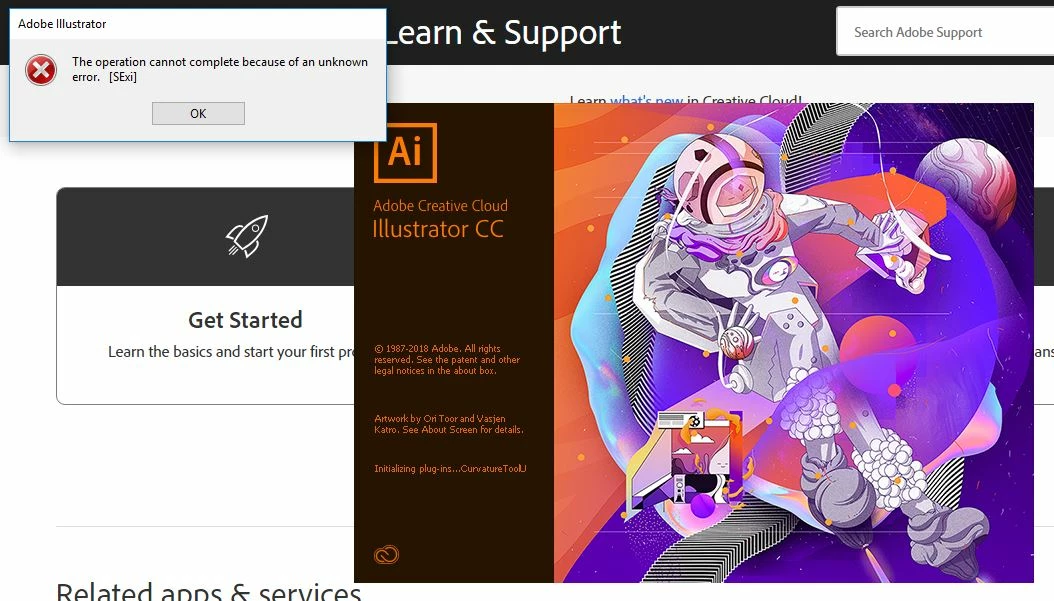
I'm getting the error seen below when I launch Illustrator for probably somewhere around 20 or so of the plug-ins.  Once I click through all of the errors the program will open, and I haven't noticed any loss of function but I'm pretty sure I've only opened it up to save .ai files in other formats.  Any ideas about why this happening or how to correct it would be appreciated.
    This topic has been closed for replies.
    Correct answer Bill Silbert

    I found this thread that offers a way to fix this Illustrator won't run Error [SExi] .

    2 replies

    Participant
    July 31, 2018

    I'm working local.

    Bill Silbert
    Community Expert
    Bill SilbertCommunity ExpertCorrect answer
    Community Expert
    July 31, 2018

    I found this thread that offers a way to fix this Illustrator won't run Error [SExi] .

    Known Participant
    March 30, 2019

    Just tried the solutions suggested by Adobe Staff in Bill's link, as well as deleting my OOBE folder, deleting any other Illustrator prefs I could find, and finally flat-out wiping Adobe CC from my machine and then reinstalling.

    After several hours, I still have that SExi error dialog come up when I start Illustrator. Doesn't stop the app from running, but I'd kinda like to understand how to make that dialog go away. Oh, and I get to redo my prefs. Thanks Adobe!

    Windows 10 Home, v10.0.17763, Illustrator CC v2015.3.1

    Edit - Because Why Not, I took travisryan's advice in this thread​. I still had Illustrator installed at the moment (this would be after the second reinstall), so I figured why not, three's the charm, so I uninstalled it via the CC app, then blew away the two folders that remained inside C:\Program Files\Adobe\Adobe Illustrator CC 2015.3\Plug-ins. Dragged them to the trash, emptied the trash. Reinstalled Illustrator CC via the CC app. Opened it via the CC app (as opposed to double-clicking on the Illustrator app inside Windows Explorer). And.... it worked. No SExi dialog.

    Closed Illustrator, reopened it the same way. Still worked. No dialog.

    Opened Illustrator via double-clicking in Windows Explorer, while the CC App was still open. Still worked. No dialog.

    Opened Illustrator via double-clicking in Windows Explorer while the CC App was closed. Still worked. No dialog.

    (You'll note the inanity of doing all these things over and over again, just on the off chance that something might change. Yes, it is. But if I hadn't been open to trying Inane Things I've Already Tried, then I would have just given up after trying two full reinstalls of Illustrator. So now we perpetuate the idea that even though things don't work in Illustrator (including Adobe's own advice and their CC Cleaner App), then one just has to keep trying Black Magic because sometimes it works. That's some really good software there, Adobe.)

    JonathanArias
    Legend
    July 26, 2018

    I am getting the same error, I was blaming it on google stream. are You working local or from a shared drive?