Inspiring
August 19, 2020
Answered

Illustrator Stroke Bug from GPU Performance

  • August 19, 2020
  • 1 reply
  • 416 views

Hello! I've just discovered a strange problem with my Illustrator (v.24.2.3). 

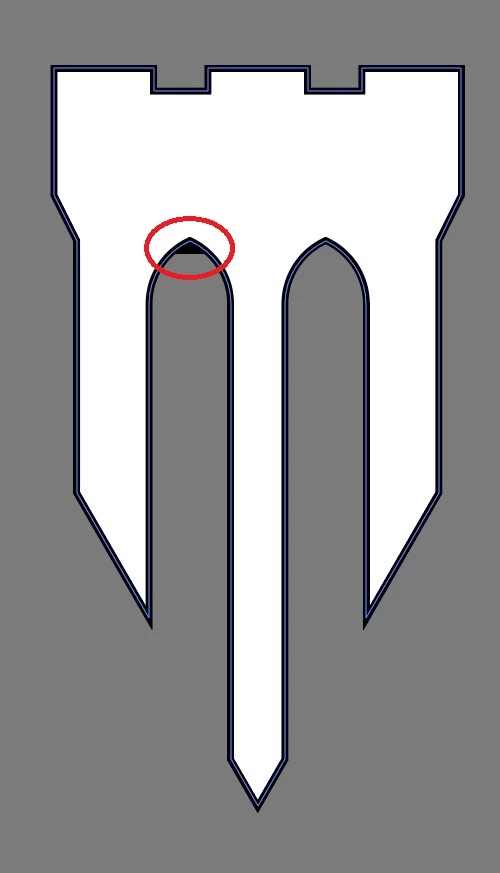
I have this graphic shape that's a closed path. As you can see in the marked area, there's this weird thing going on at the corner of the left arch. It disappears only if I disable GPU Performance. If I move it onto an artboard, it disappears again but then comes back if I move the graphic around on the artboard.


I thought at first that it's a badly joined shape but it isn't, since it's affected by turning off the GPU Performance. I have a fast machine (i7-8700, 16 GB RAM, NVIDIA GeForce GTX 1070 8GB, Windows 10 64-bit, v2004).

I tried to attach the file here but the Forum doesn't allow AI files. Does anyone know what's going on here? Thanks in advance.


This topic has been closed for replies.
Correct answer Monika Gause

You can report it to Uservoice: Please post bugs & feature requests to http://illustrator.uservoice.com

You can check if there's a new driver available for your video card

Or just check CPU preview when you're unsure.

1 reply

Monika Gause
Community Expert
Community Expert
August 19, 2020

GPU is fast, but it sacrifices precision for that.

Illustrator makes use of the graphic processor engine. So what yousee might not be the same as what I see, since I might have a different graphic card.

Inspiring
August 20, 2020

Thank you for your reply. I had GPU Performance enabled on my old version of AI but never had a problem like this. Apparently it's from this version. What would the ideal solution be in this case? 

Monika Gause
Community Expert
Monika GauseCommunity ExpertCorrect answer
Community Expert
August 20, 2020

You can report it to Uservoice: Please post bugs & feature requests to http://illustrator.uservoice.com

You can check if there's a new driver available for your video card

Or just check CPU preview when you're unsure.