


Participating Frequently
November 12, 2018
Answered

Illustrator SVG Import Problem - Please Help

  • November 12, 2018
  • 3 replies
  • 13141 views

Hello,

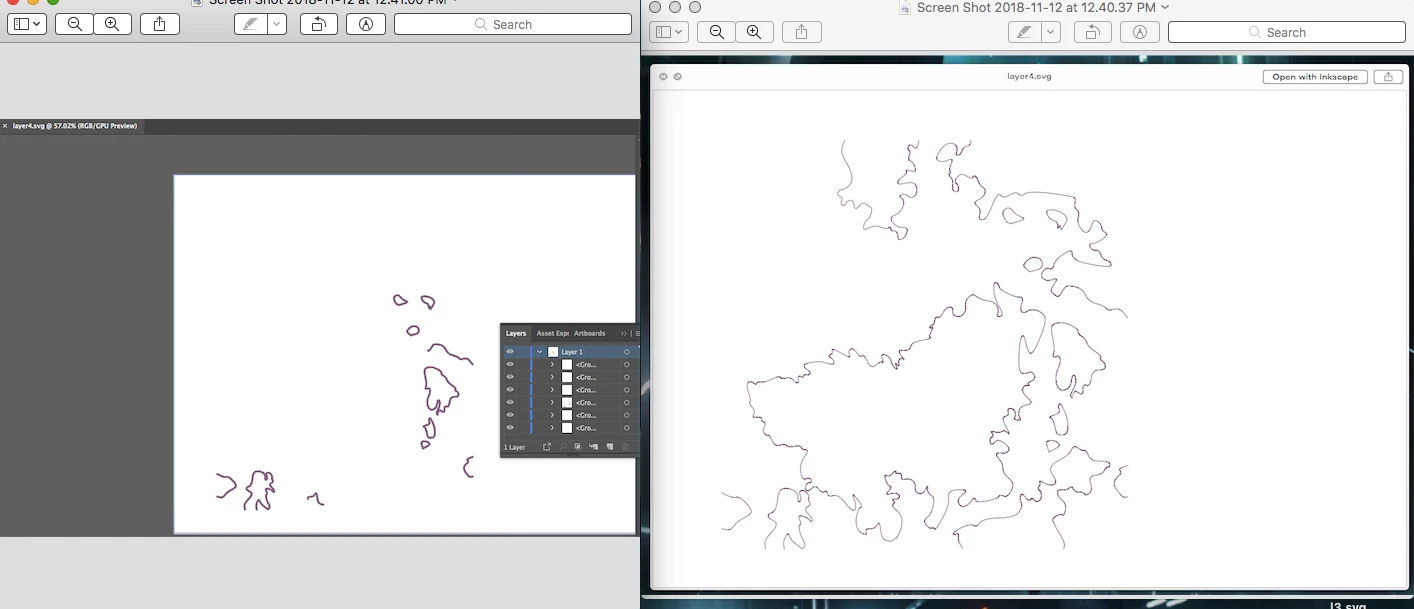
I have been having this problem with Illustrator recently where SVG files can be imported into Illustrator, however once inside on the canvas they are .. incomplete? (Photos Attached). I have tried all ways of importing them that I know to see if that had anything to so with it (Opening .svg in illustrator then moving to target canvas, using 'Place' function) and I see no change. I know that the actual files are not incomplete, as Preview, Chrome, Safari, and Inkscape can open them fully. This has happened before and after the new update, and I have tried on a different Mac with an older version of Illustrator. Please help.

Thanks

(Left = SVG in Illustrator, Right = SVG in Preview)
This topic has been closed for replies.
Correct answer Monika Gause

Outline Mode is not selected in Document Setup, and there are no paths where the missing ones should be. I've attached the .svg to this reply so that you don't have to deal with vicariously solving this, if that helps any.

layer4.svg - Google Drive


That thing has roughly 50 billion anchor points. Even Inkscape had difficulties selecting stuff in it.

Optimize the file and then try again.

3 replies

sorenw64146368
Known Participant
May 30, 2019

Also, drag n drop does not work. Instead Illustrator opens the file in a new tab...

Monika Gause
Community Expert
Community Expert
May 30, 2019

You can't place SVG files via Drag and drop.

Use File > Place

John Mensinger
Community Expert
Community Expert
November 13, 2018

For what my editorializing may be worth, I suspect we'll soon be saying the same thing about Illustrator and SVG that is repeatedly posted here about non-Illustrator PDF: "Illustrator is not a general-purpose SVG editor." It's a rather similar scenario; SVG's come from a variety of sources, with almost any kind of content, and a varied array of possible format-specific properties. So like PDF, although Illustrator can open them, when they are not of Illustrator origin, there can be no guarantee of fidelity.

Monika Gause
Community Expert
Community Expert
November 12, 2018

In Preview you could export them as a PDF. I would try that route. If it doesn't work, open them in Inkscape and export from there as a PDF.

NaperoneAuthor
Participating Frequently
November 12, 2018

Thanks for the reply. While exporting to a PDF then importing does work in displaying the whole file, the paths are no longer editable vectors, which was the goal for this project. Also, I have now tried to import to Inkscape (reads well), export as SVG, then import into Illustrator, but still no cigar.

Monika Gause
Community Expert
Community Expert
November 12, 2018

What do you mean "They are no longer editable vectors"?
