



astee
Participant
June 22, 2026
Question

Illustrator text baseline staircase characters step down

  • June 22, 2026
  • 2 replies
  • 23 views

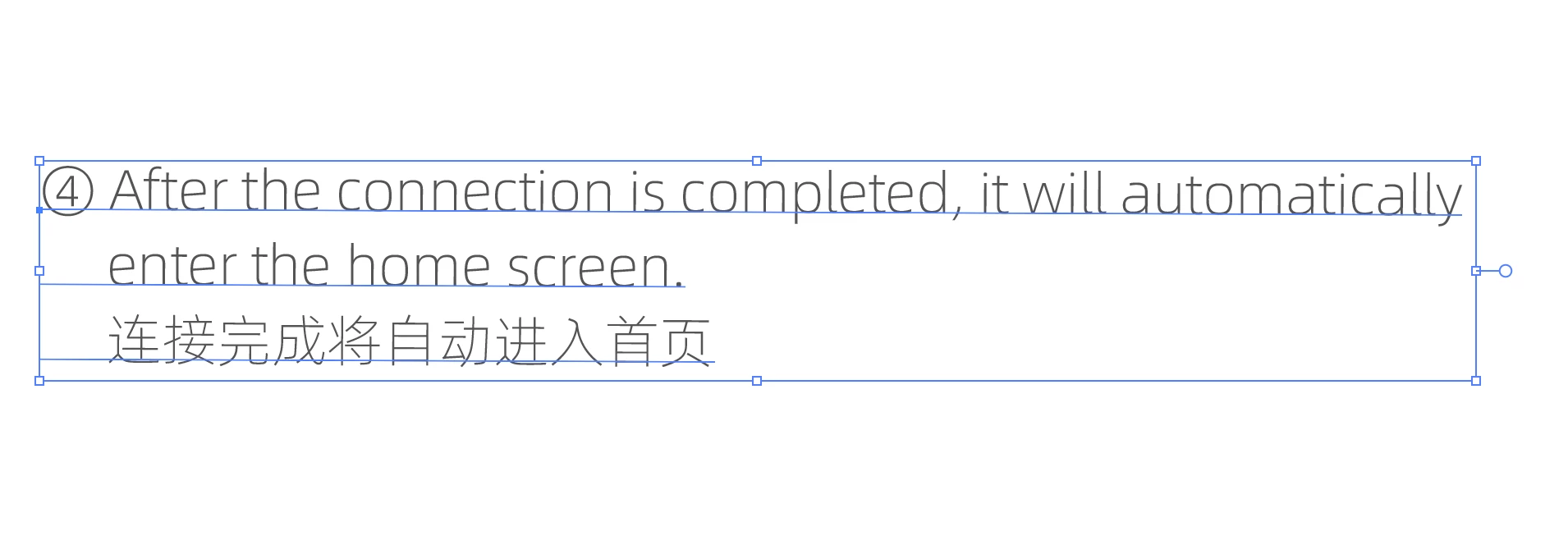
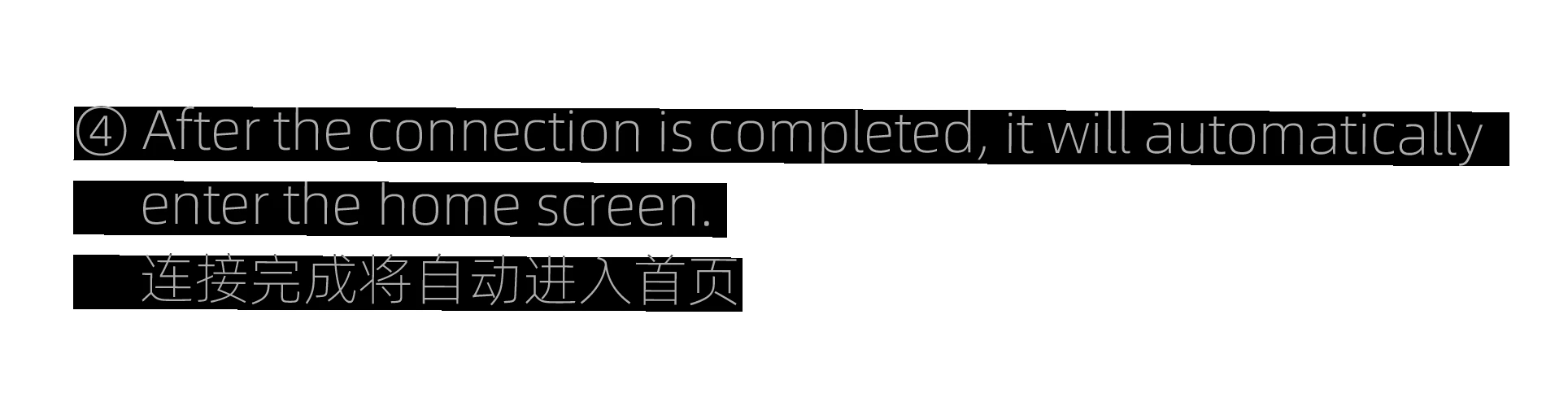
In a single horizontal line, characters don't sit on one baseline, every ~5–6 characters the baseline drops a bit, like a staircase. Not rotation, not shear, constrain angle is 0, persists in CPU preview. Only happens with .ai files created in Chinese Illustrator.

Illustrator 2026. If I create a new text box in the document everything is fine. But when I try to edit the text its slated in this weird way.
 

    2 replies

    Abhishek Rao
    Community Manager
    Community Manager
    June 22, 2026

    Hi ​@astee,


    Thank you for reaching out, and sorry to hear you're experiencing this issue. Thanks as well for confirming that the object rotation, Constrain Angle, and canvas rotation are all set to 0°.

    To help us investigate further, could you please share the exact Illustrator 2026 version and build number you're using (Help > About Illustrator), along with your operating system and version?

    If possible, please also share the affected AI file or a sample file that reproduces the issue. You can package the file via File > Package and upload it using a public file-sharing service such as Google Drive, Dropbox, WeTransfer, etc. Feel free to share the link here or send it via direct message if the file contains confidential information.

    Additionally, we'd like to understand whether the staircase effect persists when the affected text is copied into a brand-new text frame. Could you also let us know which font is being used and whether Type > Find Font reports any missing or substituted fonts?

    It would also be helpful if you could check whether any non-zero Baseline Shift values are applied in the Character panel. As another test, please save the document as a PDF and let us know whether the staircase effect is visible in the exported PDF or only while editing the text in Illustrator.

    Finally, does this behavior occur with all text objects in the file, or only with specific text objects?


    We look forward to your update.
    Abhishek

    astee
    asteeAuthor
    Participant
    June 22, 2026

    Hi ​@Abhishek Rao,

    Thank you for your response. 

    Illustrator version is 30.5.1. I’m on MacOS Tahoe 26.5.1 (25F80)

    The file is a product manual/guide. It’s originally bilingual (english/chinese). I’m preparing a translation to polish language, while also making some layout adjustments.

    I always get that sloping text when I recieve the file from the manufacturer from China.
    When i import the file into Illustrator i usually need to replace some fonts.

    But now as I look at the original pdf file, before my import, I can see the font was already sloped there… I don’t know if its the issue on the graphic designer program on their side, or is it some way my computer is interpreting mandarin-first fonts?


    I usually just make a new text field and it works. But long term I’d prefer a solution where i can know what setting/parameter is causing this sloping and just change it on all text.

    sample here, changed the font to Helvetica so it works everywhere, sloping still there:


    Download sample here
     

    Monika Gause
    Community Expert
    Community Expert
    June 22, 2026

    Is your text box in 0°? You can check in the transform panel.

    And you could check if the angle in Preferences > General is 0


    Is your canvas perhaps rotated?

    astee
    asteeAuthor
    Participant
    June 22, 2026

    Hi,

    No rotation in transform, Constrain angle in preferences is set to 0.
    Canvas is not rotated. (set to 0)