
Participant
Mar 14, 2019 2:54 PM UTC
Answered

Illustrator Thumbnail Preview Not Showing Images
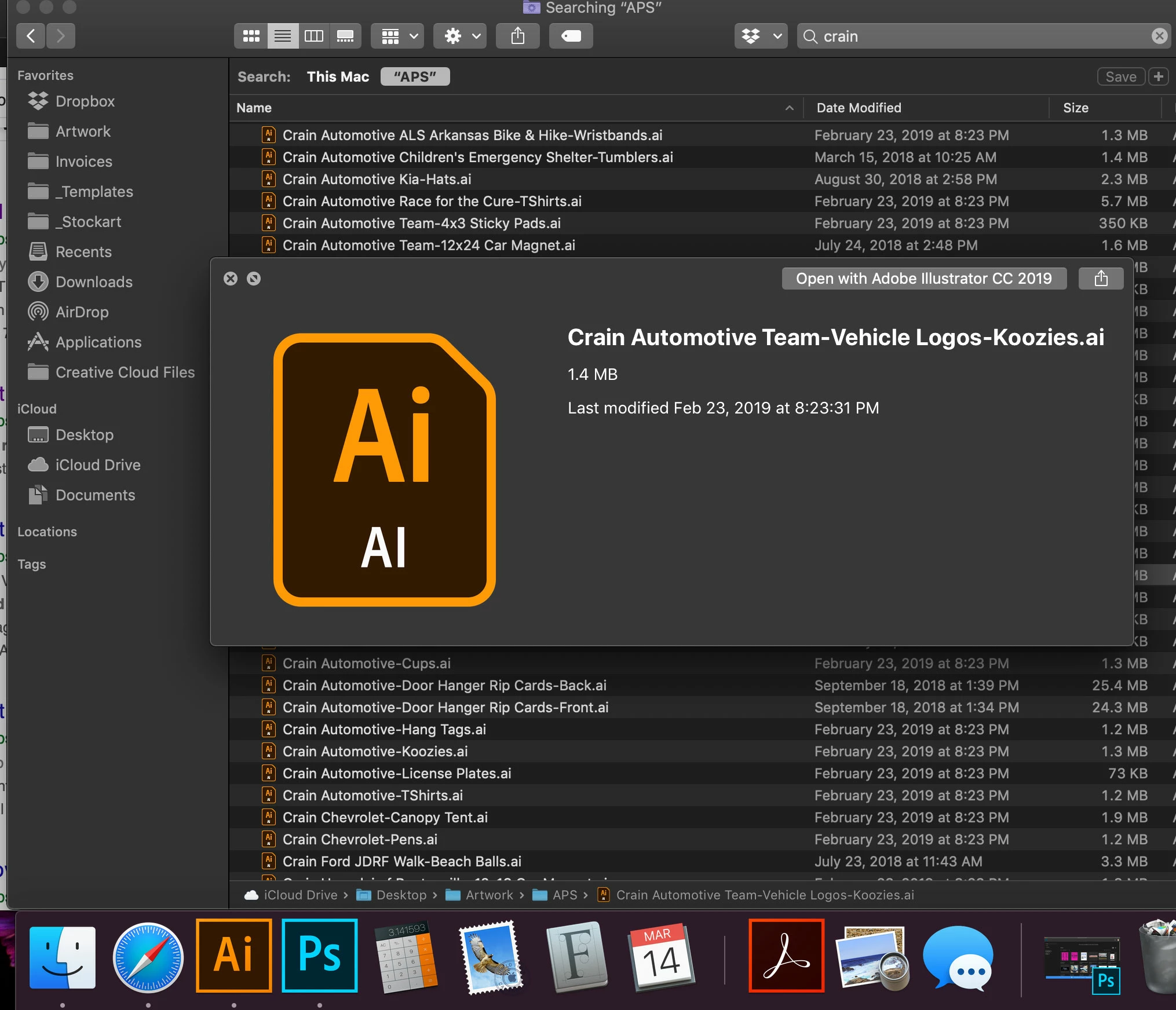
I REALLY need someone's help. I bought a new MacBook pro a couple of weeks ago and have had nothing but issues with my Illustrator since. I was running the 2019 version when I switched laptops but have had to downgrade back down to the 2018 version because the 2019 version was so laggy. I'm still having lag issues but it's not as bad. But now I have a new problem. If I search files, whether its in Illustrator or just a finder folder, I used to be able to highlight a file and hit the space bar to see a preview of my artwork, so I could then scroll through the files and open the one I want. Now, I can't see anything other than the Ai logo box. HOW DO I FIX THIS? This is literally costing me so much time as I often need to refer to other jobs for a logo or text.


Any suggestions would be much appreciated. [email removed]

This topic is closed to new replies. Start a new post to keep the conversation going.
rhondak37849348
rhondak37849348Correct answer
Inspiring
Feb 6, 2023 1:17 AM UTC

No icon preview for eps-files in Ventura (and Monterey): Here's what to do.


  1. Copy the "Illustrator.qlgenerator" from “Macintosh HD/System/Library/QuickLook" to your desktop or any other folder you have read/write access to.
  2. Open "Illustrator.qlgenerator" by right clicking it and select "Show package contents".
  3. Open "Info.plist" in the "Contents" folder with a text editor.
  4. Find the line "<string>com.adobe.illustrator.ai-image</string>" 
  5. Insert "<string>com.adobe.encapsulated-postscript</string>" below it with the same indentation and save the "Info.plist" file.
  6. Drag the "Illustrator.qlgenerator" into "Macintosh HD/Library/QuickLook" folder. Don't freak out if the folder is empty.


NOTE: Pay attention to the above words in Bold. I kept trying to paste the copy back into “Macintosh HD/System/Library/QuickLook" and of course, you can't do that.


If you did everything right, you should now have .EPS previews back again. That's a workaround until apple fixes it in the System/Library, hopefully soon.

https://discussions.apple.com/thread/254424837

55 replies

rhondak37849348
rhondak37849348Correct answer
Inspiring
Feb 6, 2023 1:17 AM UTC

No icon preview for eps-files in Ventura (and Monterey): Here's what to do.


  1. Copy the "Illustrator.qlgenerator" from “Macintosh HD/System/Library/QuickLook" to your desktop or any other folder you have read/write access to.
  2. Open "Illustrator.qlgenerator" by right clicking it and select "Show package contents".
  3. Open "Info.plist" in the "Contents" folder with a text editor.
  4. Find the line "<string>com.adobe.illustrator.ai-image</string>" 
  5. Insert "<string>com.adobe.encapsulated-postscript</string>" below it with the same indentation and save the "Info.plist" file.
  6. Drag the "Illustrator.qlgenerator" into "Macintosh HD/Library/QuickLook" folder. Don't freak out if the folder is empty.


NOTE: Pay attention to the above words in Bold. I kept trying to paste the copy back into “Macintosh HD/System/Library/QuickLook" and of course, you can't do that.


If you did everything right, you should now have .EPS previews back again. That's a workaround until apple fixes it in the System/Library, hopefully soon.

https://discussions.apple.com/thread/254424837

Translate
Participating Frequently
May 5, 2023 9:09 AM UTC

I cant find "Illustrator.qlgenerator" in my mac. 


Translate
Anubhav M
Community Manager
Community Manager
May 31, 2023 5:56 PM UTC

Hello @BukhariTorro,


Thanks for reaching out. Would you mind trying to use Adobe Bridge to preview/manage your files (https://helpx.adobe.com/bridge/get-started.html) and checking if it helps?


Looking forward to hearing from you.


Thanks,

Anubhav

Translate
rhondak37849348
Inspiring
Feb 6, 2023 12:40 AM UTC

This fixed my issue.

"No icon preview for eps-files in Ventura"

https://discussions.apple.com/thread/254424837

I'm on Monterey 12.6 but still worked. 

Translate
100pk
Inspiring
Oct 19, 2022 7:56 AM UTC

I found this thread for the same reason: no prevoews on .ai files.

After updateing to Illustrator 2023 and InDesign 2023 I found that InDesign has thumbnails again at last. But Illustrator still not. After I found the solution in thius thread: deleting the Illustrator.ql.generator (With the also mentioned alterations I did before) from User > Library > Quicklook. A wish I have left is thumbnails on Illustrator.eps files!

Translate
Anubhav M
Community Manager
Community Manager
Oct 20, 2022 10:42 PM UTC

Hello @100pk,


Thanks for reaching out. Would you mind using Adobe Bridge to preview and manage your files and check if it helps?


Looking forward to your response.


Thanks,
Anubhav

Translate
Participant
Nov 21, 2022 2:01 AM UTC

I have the same problem after updating to 2023. I cannot use bridge with box.com files - where box lives on the mac is not accessible via bridge. What is a real fix for this? Seems an Adobe issue with the 2023 update .. 

Translate
Participating Frequently
Apr 13, 2022 3:15 AM UTC

After many months of trying different methods, I finally solved it by deleting old versions of Illustrator.

Translate
Participant
Jan 7, 2022 11:47 AM UTC

Simply place the file containing the Ai images into Adobe Bridge and you can view them in Bridge.

Translate
Inspiring
Jun 21, 2021 4:06 PM UTC

Oh, wow. I finally just (compressed and) got rid of all the old files in my /Library/QuickLook folder and now suddenly the AI previews word, as does QuickLook (via pressing the spacebar) -- wonderful to have all this back -- hope this helps a few others of you!!

Translate
Participating Frequently
Jun 3, 2021 2:58 AM UTC

CocothumbX is an app that generates custom icons based on the contents.

Too bad is only for 32bit : (

https://www.macupdate.com/app/mac/17460/cocothumbx


Translate
Participant
Jun 16, 2021 4:14 PM UTC

I had several QuickLook generator files in my Library in the Quicklook folder. I threw them all away and then shut down and restarted my iMac. Gallery view now works as it should. Running Mac OS Catalina and the latest Illy.

Translate
Participating Frequently
Jun 16, 2021 5:30 PM UTC

Oh, that's great news.

Please take a look below at the quicklook files I currently have...Maybe you could shine a light on this.

(Without derailing this thread)... There was a time when I also tried to fix quicklook so I could preview Quicktime Animation formatted movies but I could never get that working either.


Thanks,


Translate
Participant
May 27, 2021 3:36 PM UTC

My problem was the DropboxQL.qlgenerator. Go to "Go" in finder bar. Press option button to give you the Library option. Go to Library/Quicklook folder and remove DropboxQL.qlgenerator. That fixed it for me. Thanks to those that directed me to this folder. Big time save for me!

Translate
Participant
Jun 16, 2021 8:19 AM UTC

Fixed for me, thank you!

Translate
Inspiring
Feb 11, 2020 1:58 PM UTC

Same issue here. Tried saving with PDF compatability (which is default) but .ai files still only show the AI logo.

Translate
Rishabh_Tiwari
Legend
Feb 11, 2020 2:39 PM UTC

Hi there,


Sorry to hear about the trouble. I would request if you can share a few more details like:


  1. The exact version of Illustrator and the Operating System.
  2. Do you have more than one version of Illustrator installed?
  3. Are you able to preview other files created on different applications?
  4. Where are the files saved, locally or on any network or shared drive?


Regards

Rishabh

Translate
Inspiring
Feb 11, 2020 3:09 PM UTC

Hi Rishabh

Mac OS 10.15.3 (Catalina)
Illustrator Creative Cloud 24.0.3
Only that version is installed.
I have the same issue with the latest version of InDesign CC, but Photoshop CC previews fine whether the files are saved as PSDs or JPGs.
All files are saved locally on my internal drive.
Note: AI and ID files preview properly in Bridge CC which I generally use all the time, but there are times when I need to work in the Finder and that's where I'm not getting any previews.

Regards,
Paul

Translate
italosan
Community Expert
Community Expert
Apr 16, 2019 10:55 AM UTC

Hi, the files must be saved with "PDF compatibility".

Translate