Participant
January 21, 2020
Question

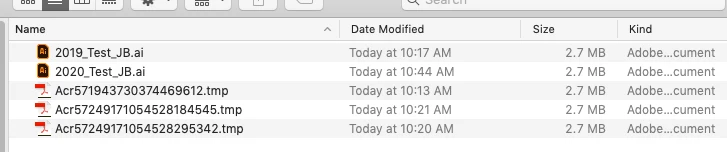
Illustrator v23.1.1 & 24.0.3 creating .tmp files on server. macOS 10.14.6

  • January 21, 2020
  • 1 reply
  • 4609 views


Mac OS 10.14.6

Adobe 2019 (23.1.1)  and Adobe 2020 (24.0.3)  Both versions are up to date. No saving in background.


Test: User1  Create .ai file and saves to server. User 1 Close file.

User 2, opens edits saves to server. User 2 Closes file.

User 1 opens file again, but does not see changes user 2 has made.

This is creating multiple .tmp files on the server and files are not getting updates.


{Renamed By MOD}


I also have a ticket in with the file server manufacturer, Nasuni. They are saying it is a Adobe issue.  But still don't understand why Illustrator is making these .tmp files.  Just started happing in the last couple months.


ANy ideas on how to stop illustrator from making these temp files?


Thanks,

Jeff


This topic has been closed for replies.

1 reply

Rishabh_Tiwari
Legend
January 21, 2020

Hi there,


Sorry to hear about the trouble. I would request if you can try the steps below:


  • Please disable Save in Background in Preferences > File Handling & Clipboard.
  • Please disable Optimize File Open and Save Time on Slow Networks(Beta) options in Preferences > File Handling & Clipboard.
  • Please disable "Automatically Save Recovery Data Every" in File Handling & Clipboard. For more information please refer to the screenshot.


Please try testing after disabling these and let us know how it goes.


Regards

Rishabh


Participant
May 25, 2020

I have this same issue with doing batch saving. I am on the latest version of Illustrator on Windows 10 64