Inspiring
Aug 8, 2022 2:01 PM UTC
Answered

Illustrator v26.4.1 freezes with progress / processing bar

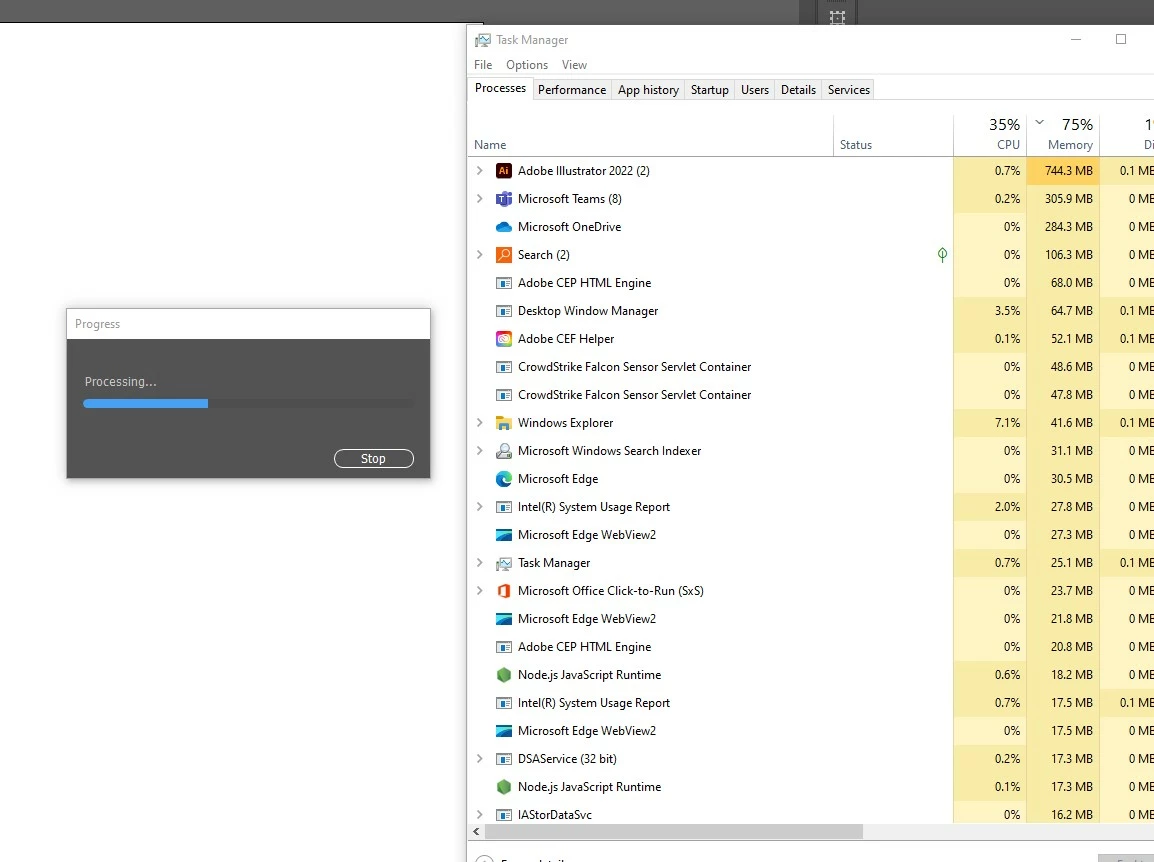
Hello, everyone. This is an issue which has just started today, Monday, August 8th, 2022. I launch Illustrator, but when I do anything that opens a dialog box, I get a progress bar with the word Progress, and below it, Processing...  

Sometimes if I click off of Illustrator and click back on the interface the progress bar goes away, but it comes back a few moments later. I tried restarting Illustrator, restarting the computer (Windows 10), as well as deleting the Illustrator preferences. 

Here is a screenshot of the progress bar and the task manager window. The CPU and Memory usage seems unusually high for an empty document.

I have contacted the IT administrator, but thought I would check with the community too.
 

This topic is closed to new replies. Start a new post to keep the conversation going.
Anshul_Saini
Anshul_SainiCorrect answer
Community Manager
Aug 22, 2022 10:27 PM UTC

Hi All,


I am glad to inform you this issue has been fixed. Please update Illustrator to v26.5 and let us know how it goes.

Please feel free to reach out if the issue persists after updating.


Regards,

Anshul Saini

81 replies

Participating Frequently
Aug 8, 2022 8:24 PM UTC

Hello! every time I save as or open preferences I get this dialog box that won't let me save my work. I can get out out of it by swithing apps then switching back to illustrator, but the dialog comes back again. I uninstalled and installed again, cleaning the preferences, to no avail. How can I fix this? It was working just fine until today.


Willy.


Translate
Anubhav M
Community Manager
Community Manager
Aug 8, 2022 8:28 PM UTC

Hello @willynanita,


We are sorry for the trouble. There are multiple reports regarding crashes. Users see a process bar, and Illustrator freezes or crashes then. Do you see similar behavior at your end? If yes, would you mind sharing a few details like:

  • The exact version of Windows (Build Number) and Illustrator (Version)
  • Is this happening with both old & new files?
  • Is this happening after opening a file or performing a particular action/using a specific tool?
  • What exactly happens? Illustrator freezes and starts non-responding, or it simply crashes?
  • Please share the Illustrator app dump file from the Task Manager. The steps are here (https://helpx.adobe.com/acrobat/kb/collect-logs-crash-freeze.html)


Also, try resetting Illustrator's preferences by following the steps shared in this article (https://helpx.adobe.com/illustrator/kb/troubleshoot-preference-issues.html) and sharing your observations.
Disclaimer: Please note that resetting preferences will remove all custom settings, and Illustrator will launch with the defaults. You may take a backup of these settings from the location mentioned in the article.


If that doesn't help, you may roll back and install the older v26.3.1.


Looking forward to your response.


Thanks,

Anubhav

Translate
Participating Frequently
Aug 8, 2022 8:37 PM UTC

Thank you for replying!


  • The exact version of Windows (Build Number) and Illustrator (Version): Windows: Edition Windows 11 Pro
    Version 21H2, OS build 22000.832, Experience Windows Feature Experience Pack 1000.22000.832.0. Illustrator: 26.41
  • Is this happening with both old & new files? Yes, and with no file loaded, just launching preferences.
  • Is this happening after opening a file or performing a particular action/using a specific tool? No.
  • What exactly happens? Illustrator freezes and starts non-responding, or it simply crashes? The dialog appears and I can't stop the progress bar, the only option is to terminate the app.
  • Please share the Illustrator app dump file from the Task Manager. The steps are here (https://helpx.adobe.com/acrobat/kb/collect-logs-crash-freeze.html😞 Can't collect the dump file, it is not available.
Translate
Participant
Aug 8, 2022 7:39 PM UTC

Same issue here -- using Illustrator 26.4.1 running Window Version 10, build 19044.


System hangs (...Processing...) when I'm trying to export a Illustrator file to a PSD format.  Shutting down the system and restarting -- I have been able to edit AI files -- but the system hung when I tried to change a layer name -- so it appears its a broader issue than just export.


Can't do anything more at this point..... please advise.

Translate
Inspiring
Aug 8, 2022 7:24 PM UTC

Hello, everyone!

I reverted back to the previous version of Illustrator, so may help to confirm that the update causes this issue. Thanks to everyone for their help!

Translate
BPSwiz
Participating Frequently
Aug 8, 2022 6:50 PM UTC

Same. New issue as of today, 8/8.

Translate
BPSwiz
Participating Frequently
Aug 8, 2022 7:31 PM UTC

I had success using this method posted under another topic. No more crashing.

Translate
BPSwiz
Participating Frequently
Aug 9, 2022 2:40 PM UTC

The issue is back this morning, unfortunately. Installing the previous version works, but it nuked all my preferences.

Translate
Participant
Aug 8, 2022 6:30 PM UTC

I'm having the exact same issue. And then when I restart illustrator 1/2 the time it freezes and just closes out. This is definitely an issue since the last update.

Translate
Participant
Aug 8, 2022 6:26 PM UTC

As soon as I go to save a file I get a window that says "Progress" and that it's processessing and does nothing. I have to use the task manager to shut it down.

Translate
Kevin Stohlmeyer
Community Expert
Community Expert
Aug 8, 2022 6:38 PM UTC

Where are you saving your files? What OS and Illustrator version are you running?

Translate
Participant
Aug 8, 2022 6:40 PM UTC

I am saving them in a folder that is on my desktop. I am using the latest version of Illustrator.

Translate
Anshul_Saini
Community Manager
Community Manager
Aug 8, 2022 6:01 PM UTC

Hi All, @josephb2381006 @corid33231304 @GrafiskWingman @Virginia25568315fg3u @grege39192716 

We are sorry for the trouble. This has been reported on multiple posts by many users. We have logged a bug with the product team and will like to investigate the issue further. Would you mind sharing a few details like:


Also, @laurav32853438 recently contacted the support team and resetting Illustrator preferences resolved the issue for him. If that doesn't help, you may roll back and install the older v26.3.1.


Looking forward to your responses.


Thanks & Regards,
Anshul Saini


#Marking it correct to highlight

Translate
Participant
Aug 8, 2022 6:09 PM UTC

Hola a todos, acabo de instalar la version anterior y funciona todo bien hasta ahora.

Translate
Participating Frequently
Aug 8, 2022 5:38 PM UTC

Issue seems to have been solved for me! Via the live chat on Adobe I got in touch with Rohit. He access my computer remotely and solved the issue. So my reccomendation is to reach out via the chat and get them to solve the issue the same way! 

Translate
Participating Frequently
Aug 9, 2022 2:36 PM UTC

The issue has returned today! 😞 So the solution was short lived

Translate
BPSwiz
Participating Frequently
Aug 9, 2022 2:38 PM UTC

Same here.

Translate
Participant
Aug 8, 2022 5:21 PM UTC

I'm having the same problem! It was working just fine last night. 

Translate
GrafiskWingman
Known Participant
Aug 8, 2022 5:19 PM UTC

I reverted back to previous version = No problems. So it's definitely a problem related to the new update. It also loads the app (with the new update) for a longer time than previously. 

Translate