Participant
June 16, 2023
Answered

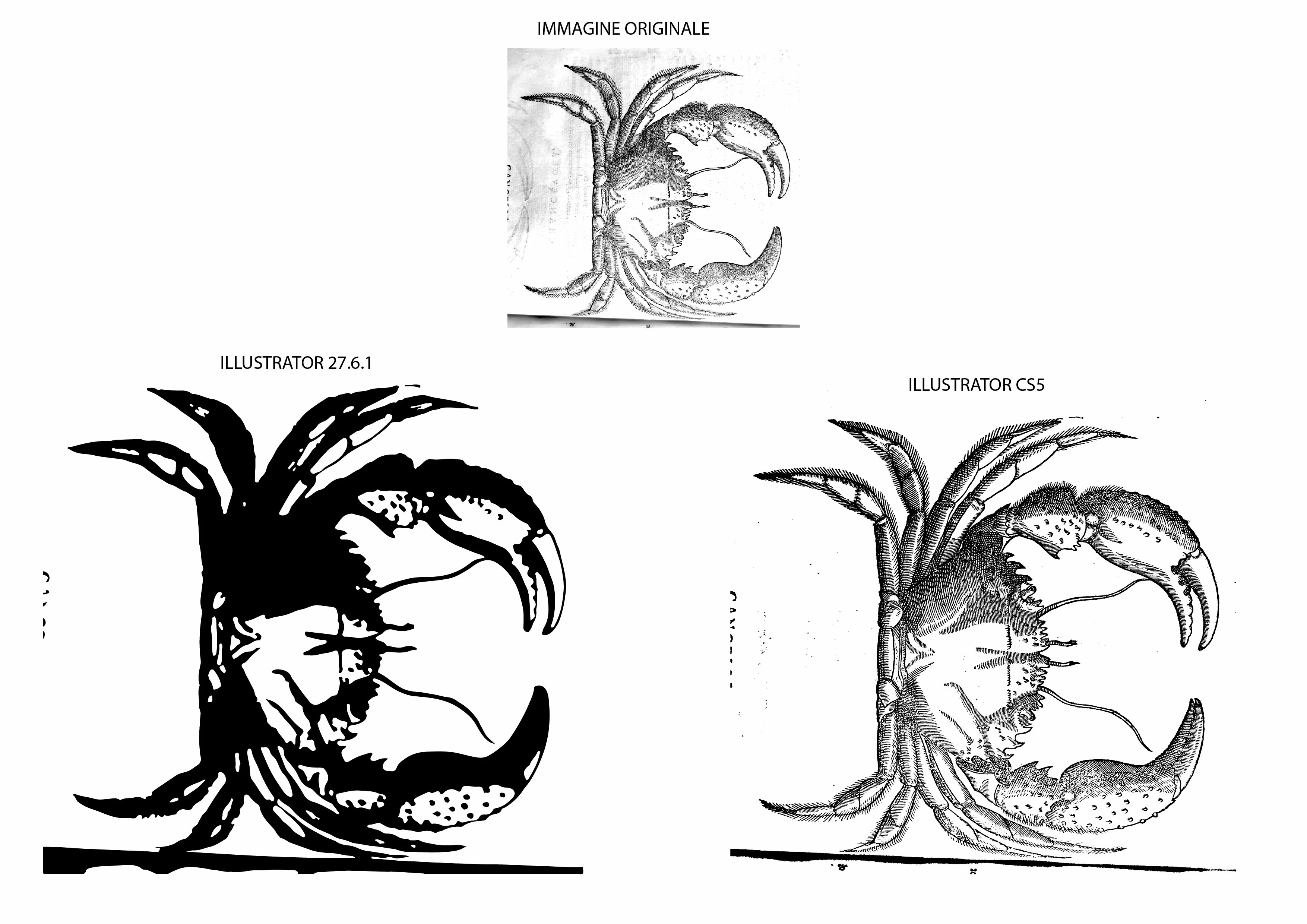
Illustrator v27.6.1 RICALCO IMMAGINE??

  • June 16, 2023
  • 2 replies
  • 459 views

slave

installo l'ultima versione di illustrator e con tanto stupore scopro che la funzione ricalco immagine è tornata indietro di 1000anni

ci sono delle spiegazioni o soluzioni in merito?
This topic has been closed for replies.
Correct answer Anubhav M

Hello @paolo30538083guoa,


We understand that encountering technical issues with Image Trace can be frustrating. Would you mind sharing some more details, like the exact version of the OS/Illustrator, system config (CPU/GPU/Memory), and a sample file (https://community.adobe.com/t5/illustrator-discussions/share-your-files-in-6-simple-steps/td-p/12967531), so we can investigate this further?


Looking forward to hearing from you.


Thanks,

Anubhav

2 replies

Anubhav M
Community Manager
Anubhav MCommunity ManagerCorrect answer
Community Manager
June 16, 2023

Hello @paolo30538083guoa,


We understand that encountering technical issues with Image Trace can be frustrating. Would you mind sharing some more details, like the exact version of the OS/Illustrator, system config (CPU/GPU/Memory), and a sample file (https://community.adobe.com/t5/illustrator-discussions/share-your-files-in-6-simple-steps/td-p/12967531), so we can investigate this further?


Looking forward to hearing from you.


Thanks,

Anubhav

Participant
June 26, 2023

Greetings
checking in more detail and verifying the various settings or discovered that the presets that are automatically selected by illustrator are probably not only presets of the various specifications available in the dedicated page but even if entering the same values in the various selections the results are very different
I'll explain
if I do the tracing starting from the sketch preset or I start from silhouette while setting the setssi values ​​on "color mode", and in the advanced settings same values for angles and noise paths
the results vary a lot
in fact with sketch I get a very coarse result while with silhouette really much more detailed

but the strange thing is that starting from the sketch mode but removing the preview function I get the same result that I can get by starting from the silhouette mode
while if I activate the preview the result remains coarse

Anyway, as far as I'm concerned, my doubt is solved

Monika Gause
Community Expert
Community Expert
June 26, 2023

Please provide your feedback and sample files to https://illustrator.uservoice.com


That's where the developers read. They need to have detailed feedback in order to make this better.

Jacob Bugge
Community Expert
Community Expert
June 16, 2023

Paolo,


Have you tried all the possible options in the new version?


That said, some are staying with the old Live Trace used up to CS5, as in your comparison screenshot, the last one before Image Trace took over from CS6 on; maybe you will be happier with that, too.


Participant
June 16, 2023

Have you tried all the possible options in the new version?


si, ma non ho trovato particolari miglioramenti


That said, some are staying with the old Live Trace used up to CS5, as in your comparison screenshot, the last one before Image Trace took over from CS6 on; maybe you will be happier with that, too.


come posso fare questo?

Jacob Bugge
Community Expert
Community Expert
June 16, 2023

Paolo,


Facendolo ancora in CS5.
