Participant
February 9, 2022
Question

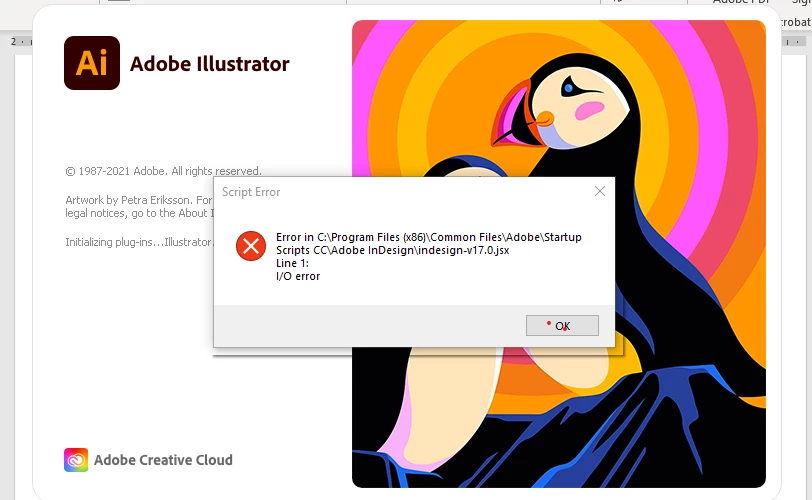
Illustratore 26.0.3 failing to load - script error
  • February 9, 2022
  • 2 replies
  • 212 views

I get the following error message everytime opening Illustrator.  I work off a Dell laptop with sufficient processing  capabilities.
this error has been occuring with any of the version 26 loaded.
How to fix?
And I do not have experience in re-writing code as a lot of the other resolves have suggested. 

This topic has been closed for replies.

2 replies

Anshul_Saini
Community Manager
Community Manager
March 24, 2022

Hi @markv75295749,


We are sorry for the trouble. I would request you to share a few details like:

  • The exact version of OS and its built number
  • The exact version of Illustrator
  • When did this start happening? Are there any recent changes made to your system? For example, any antivirus, system updates, plugins, or web extensions installed recently.
  • Would it be possible for you to compress the Startup Script folder in the Zip file from the location mentioned in error and upload it to Creative Cloud/ Dropbox or any other similar service and share the download link here with us?


Also, when does this error pop up while launching the app or while using the app? Does the app close/ crash or start not responding after clicking on the "Ok" button?


We are here to help. We just need more information.


Thanks & Regards,

Anshul Saini

Community Expert
February 9, 2022

Try removing this file and see if causes any issues with using Illustrator. I am not sure why InDesign script is being referred by Illustrator. If the removal of file does not work then unistall Illustrator, clean up using the Creative Cloud Cleaner tool and then reinstall.

-Manan

-Manan